Understand security and privacy in RenamerX
Check what stays on your device, what an external AI Provider can receive, and what to inspect before processing sensitive files or sharing diagnostics.
RenamerX reads file content and saved file information on your device. Built-in Local AI uses that information and the selected template to create new filenames on your device.
If you choose another AI Provider, RenamerX sends the information needed to create a name to that Provider. Before adding files, choose a Provider and review mode that match their sensitivity.
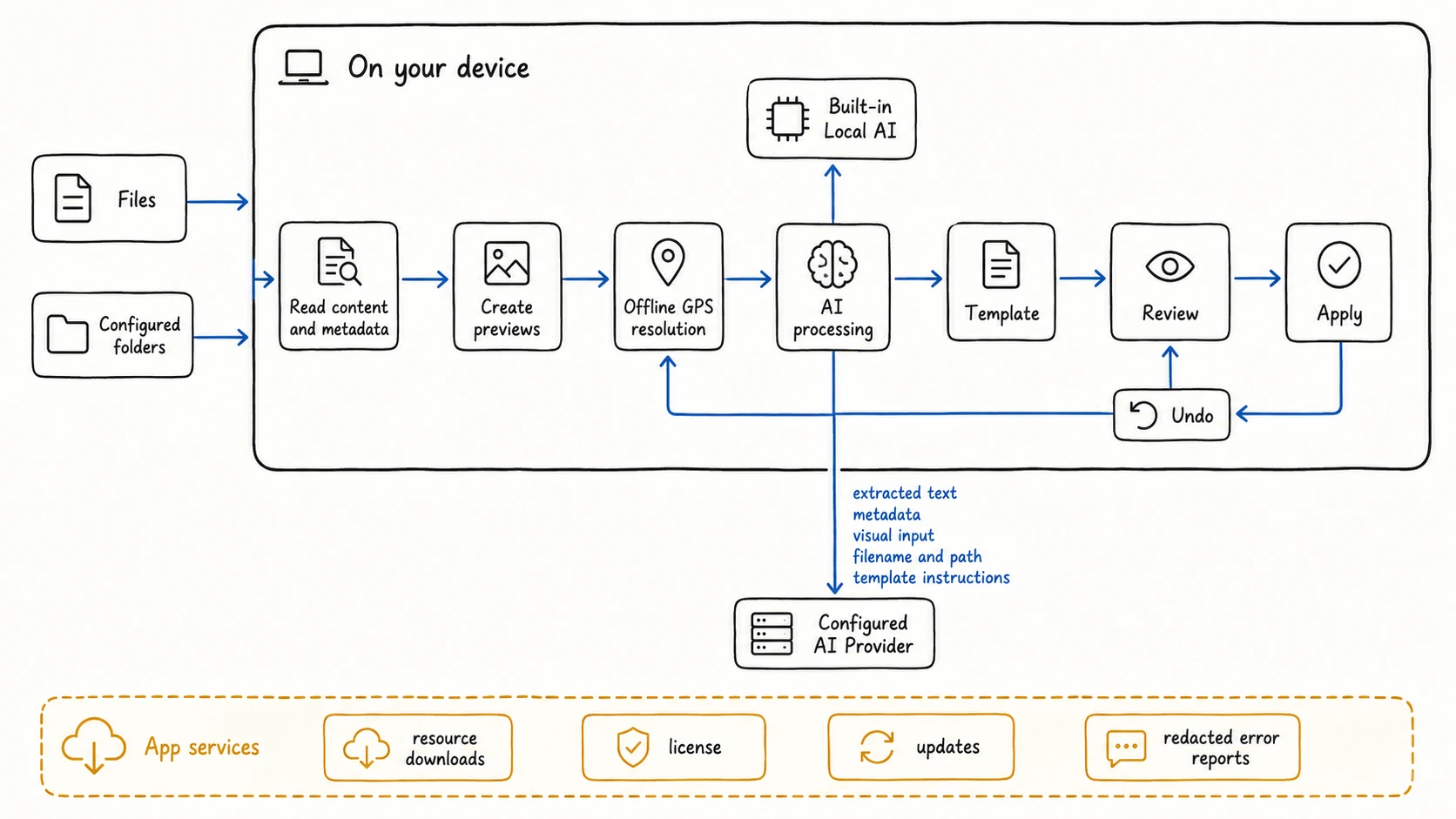
Choose where AI processing happens
Your active AI Provider determines where RenamerX identifies the details used in a new filename.
| AI Provider | Where AI processing happens | Data boundary |
|---|---|---|
| RenamerX Built-in Local AI | On your device | Prepared file information stays on the device during AI processing |
| Ollama or LM Studio | At the server address you configure | Prepared file information goes to that local, network, or remote address |
| OpenAI or Google Gemini | In the Provider’s cloud service | Prepared file information goes directly to that Provider |
| Custom Provider | At the OpenAI-compatible service you configure | Prepared file information goes directly to that service |
RenamerX does not route these Provider requests through a RenamerX cloud service. A server on your local network still uses a network connection, even if it is not a public cloud service.
See AI Providers before connecting a service. The Provider controls its own storage, retention, training, account, and privacy policies.
Know what an external AI Provider can receive
RenamerX first reads supported information on your device. It then sends the information needed for AI processing to the configured AI Provider.
Depending on the file and template, that information can include:
- extracted document text
- available image or video input
- file information saved inside the file
- the original filename and full local path
- selected template fields, output language, and formatting context
- a Custom AI Prompt and relevant controlled terms
RenamerX does not always upload an unchanged copy of the source file. However, image previews and extracted content can still reveal sensitive information. Treat the configured AI service as a recipient of that prepared content.
Switching Providers affects each file when its AI processing starts. Files already waiting in the same workspace can use different Providers if you switch before they all finish.
Understand how location data is handled
When a template includes Location, RenamerX uses saved Global Positioning System (GPS) coordinates to identify a city, district, region, or country. This lookup runs automatically on your device and does not use an online map service.
RenamerX removes GPS coordinates from the file information sent for AI processing. It identifies Location on your device afterward, so an external Provider neither receives nor chooses that location.
RenamerX performs this lookup only for templates that include Location. See Add Locations to Filenames from GPS Coordinates for available detail and empty results.
Protect API keys and license data
RenamerX stores external Provider API keys in a dedicated encrypted file on your device. License state, the license key, and credit data use separate encrypted local storage.
These files are not the macOS Keychain or Windows Credential Manager. Device access and the security of your operating-system account still matter. RenamerX excludes API keys and the plaintext license key from normal preferences and the diagnostic summaries it creates.
Do not paste a key into a Custom AI Prompt, filename, controlled term, support message, or screenshot. If you believe a key was exposed, revoke it with the Provider and save a replacement in Preferences → AI provider and model.
Know when RenamerX uses the network
Built-in Local AI keeps AI processing on the device, but RenamerX is not an entirely offline application. These features can use a network connection:
| Feature | Why it connects |
|---|---|
| Setup and resource repair | Downloads file-reading tools, local AI components, and other required resources |
| External AI Providers | Sends prepared file information to the configured AI Provider |
| Purchase and license | Opens checkout and activates or periodically validates a license |
| App updates | Checks for or downloads a newer release through the supported platform channel |
| Production error reporting | Sends limited error information after sensitive fields are redacted |
Built-in Local AI can continue processing after its required resources are installed and ready. License validation and other App services can still require a connection independently of AI processing.
Control file and folder access
RenamerX works with files you add and folders you configure. Folder import skips hidden folders, common development output folders, and temporary download files, but this filtering is not an access-control boundary.
An active Watch Folder continues to observe its configured source. Pause or delete the Watch Folder when RenamerX should no longer monitor that location. Review the source, subfolder setting, target folder, and template before starting it.
The following actions change files locally:
- Apply changes renames or moves selected files
- Auto apply renames or moves files without per-file approval
- Apply can write Description to the metadata of supported files
- Undo attempts to restore the recorded original path and Description state
Use Review, Apply, and Undo for conflicts, partial results, Description, and recovery rules. Test a Watch Folder with Review first before enabling Auto apply for sensitive or important files.
Inspect diagnostics before sharing
RenamerX can send a redacted error report when the App encounters a failure. Before sending it, RenamerX removes user-context and request data, then redacts fields associated with paths, prompts, credentials, licenses, request bodies, and responses.
An exported diagnostic bundle is different. Preferences → Support → Export diagnostics creates a ZIP on your device and does not upload it automatically. The bundle contains system, download, local AI, permission, recovery, saved-record, and recent error summaries, together with recent logs.
RenamerX excludes your original files, Provider API keys, readable license key, complete extracted content, all information saved inside the file, and a complete copy of App records. Logs and error details can still contain local paths, filenames, AI service addresses, and error context. Inspect the ZIP and share it only with a recipient you trust.
See System Status and Diagnostics for the complete export contents and steps.
Use sensitive files with additional care
Before processing confidential, personal, financial, legal, or medical material:
- Choose Built-in Local AI if prepared file information must remain on the device.
- If you use another Provider, review the service address and privacy terms first.
- Test the template with non-sensitive files of the same kind.
- Use Batch Rename or Review first before considering Auto apply.
- Check that new filenames do not expose private information in search, backups, shared links, or attachments.
- Inspect diagnostic bundles and screenshots before sharing them.
RenamerX helps you control where processing happens, but you remain responsible for choosing an appropriate Provider, filename content, folder scope, and recipient.
Continue by task
- AI Providers to compare processing locations and connection requirements
- Add Locations to Filenames from GPS Coordinates to understand location results and privacy
- Review, Apply, and Undo to control local file changes
- System Status and Diagnostics to inspect and export support data
- Troubleshooting to recover from a visible problem