Choose a date format
Compare the five date formats in RenamerX and choose how resolved dates appear in filenames and By Date folders.
Dates are an important part of many filenames because they provide chronological context and support sorting. RenamerX identifies a meaningful date from the file's content and information saved inside it, then applies the template's Date Format to use it in the filename or a By Date folder.
Choose YYYY-MM-DD for a readable, sortable default. Choose a shorter format only when your filing system intentionally needs month-level or year-level precision.
Supported date formats
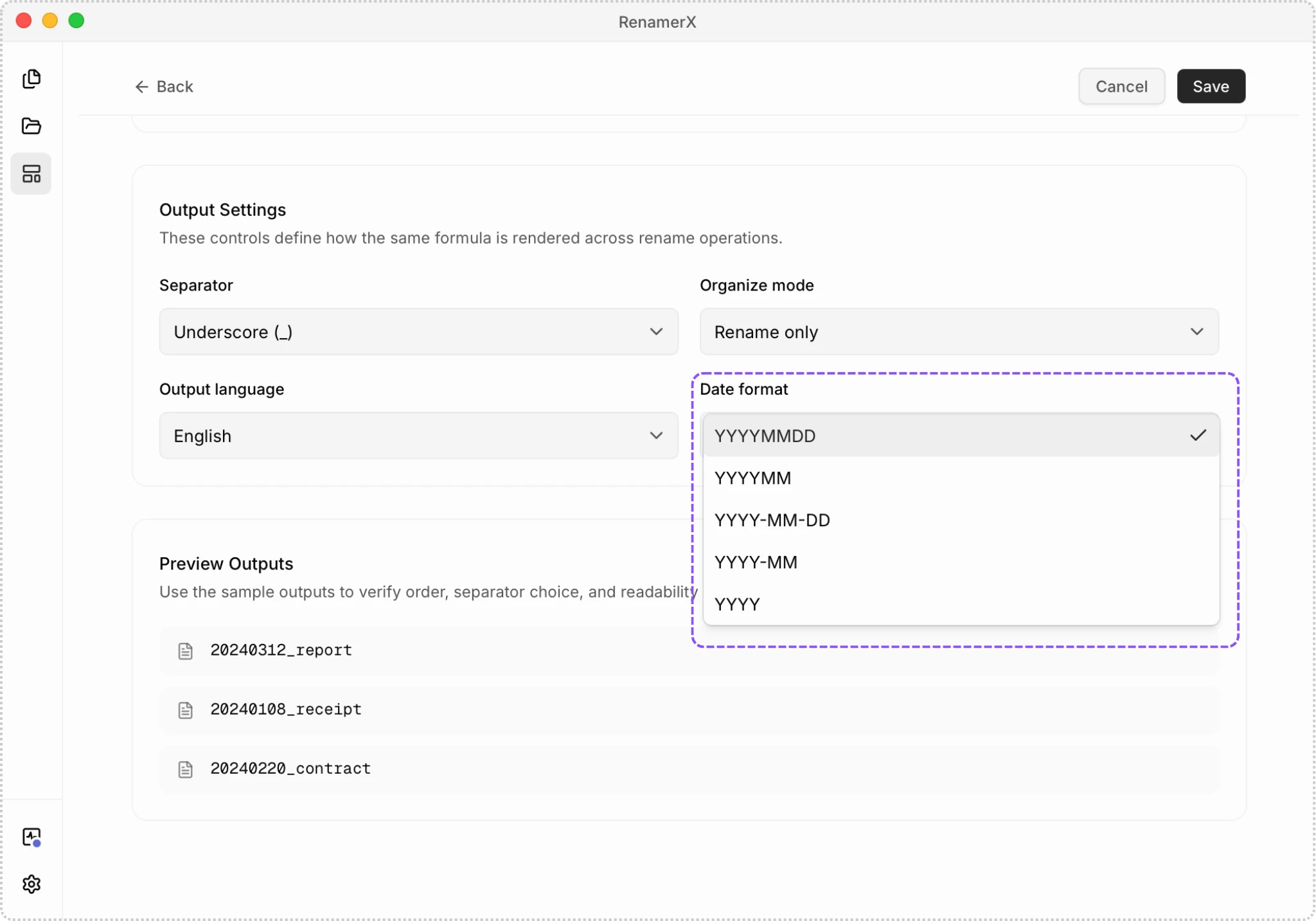
RenamerX supports five output formats. The examples below all start from the same resolved date: May 16, 2026.
| Date Format | Output | Best fit |
|---|---|---|
YYYY-MM-DD | 2026-05-16 | A readable, sortable default for most files |
YYYYMMDD | 20260516 | Compact filenames that still sort chronologically |
YYYY-MM | 2026-05 | Monthly reports, statements, and collections |
YYYYMM | 202605 | Compact month-based archives |
YYYY | 2026 | Annual material and collections where only the year matters |
New custom templates start with YYYY-MM-DD.
How RenamerX resolves dates
The date source and output format are different decisions. AI processing looks for a meaningful date rather than selecting any date in the file. This may be an invoice, signing, meeting, publication, or photo capture date.
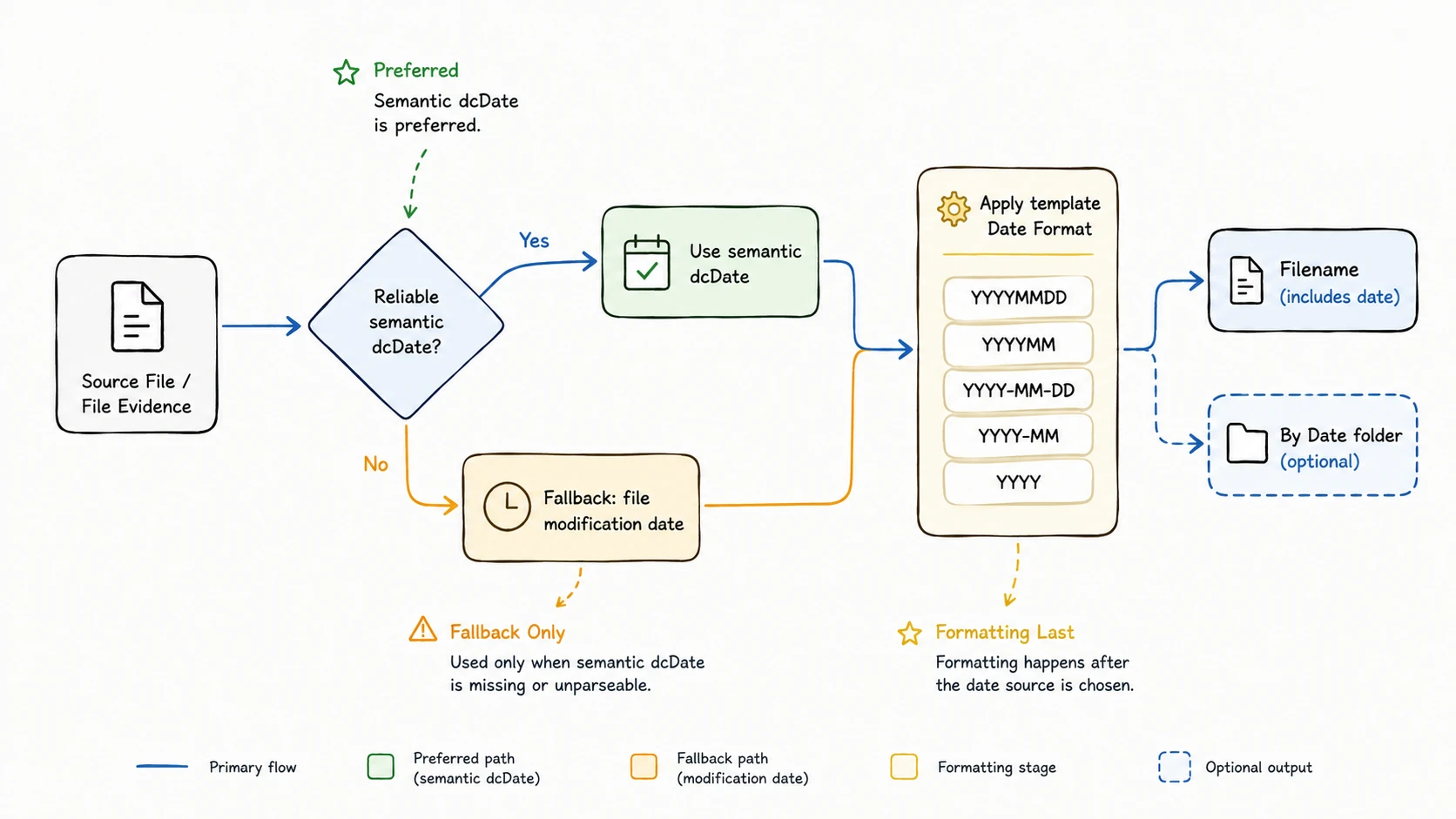
AI processing returns a full semantic date when the evidence is reliable. RenamerX accepts and normalizes 2026-05-16, 2026/05/16, 2026.05.16, and 20260516.
If the AI value is missing or invalid, RenamerX tries the creation date saved inside the file. It uses the file modification date only when neither earlier source produces a valid date. The template then applies the selected format.
The selected format changes presentation, not the standard for accepting evidence. For example, selecting YYYY removes the month and day from a resolved full date; it does not make an uncertain year mention sufficient evidence by itself.
Choose the right precision
Use day-level formats for invoices, contracts, event media, meeting records, and other files where the exact day helps retrieval. YYYY-MM-DD visually separates the year, month, and day, while YYYYMMDD produces a shorter filename.
Use month-level formats only when the collection itself is monthly. Use YYYY when the year is the meaningful unit, such as annual reports or year-based research collections. Reduced output precision does not change the underlying date that RenamerX resolved.
Keep one format within a template family. Mixing YYYY-MM-DD and YYYYMMDD for the same kind of material weakens visual consistency even though both formats sort correctly.
Organize files by date
When a template’s Organize Mode is By Date, RenamerX uses the same resolved and formatted date as the category folder name. A template using YYYY-MM therefore organizes a May 2026 file into 2026-05, while YYYYMMDD would use a day-level folder such as 20260516.
This behavior applies even when Date is not included in the filename. By Date uses the same date order and the template's Date Format for the folder name.
Date formatting limits
The Template editor does not provide custom date patterns, time-of-day tokens, date ranges, regional numeric formats, or localized month names. Use one of the five listed formats.
The creation date saved inside a file can mean when it was captured or when it was created, depending on the file type. The file modification date may reflect a later copy or edit. Remove Date from the template when either alternative would misrepresent the files.