Design a file naming convention
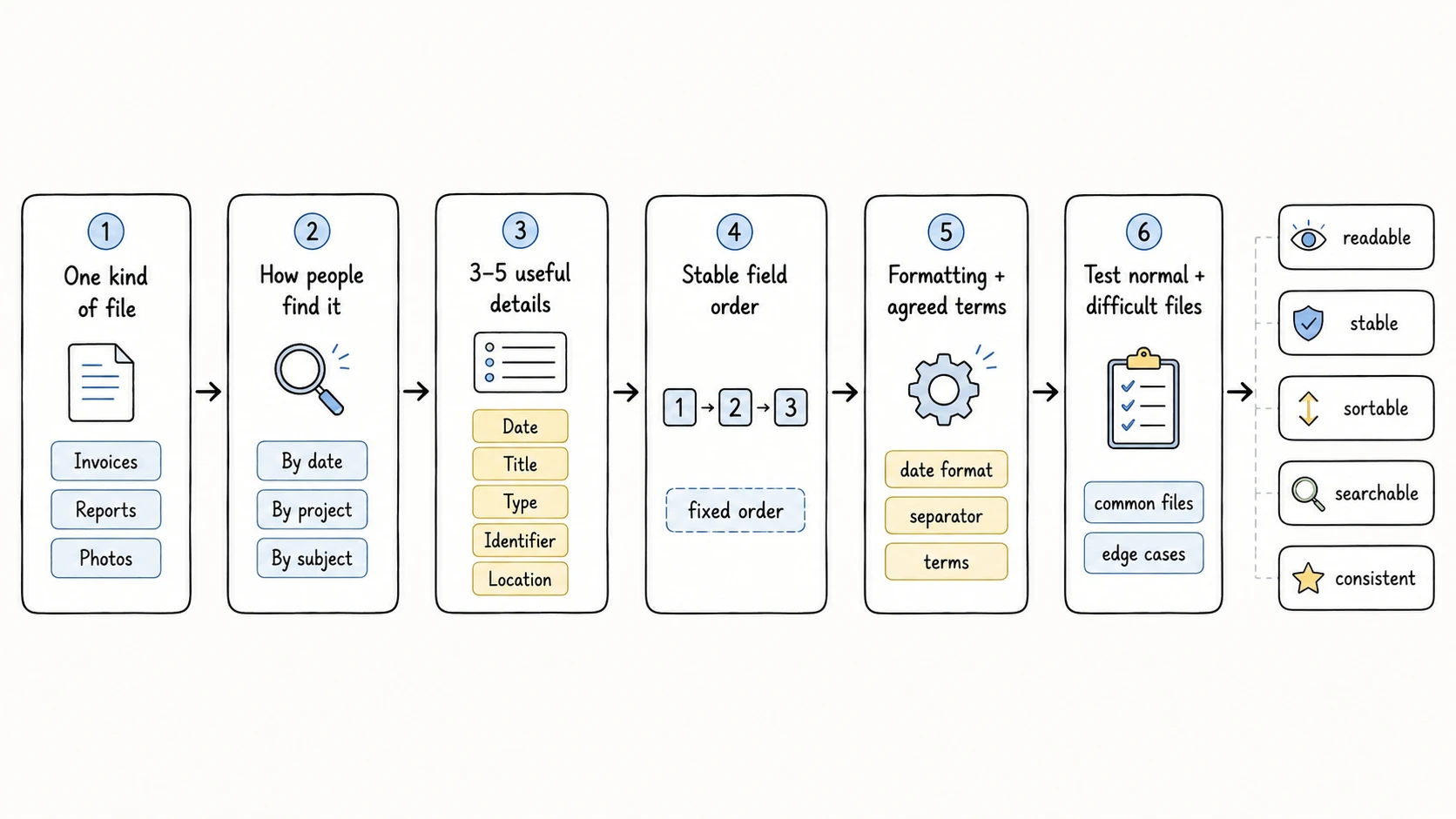
Design a file naming convention that stays readable, sortable, searchable, and consistent, then test it with the files you handle.
A file naming convention is a rule you use every time you name the same kind of file. It defines which files share the rule and what information appears in the filename. It also defines the information order, formatting, and terms you use consistently. Design one convention for one kind of file, then test it with files you handle regularly.
What a useful filename should do
A useful filename keeps enough context when someone copies, shares, searches, or moves the file. It should meet five goals:
- Readable at a glance
- Stable over time
- Sortable in a useful order
- Searchable with familiar terms
- Consistent across the file set
Longer does not mean better. Each field should help someone identify, retrieve, or distinguish the file. Keep richer descriptions, rights information, source URLs, and relationships in information saved inside the file or another record system.
Design the naming rule
Work through the following decisions in order. If one decision remains unclear, do not compensate by adding more fields.
1. Choose one kind of file
Choose a group of files that serves the same task. The scope can be a folder, inbox, recurring workflow, or file type.
Examples include vendor invoices, project deliverables, meeting records, research papers, travel photos, contracts, and incoming scans. Do not create one formula for every file on the computer. Different kinds of files need different information in their names.
Write the scope as one sentence:
This convention applies to invoices and credit notes received from vendors.
If the sentence needs a long list of exceptions, narrow the scope or create another convention.
2. Decide how people will find the files
Ask how someone will look for a file six months from now. Consider browsing, sorting, searching, sharing, and matching the file to another record.
A filename can help people in four ways:
| Goal | Question | Fields that can help |
|---|---|---|
| Identify | What is this file? | Title, Type, Creator, Organization |
| Add context | What work, client, topic, or place does it belong to? | Project, Client, Subject, Location, Organization |
| Control sorting | How should nearby files group? | Date, Project, Creator, Identifier |
| Distinguish copies | Which similar file is this? | Identifier, Status, Version, Date |
The filename does not need to answer every question. Choose the goals that matter for these files.
3. Choose three to five useful details
Start with three to five fields. Two fields can be enough for a narrow scenario, while additional fields should each remove a specific ambiguity.
Keep a field when it meets these conditions:
- People use it to recognize, sort, search, or distinguish the files
- The value is available for most files, or safe to omit when unavailable
- The value remains meaningful when the file leaves its current folder
- The value is safe to expose in a filename
Remove a field when it repeats the folder path, is missing from many files, or adds no retrieval value. Treat the filename as the minimum context that should travel with the file, not as a complete record.
Keep separate meanings in separate fields. Use Title for the specific file, Type for its class, Identifier for an official number, Status for its stage, and Version for its revision. Do not hide all five ideas inside Title.
See the Naming Fields Dictionary for the complete field definitions and evidence rules.
4. Put details in the order people look for them
The first field controls how files group when sorted by name. Put the detail people look for most first, provided that its value is reliable and safe.
Use these patterns as starting points:
| Kind of file | What people look for first | Starter pattern |
|---|---|---|
| Meetings and event records | Date | Date_Project_Title |
| Project or client work | Project or Client | Project_Title_Status_Version |
| Research and reference files | Creator | Creator_Date_Title |
| Location-based media | Date or Location | Date_Location_Title |
| Invoices and financial records | Date, Organization, or Identifier | Date_Organization_Type_Identifier |
| Contracts and proof records | Identifier | Identifier_Title_Status |
| Scans and mixed inboxes | Date or Type | Date_Type_Title |
Put broad context before the specific Title. Put Status and Version near the end because they qualify the file rather than define its main group.
The most stable field is not automatically the best first field. An Identifier may be stable but unhelpful for visual browsing. Date may sort well but mislead when its meaning changes across files. Choose the first field based on how people find these files.
5. Use one meaning for Date and one name for each category
State what Date means for the scenario. It may represent an invoice date, signing date, meeting date, publication date, or capture date.
When AI cannot identify a reliable content date, RenamerX uses the creation date saved in the file and then the file modification date. Leave Date out of the template when those alternatives would misrepresent the files.
Choose one format for the convention. YYYY-MM-DD is readable and sortable, while YYYYMMDD is more compact. See Date Formatting for month-only and year-only formats.
Repeated categorical values also need agreed terms. Use one name for each recurring Subject, Type, Status, Organization, and Project. For example, do not mix Invoice, Bill, and Inv for the same Type.
Configure these values in Controlled Vocabulary. Controlled terms guide AI processing, but they do not replace review.
6. Set formatting and privacy rules
Use one field order, separator, Date format, and vocabulary throughout the convention. RenamerX supports an underscore or hyphen as the main field separator.
Keep identifiers and client names out of filenames unless they are safe and necessary for retrieval. Filenames can appear in search indexes, backups, recent-item lists, shared links, and email attachments.
Exclude unnecessary personal and confidential information, including:
- Full government identifiers
- Medical details
- Personal addresses
- Account credentials
- Payment card or bank account details
Keep that information in protected file information or the system that manages the files.
Write down the complete rule
Record the finished convention in a short table. The table reveals missing decisions and inconsistent exceptions.
This example covers vendor invoices and credit notes:
| Decision | Rule |
|---|---|
| Scope | Invoices and credit notes received from vendors |
| How people find files | Browse by date, group by vendor, and search by document number |
| Fields | Date, Organization, Type, Identifier |
| Order | Date → Organization → Type → Identifier |
| Date meaning | Document issue date; review any modification-date fallback |
| Date format | YYYY-MM-DD |
| Separator | Underscore (_) |
| Agreed terms | One approved vendor name; Type is Invoice or Credit-Note |
| Privacy rule | Keep invoice number; exclude account and payment details |
| Example | 2026-05-16_Stripe_Invoice_42558262.pdf |
| Split condition | Create another convention if receipts need a payment date or lack a stable identifier |
Someone should be able to follow this table without interpreting a policy paragraph. If the rule cannot fit in a compact table, reduce its scope.
Understand RenamerX filename behavior
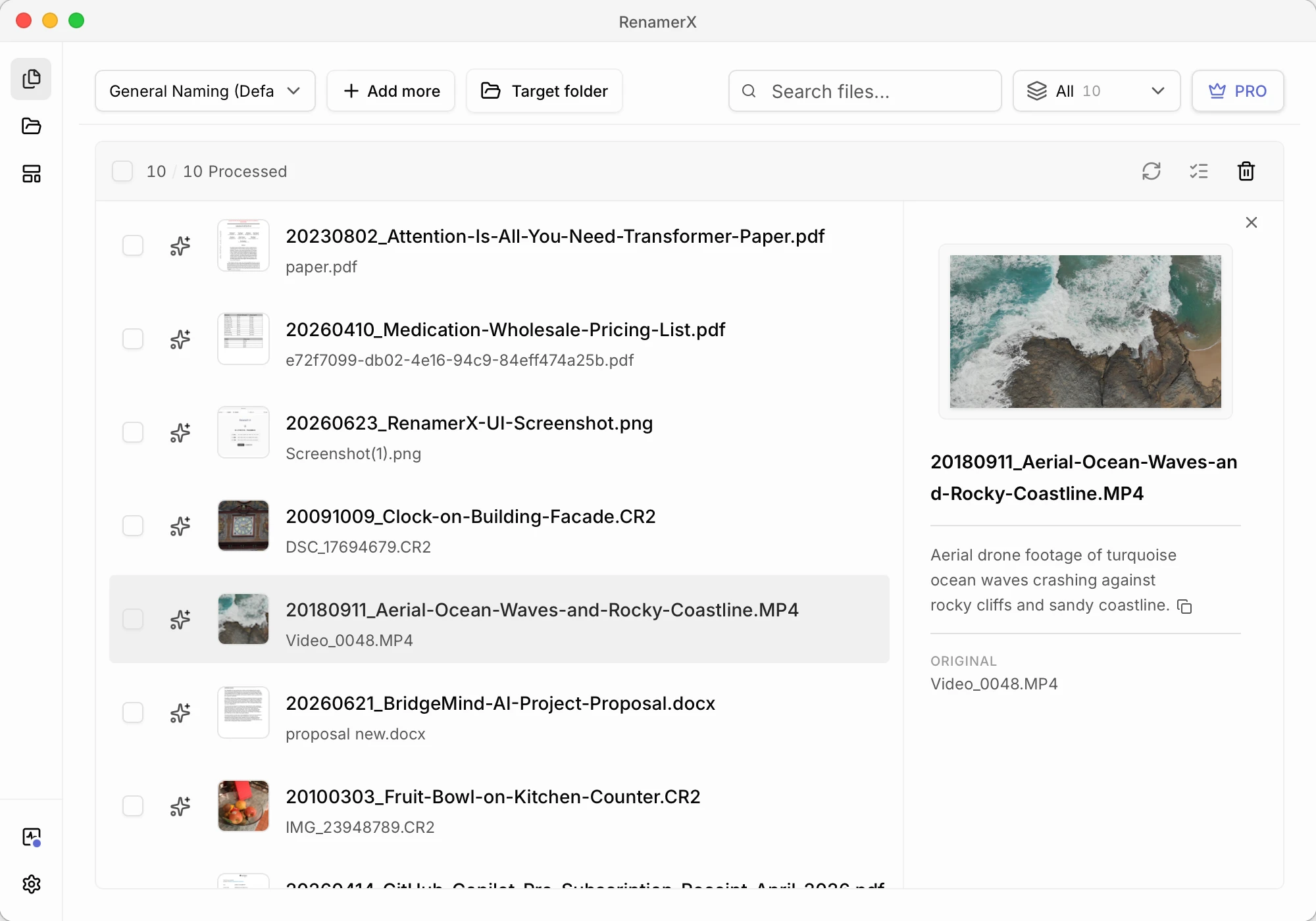
Create the convention as a Template. The template selects fields and fixes their order, separator, Date format, output language, and file organization preference. AI processing suggests values from file evidence; it does not choose a new naming convention for each file.
RenamerX applies these deterministic rules when it builds a suggested filename:
- It omits unavailable fields without leaving an empty separator
- It replaces reserved characters
/,\,:,*,?,",<,>,|and control characters with hyphens - It preserves the file extension
- It limits the generated base name to 140 Unicode characters before the extension
- When the field separator is
_, spaces inside Title become- - When the field separator is
-, spaces inside Title become_
At Apply time, RenamerX searches for an available conflict suffix from -01 through -999 when the destination name already exists. A conflict suffix prevents a path collision; it is not the Version field. See Review, Apply, and Undo for Apply failures and conflict handling.
Compare weak and useful filenames
The improved names are not better because they are longer. Each added or corrected field removes a specific uncertainty.
| Problem | Weak filename | Improved filename | What changed |
|---|---|---|---|
| Too vague | document-final.pdf | 2026-05-16_Stripe_Invoice_42558262.pdf | Date, Organization, Type, and Identifier identify the record |
| Temporary words replace structure | new_final_final_v3_updated.docx | Website-Redesign_Homepage-Copy_Final_v03.docx | Project and Title identify the work; Status and Version qualify it |
| Meanings are mixed | ACME_Bill_invoice_FINAL.pdf | Acme_Invoice_42558262_Final.pdf | Organization, Type, Identifier, and Status have separate values |
| Folder supplies all context | Meeting-Notes.pdf | 2026-06-21_BridgeMind-AI-POC_Architecture-Review-Notes.pdf | Date and Project keep the file understandable after it moves |
Avoid weak leading words such as New, Final, Draft, Scan, or Document when they do not help people find the file. Status and Type can remain useful later in the filename.
Test with files you handle regularly
Test the convention before applying it to a large file set or a Watch Folder:
- Create the rule in Templates.
- Select the template in Batch Rename.
- Add a few files that cover the normal and difficult cases.
- Include files with clear information, unclear current names, missing fields, ambiguous dates, and duplicate destinations.
- Generate new filenames and compare how their prefixes group when sorted by name.
- Check the filenames against the five goals at the start of this page.
- Revise the convention when the same correction appears across several files.
- Repeat the test before expanding the file set.
Use these questions during review:
- Can someone identify each file without opening it?
- Does sorting by name create useful groups?
- Do files remain understandable outside the original folder?
- Are similar files distinguishable?
- Are repeated terms consistent?
- Are missing values handled without misleading guesses?
- Does the filename avoid unnecessary private information?
Split the convention when different files need different first fields, Date meanings, vocabulary, or interpretation rules. Repeated manual exceptions show that more than one kind of file is using the same rule.