Create a controlled vocabulary
Define consistent terms for recurring file concepts, use them with naming templates, and keep the vocabulary focused as your files change.
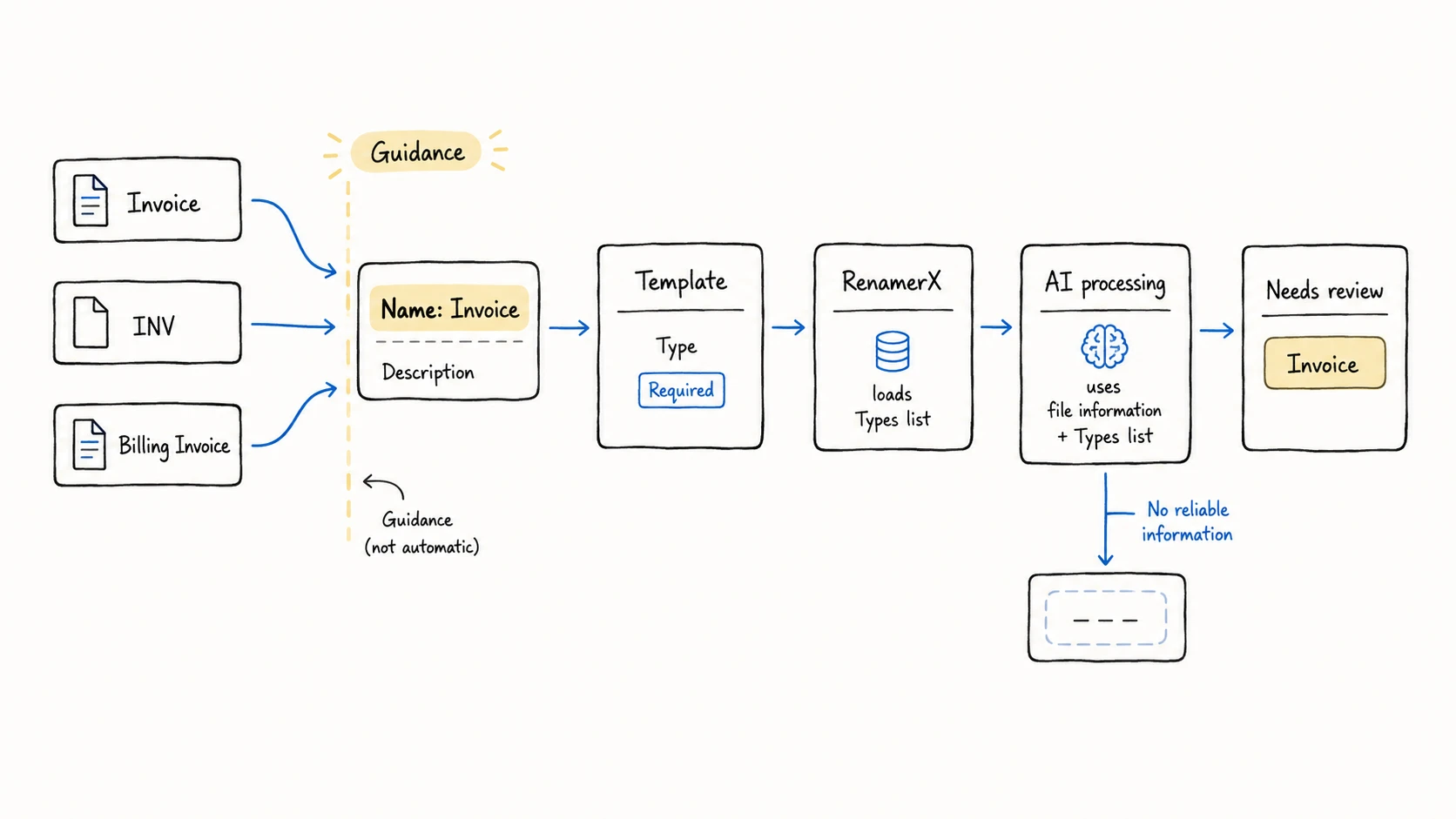
Use Controlled Vocabulary when the same information appears under different names. For example, Invoice may also appear as INV or Billing Invoice. Add Invoice as the agreed term so RenamerX can use one consistent value in new filenames.
You can build controlled vocabularies for Subjects, Types, Statuses, Organizations, and Projects. These terms help RenamerX generate consistent values, but they do not lock every result to the list. Review each new name before applying it.
When to use Controlled Vocabulary
A controlled vocabulary is useful when recurring files use different labels for the same concept. Use a controlled term when all these conditions apply:
- The value recurs across files
- Different spellings or labels refer to the same concept
- Your naming convention needs one stable value for search, sorting, or file organization
Do not control every word in a filename. Title, Date, Identifier, and Version describe one file. These fields should follow their own evidence rules.
Combine controlled terms with a template
Templates and controlled terms solve different parts of the naming system:
- Template: selects filename fields, fixes their order, and controls formatting and organization
- Controlled Vocabulary: guides the values suggested for recurring fields
For a Date + Organization + Type + Identifier template, the template keeps the structure stable. Controlled terms guide Organization and Type. Date and Identifier still come from the evidence in each file.
RenamerX loads a vocabulary category only when the active template requires its field. A field can appear in the filename or control how RenamerX organizes files. For example, By Organization loads Organizations even when Organization is absent from the filename.
Choose the category by meaning
The manager supports five categories. Choose the category by the question the value answers, not by where you plan to place it in the filename.
| Category | Field | What belongs in it | AI processing behavior |
|---|---|---|---|
| Subjects | Subject (dcSubject) | Broad topics such as finance, legal, or travel | Asks AI processing to choose a listed Subject or return an empty value |
| Types | Type (dcType) | Resource classes such as invoice, contract, report, or screenshot | Asks AI processing to choose a listed Type or return an empty value |
| Statuses | Status (extStatus) | Lifecycle stages such as draft, final, or archived | Asks AI processing to map a clear equivalent to a listed Status or return an empty value |
| Organizations | Organization (extOrganization) | Companies, teams, institutions, issuers, or vendors | Prefers an agreed Organization but permits a clear unlisted organization from the file |
| Projects | Project (extProject) | Projects, campaigns, cases, activities, or workstreams | Prefers an agreed Project but permits a clear unlisted project from the file |
Keep Type separate from Subject. An invoice belongs in Types, while finance belongs in Subjects. A delivery stage such as final belongs in Statuses.
Controlled Vocabularies does not manage Creator or Client. RenamerX extracts them from file evidence. Title, Date, Identifier, Location, and Version use their own extraction or formatting rules.
Build the vocabulary from real files
Start with concepts that already recur in the files covered by your naming convention. Do not add terms for possible future use.
Build each term in this order:
- Collect the existing spellings from representative files.
- Confirm that the spellings describe the same concept.
- Choose one concise Name for filenames and category folders.
- Choose the category that matches the meaning of the concept.
- Write a Description that defines the scope of the term.
Do not merge related but distinct concepts. An invoice requests payment, while a receipt records payment. They should remain separate Types.
Write term names and descriptions that prevent confusion
The Name is the value RenamerX can suggest. The Description explains when the term applies and distinguishes nearby concepts.
| Category | Weak entry | Better entry |
|---|---|---|
| Subjects | business with no definition | finance: Money, billing, taxes, reimbursements, statements, and financial records |
| Types | document | invoice: A billing document requesting payment; do not use for proof of payment |
| Statuses | done | final: Completed output approved for normal use; not a signed legal status |
| Organizations | Separate World Health Organization and WHO terms | World Health Organization: Agreed name; WHO is the common abbreviation |
| Projects | website | website-redesign: The public website redesign workstream |
Put aliases, exclusions, and scope details in Description. Do not create another term for every spelling.
Keep each category focused
A shorter list of distinct terms gives AI processing clearer guidance and makes the vocabulary faster to review. Remove or revise entries with these problems:
- Near-duplicates that differ only by spelling, capitalization, abbreviation, or legal suffix
- Broad catch-all terms such as
document,business, orother - Descriptions that overlap without explaining the difference
- Old Organizations or Projects that no longer belong to this naming system
- Terms placed in the wrong category
Create a controlled term
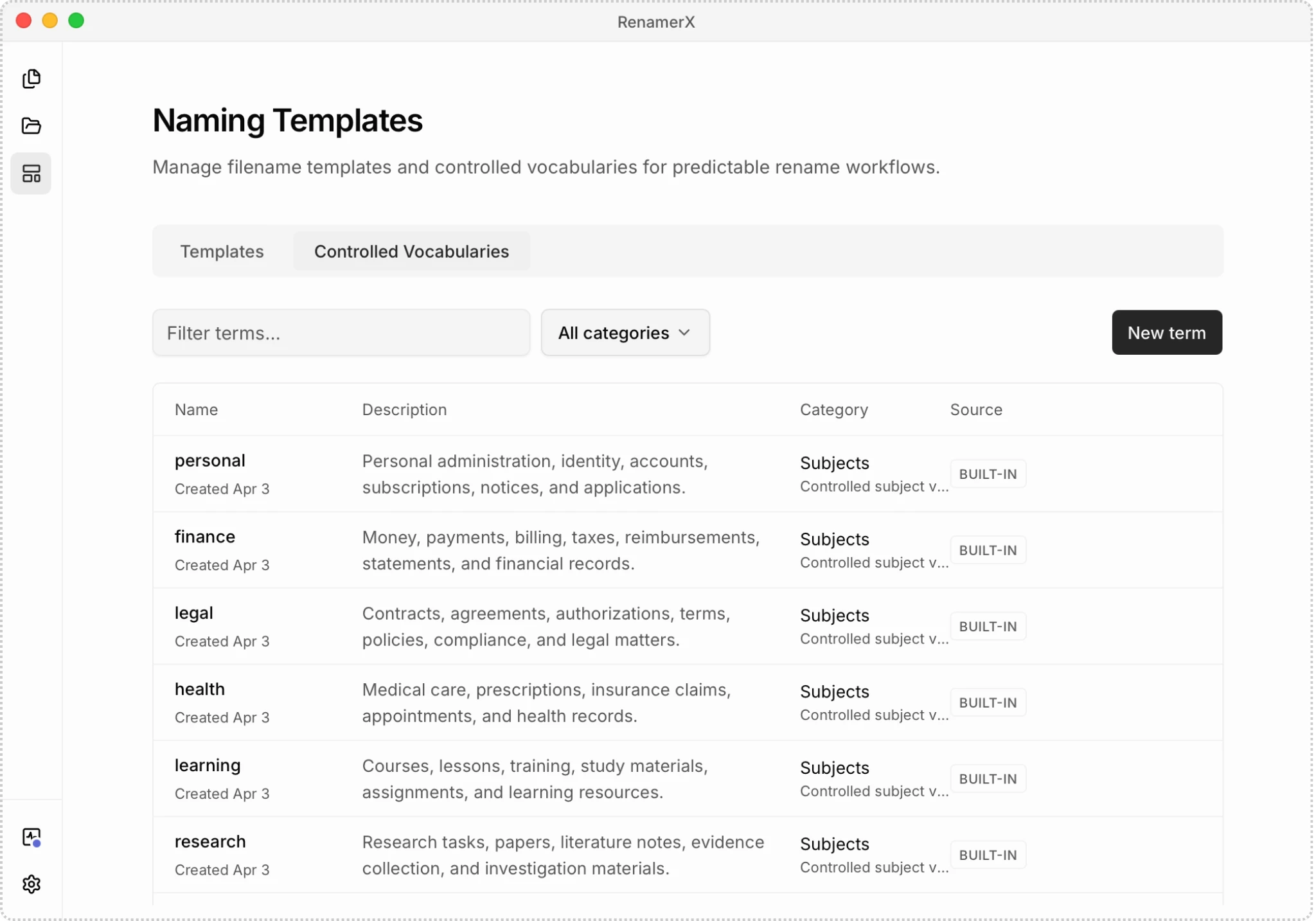
Create terms in the Controlled Vocabularies tab under Naming Templates:
- Open Naming Templates.
- Select Controlled Vocabularies.
- Select a category filter, or leave All categories selected.
- Select New term.
- Enter the agreed Name.
- Write a Description that defines when the term applies.
- Confirm the Category, then select Save.
When All categories is active, a new term starts in Subjects. Change Category before saving if the term belongs elsewhere.
A Name can contain up to 120 characters. A Description can contain up to 500 characters. The same Name cannot appear twice within one category.
Find, edit, or delete terms
Use Filter terms to search both Name and Description. Use the category menu to limit the list to one category.
The Source column identifies a term as Built-in or Custom. Source records where the term came from; it does not prevent editing or deletion.
Select a row or its edit action. Change its Name, Description, or Category, then select Save. Editing a Built-in term saves it as Custom.
You can delete Built-in and Custom terms. The manager deletes a term immediately, and this action has no Undo. Deletion removes the term from future AI processing. It does not change existing templates, filename suggestions, or filenames.
Update the vocabulary when you observe one of these changes:
- A new Organization or Project begins to recur
- You repeatedly correct the same field to one agreed value
- The meaning or approved name of a term changes
- A term no longer belongs to the files covered by the naming convention
Test the vocabulary with representative files
RenamerX includes the relevant controlled terms in the input to AI processing. It does not fuzzy-match, validate, or replace the returned value afterward. Review the result, especially when files contain ambiguous evidence.
Test a new or revised vocabulary before relying on it in a Watch Folder:
- Choose a template that requires the controlled field.
- Process a small batch of representative files in Batch Rename.
- Inspect the field values when each file reaches Needs review.
- Include files with missing or ambiguous evidence in the test.
- Revise overlapping Names or Descriptions, then generate new filenames for the test files.
Vocabulary changes affect later AI processing. They do not recalculate filename suggestions already in Needs review. To use the updated terms, select those files and choose Generate suggestions. Each successfully generated filename follows the normal Credits and License rules.
Related pages
Use these pages to connect the vocabulary to its naming rule, fields, workflow, and destination behavior: