File Naming Examples: Before-and-After Patterns for Messy Files
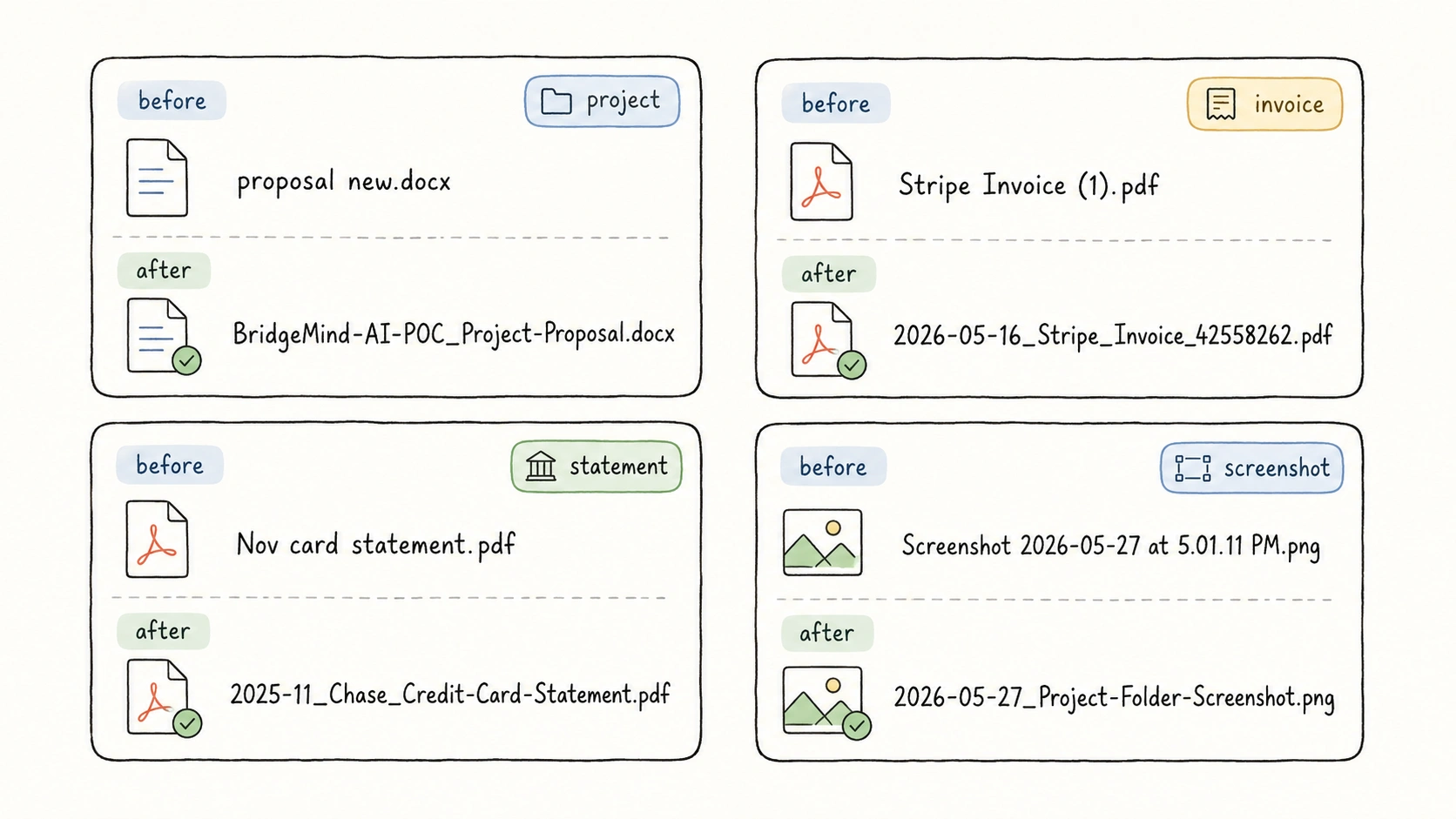
Messy filenames usually fail in the same few ways: they hide the date, bury the invoice number, start with final, or keep a camera or download ID that says nothing about the file.
A better filename does not need to describe everything. It needs to expose the few fields someone will use later: project, client, date, type, title, organization, identifier, location, status, or version. The examples below show the before and after for common folders, using the same field vocabulary as the companion guide to file naming templates.
Quick File Naming Examples
Use this table when you need the fastest answer. The detailed sections below show more examples for each scenario.
| Scenario | Messy filename | Better filename |
|---|---|---|
| Project, client, and business files | proposal new.docx | BridgeMind-AI-POC_Project-Proposal.docx |
| Meetings, communication, and confirmation records | photoshoot notes.pdf | 2026-06-21_Brand-Photoshoot-Visual-Direction-Meeting-Notes.pdf |
| Knowledge documents, reference material, and notes | 1706.03762v7.pdf | Vaswani_2017_Attention-Is-All-You-Need.pdf |
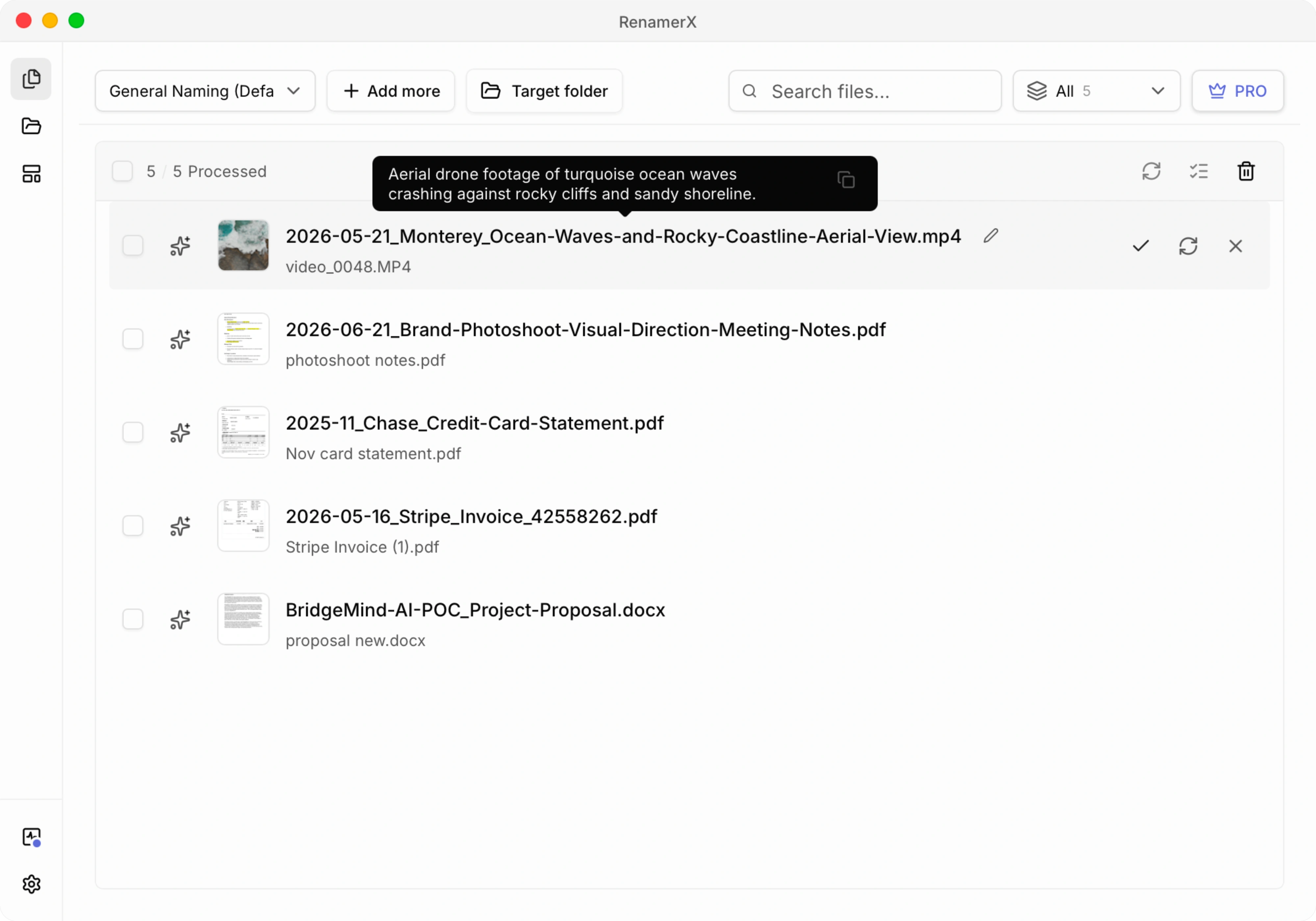
| Images, screenshots, videos, and asset files | video_0048.MP4 | 2026-05-21_Monterey_Ocean-Waves-and-Rocky-Coastline-Aerial-View.mp4 |
| Invoices, receipts, bills, and payment proof | Stripe Invoice (1).pdf | 2026-05-16_Stripe_Invoice_42558262.pdf |
| Contracts, certificates, IDs, and important records | car sales agreement signed.pdf | AGR2024042801_Vehicle-Purchase-Agreement_Signed.pdf |
| Inboxes, scan folders, and old folders | 25537000000211919494.pdf | 2025-12-28_Notice_Internet-Service-Outage.pdf |
These examples keep the extension, use one separator pattern, and avoid reserved filename characters such as <, >, :, ", /, \, |, ?, and *, which Microsoft lists as unsafe in Windows filenames. Microsoft Learn
Before-and-After Examples by Scenario
Each scenario below includes the pattern, a messy original filename, a better filename, and the reason the new name works.
Project, Client, and Business Files
Use project or client fields when the file belongs to a workstream, account, campaign, delivery process, order, or customer folder.
| Before | After | Pattern | Why it works |
|---|---|---|---|
proposal new.docx | BridgeMind-AI-POC_Project-Proposal.docx | {project}_{title} | The project becomes the first lookup clue, and new is replaced by the real document title. |
research report final.docx | Common-Ground-Bikes_Business-Requirements-Research-Report.docx | {client}_{title} | The client is the grouping field, and the title names the business requirements being researched. |
BridgeMind AI POC monthly progress report FINAL v1.pptx | BridgeMind-AI-POC_Monthly-Progress-Report_Final_v01.pptx | {project}_{title}_{status}_{version} | The title already says this is a report, while status and version stay visible at the end. |
Use the short patterns when the folder already supplies the missing context. Add status and version when drafts, final copies, and revisions need to sit together.
Meetings, Communication, and Confirmation Records
Communication records usually need date first because they prove what happened or what was agreed on a specific day.
| Before | After | Pattern | Why it works |
|---|---|---|---|
photoshoot notes.pdf | 2026-06-21_Brand-Photoshoot-Visual-Direction-Meeting-Notes.pdf | {date}_{title} | The date sorts the record, and the title says both the topic and the kind of record. |
meeting minutes.docx | 2025-10-06_BridgeMind-AI-POC_Payment-API-Integration-Review-Meeting-Minutes.docx | {date}_{project}_{title} | BridgeMind-AI-POC is the project; the title keeps the integration topic and meeting record together. |
arch review + customer feedback.docx | 2025-10-14_Common-Ground-Bikes_Architecture-Review-and-Customer-Feedback-Meeting-Notes.docx | {date}_{client}_{title} | The client field uses the customer account, and the title keeps the review topic. |
This scenario includes more than meeting notes. Approval screenshots, call notes, sign-offs, customer confirmations, and follow-up records often need the same date-first structure.
Knowledge Documents, Reference Material, and Notes
Reference files should be named by the way someone will cite, learn from, or reuse them later.
| Before | After | Pattern | Why it works |
|---|---|---|---|
1706.03762v7.pdf | Vaswani_2017_Attention-Is-All-You-Need.pdf | {creator}_{date:year}_{title} | The arXiv-style ID is useful, but author, year, and title are easier to recognize in a folder. |
energy refs.docx | Research_Energy-Market-Reference-List.docx | {subject}_{title} | Research is the subject category; Energy-Market-Reference-List is the specific title. |
high level architecture final.docx | BridgeMind-AI-POC_High-Level-Architecture_v01.docx | {project}_{title}_{version} | Project reference material stays with the project and keeps revision history visible. |
Do not put a full citation, abstract, source URL, and personal notes into the filename. Keep those in your reference manager or metadata.
Images, Screenshots, Videos, and Asset Files
Media names should say what the file shows, where it belongs, or which version it is.
| Before | After | Pattern | Why it works |
|---|---|---|---|
arch diagram final2.png | BridgeMind-AI-POC_High-Level-Architecture-Diagram_v01.png | {project}_{title}_{version} | The title says this is a diagram, while the project and version stay easy to scan. |
video_0048.MP4 | 2026-05-21_Monterey_Ocean-Waves-and-Rocky-Coastline-Aerial-View.mp4 | {date}_{location}_{title} | Date and a concrete coastal city make aerial footage easier to sort and verify later. |
IMG_12409615.jpg | 2026-05-20_Travel_Couple-Walking-on-Beach-Near-Cliffs.jpg | {date}_{subject}_{title} | Travel is the subject category; the visible people and scene stay in the title. |
Screenshot 2026-05-27 at 5.01.11 PM.png | 2026-05-27_Project-Folder-Screenshot.png | {date}_{title} | The title describes the screen state and keeps Screenshot as part of the readable name. |
For image and video folders, avoid relying on camera names, export names, or screenshot timestamps alone. They usually describe the file creation process, not the content.
When visible content or embedded metadata must supply the missing details, use the focused workflows for photos, screenshots, and video files.
Invoices, Receipts, Bills, and Payment Proof
Finance filenames need enough fields to match a transaction later. Date, organization, title, and identifier usually do the heavy lifting.
| Before | After | Pattern | Why it works |
|---|---|---|---|
Stripe Invoice (1).pdf | 2026-05-16_Stripe_Invoice_42558262.pdf | {date}_{organization}_{type}_{identifier} | The date, issuer, document type, and invoice number are all visible. |
Nov card statement.pdf | 2025-11_Chase_Credit-Card-Statement.pdf | {date}_{organization}_{title} | The statement has no useful short ID, so the month, bank, and readable title carry the name. |
GitHub Copilot receipt (1).pdf | RCPT-20260414-01_GitHub_Copilot-Pro-Receipt.pdf | {identifier}_{organization}_{title} | A receipt or transaction number is a real identifier, so it can lead the filename. |
Do not hide invoice numbers, quote numbers, order numbers, or shipment numbers inside title. If a number is visible and reliable, keep it as identifier. George Washington University's invoice protocol also prioritizes the supplier invoice number when one exists. GW Procurement
The invoice file renaming guide covers how to distinguish invoice dates, supplier or client names, official invoice numbers, and optional totals before applying a batch.
Contracts, Certificates, IDs, and Important Records
Important records are kept because they prove, authorize, certify, or preserve something. The filename should help retrieval without exposing unnecessary personal details.
| Before | After | Pattern | Why it works |
|---|---|---|---|
car sales agreement signed.pdf | AGR2024042801_Vehicle-Purchase-Agreement_Signed.pdf | {identifier}_{title}_{status} | A stable record number is the strongest lookup key, and status stays near the end. |
Share Subscription Agreement draft copy.docx | Acme-Robotics_Share-Subscription-Agreement_Draft_v01.docx | {client}_{title}_{status}_{version} | The title already says this is an agreement, and copy becomes a real version. |
denver office building loi.docx | 2025-07-13_BlueRiver-Investors_Denver-Office-Building-LOI.docx | {date}_{organization}_{title} | The date, organization, and title make the record readable without exposing extra personal detail. |
Use a stable identifier only when it is safe and useful. Avoid full government ID numbers, full medical details, and other sensitive personal details in filenames.
Inboxes, Scan Folders, and Old Folders
Downloads, scan folders, email attachments, customer uploads, camera imports, and old shared folders often contain files with names that say nothing about the content. Open the file, name what it is, then file it in the right place.
| Before | After | Pattern | Why it works |
|---|---|---|---|
25537000000211919494.pdf | 2025-12-28_Notice_Internet-Service-Outage.pdf | {date}_{type}_{title} | The unreadable number becomes a date, a file kind, and a recognizable notice topic. |
scan0001.pdf | 2026-04-10_Price-List_Office-Supplies.pdf | {date}_{type}_{title} | Price-List is the file kind, and Office-Supplies says what the list covers. |
First identify what each file is: invoice, receipt, price list, catalog, screenshot, contract, or note. Once the file is recognizable, move it to the matching project, finance, media, contract, or reference folder.
For ambiguous document folders, continue with the PDF renaming guide or the focused workflow for scanned PDFs.
What Changed in These Examples
The after filenames are not longer for decoration. Each added field removes a specific kind of uncertainty.
date makes time-based records sort correctly. Year-first dates such as YYYY-MM-DD or YYYYMMDD reduce regional ambiguity and sort predictably in file lists. ISO 8601 uses year-month-day order, and Princeton Research Data Service recommends ISO-style dates in file names. ISO 8601, Princeton Research Data Service
When a template uses {type}, keep the values short and consistent: Invoice, Receipt, Price-List, Catalog, Screenshot. A small controlled vocabulary for file naming helps when a team shares the folder.
title should be the smallest readable name for the specific file. It should not repeat the date, identifier, version, extension, scan number, or download trace. ISO Helpdesk makes a similar distinction in document systems: a clear title helps people understand the document, while metadata connects it to meetings, projects, and related content. ISO Helpdesk
identifier, status, and version should stay in their own segments. Identifiers help with matching, de-duplication, and audit trails. Status and version usually belong near the end because they qualify the file rather than define the main group. Queen's University warns against starting unrelated files with words such as draft or final because that groups different subjects together. Queen's University
project, client, organization, subject, and location decide how files group when you sort by name. Harvard Biomedical Data Management and Rhode Island State Archives both recommend choosing filename elements based on how people will retrieve the file. Harvard Biomedical Data Management, Rhode Island Department of State
When the Missing Fields Are Inside the File
Many bad filenames are not bad because someone was careless. The useful information was never in the filename.
photoshoot notes.pdf may need the topic from the first page. 25537000000211919494.pdf may need the notice date and outage topic from the PDF. video_0048.MP4 may need a visual description and a location. Stack Overflow has years of questions from users trying to rename PDFs by a license number, title, name, or receipt number inside the document. Stack Overflow
That is the workflow RenamerX is built for:
file content -> extracted fields -> naming template -> reviewable filename
RenamerX reads supported local documents, images, and videos, extracts structured fields, applies your template, and shows suggested filenames before anything changes on disk. You can edit suggestions, skip uncertain files, apply the batch, and undo applied renames if something looks wrong.
Checklist Before You Rename a Folder
Before you apply a naming style to a whole folder, check six things:
- Does the pattern match the file scenario?
- Can you tell what the file is without opening it?
- Does the first field match how the folder is searched?
- Are date, type, identifier, status, and version in their own segments when you use them?
- Did you avoid unsafe characters and keep the extension?
- Would the name still make sense if the file left its current folder?
If a name only works because the folder gives it context, add one more field. Columbia Photo Library gives similar advice for images: names should be descriptive enough to understand the content before opening the file, and teams should use agreed terms, year-month-day dates, leading zeroes, and written conventions. Columbia Photo Library
Related Guides
- Use file naming templates when you want reusable patterns for these examples.
- Use file naming conventions when you need team-wide rules.
- Use metadata-driven file naming when the useful fields live inside the file.
- Use controlled vocabulary for file naming when repeated values such as type, subject, status, organization, or project need one approved spelling.
- Use date formats in file names when you need to choose between
YYYY-MM-DD,YYYYMMDD,YYYY-MM, andYYYYMM. - Use safe filename characters when files move across Mac, Windows, scripts, URLs, cloud drives, or shared folders.
Sources
- Harvard Biomedical Data Management: File Naming Conventions
- Princeton Research Data Service: File Organization
- ISO 8601: Date and Time Format
- ISO Helpdesk: Document Naming Convention
- Rhode Island Department of State: Guide for File Naming
- Microsoft Learn: Naming Files, Paths, and Namespaces
- Queen's University: Creating and Maintaining File Naming Standards
- Columbia University Photo Library: File Naming Conventions
- GW Procurement: Invoice Number Protocol
- Stack Overflow: Batch Renaming PDFs using content from document on Mac