File Naming Templates: Practical Patterns for Common Files
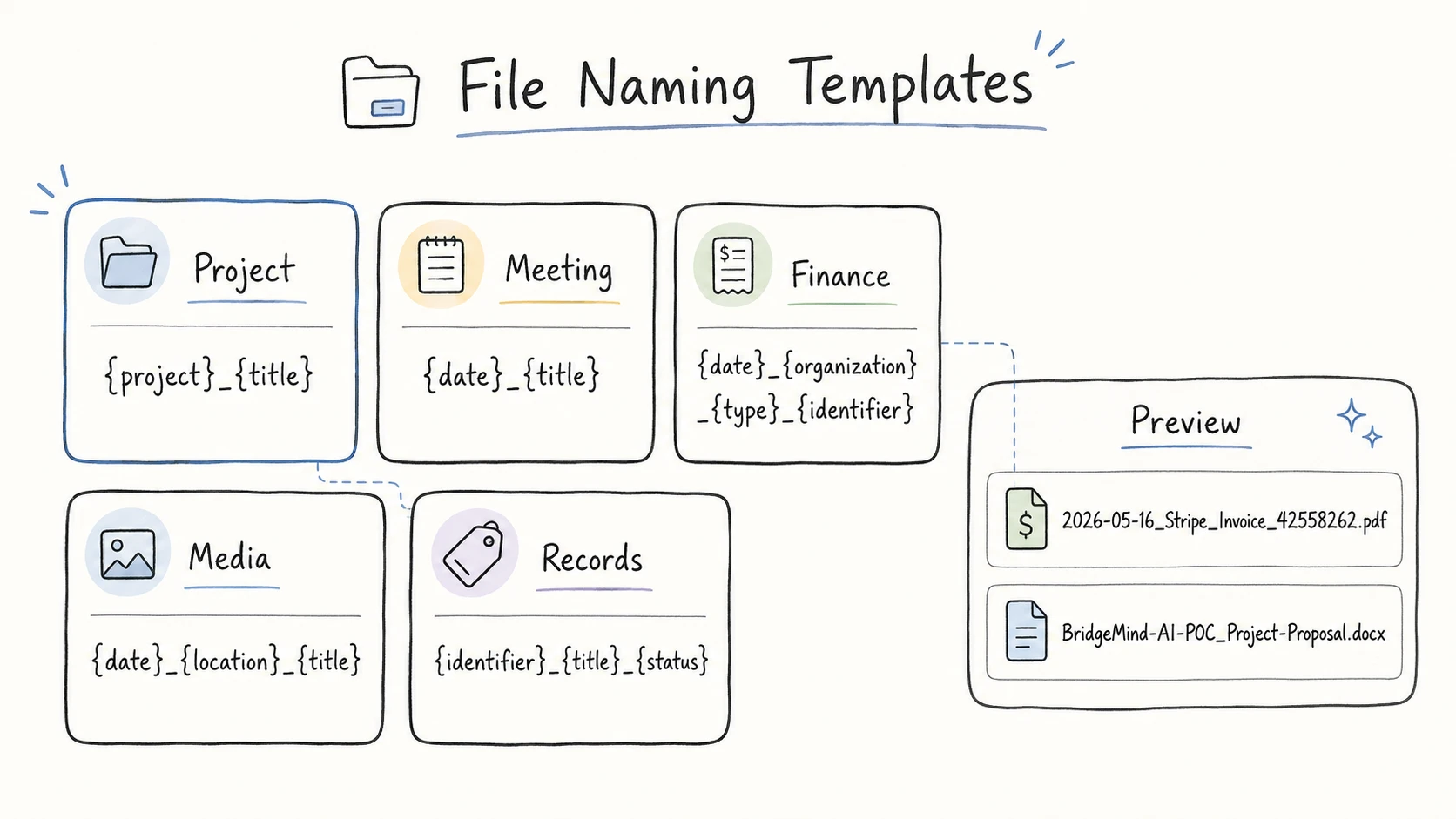
File naming templates work best when they match the way you will find the file later.
For a meeting record, the date often matters first. For a project file, the project name may matter first. For an invoice, the useful fields are usually the date, issuer, invoice title, and invoice number. The template is not decoration. It is the small set of fields that makes a file easy to scan, search, sort, and share.
Use the table below as the answer. The sections after it explain why these fields appear in this order, how to keep templates short, and how AI file renaming can fill the fields for you without turning every filename into a guess.
File Naming Templates by Scenario
Use these file naming templates as starting points. Copy the field logic, not every example word.
| File scenario | Start with these templates | Examples |
|---|---|---|
| Project, client, and business files | {project}_{title}<br>{client}_{title}<br>{project}_{title}_{status}_{version} | BridgeMind-AI-POC_Project-Proposal.docx<br>Common-Ground-Bikes_Business-Requirements-Research-Report.docx<br>BridgeMind-AI-POC_Monthly-Progress-Report_Final_v01.pptx |
| Meetings, communication, and confirmation records | {date}_{title}<br>{date}_{project}_{title}<br>{date}_{client}_{title} | 2026-06-21_Brand-Photoshoot-Visual-Direction-Meeting-Notes.pdf<br>2025-10-06_BridgeMind-AI-POC_Payment-API-Integration-Review-Meeting-Minutes.docx<br>2025-10-14_Common-Ground-Bikes_Architecture-Review-and-Customer-Feedback-Meeting-Notes.docx |
| Knowledge documents, reference material, and notes | {creator}_{date:year}_{title}<br>{subject}_{title}<br>{project}_{title}_{version} | Vaswani_2017_Attention-Is-All-You-Need.pdf<br>Research_Energy-Market-Reference-List.docx<br>BridgeMind-AI-POC_High-Level-Architecture_v01.docx |
| Images, screenshots, videos, and asset files | {project}_{title}_{version}<br>{date}_{location}_{title}<br>{date}_{subject}_{title}<br>{date}_{title} | BridgeMind-AI-POC_High-Level-Architecture-Diagram_v01.png<br>2026-05-21_Monterey_Ocean-Waves-and-Rocky-Coastline-Aerial-View.mp4<br>2026-05-20_Travel_Couple-Walking-on-Beach-Near-Cliffs.jpg<br>2026-05-27_Project-Folder-Screenshot.png |
| Invoices, receipts, bills, and payment proof | {date}_{organization}_{type}_{identifier}<br>{date}_{organization}_{title}<br>{identifier}_{organization}_{title} | 2026-05-16_Stripe_Invoice_42558262.pdf<br>2025-11_Chase_Credit-Card-Statement.pdf<br>RCPT-20260414-01_GitHub_Copilot-Pro-Receipt.pdf |
| Contracts, certificates, IDs, and important records | {identifier}_{title}_{status}<br>{client}_{title}_{status}_{version}<br>{date}_{organization}_{title} | AGR2024042801_Vehicle-Purchase-Agreement_Signed.pdf<br>Acme-Robotics_Share-Subscription-Agreement_Draft_v01.docx<br>2025-07-13_BlueRiver-Investors_Denver-Office-Building-LOI.docx |
| Inboxes, scan folders, and old folders | {date}_{type}_{title} | 25537000000211919494.pdf -> 2025-12-28_Notice_Internet-Service-Outage.pdf<br>scan0001.pdf -> 2026-04-10_Price-List_Office-Supplies.pdf |
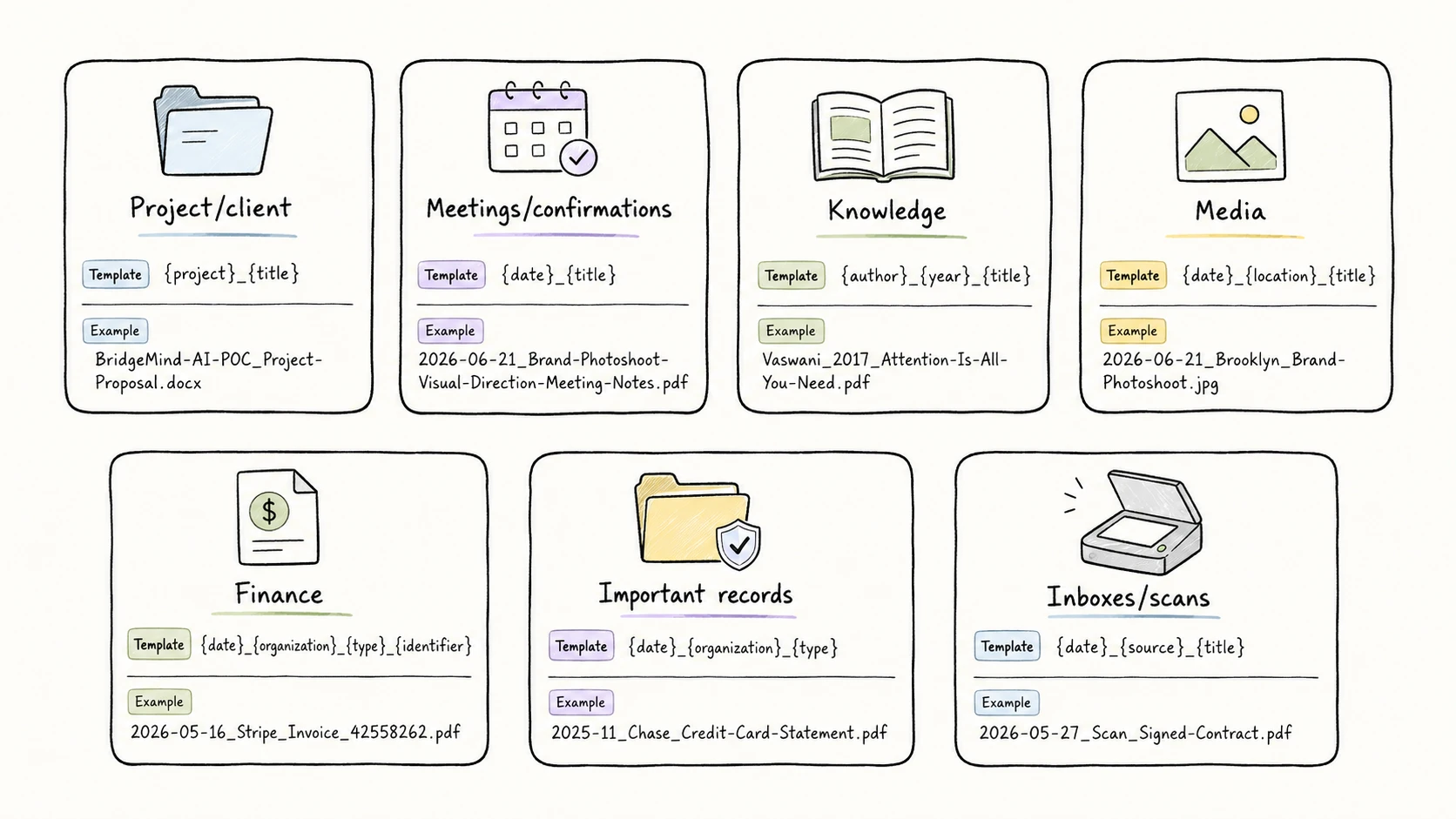
Why These Templates Use These Fields
Good templates start with a practical question: how will someone look for this file six months from now?
Harvard Biomedical Data Management recommends deciding what file set a convention covers, then choosing the metadata needed to locate a specific file. Rhode Island State Archives gives a more direct rule: order filename elements in the most logical order for retrieval. Queen's University makes the same point for records, saying elements should be sorted in the way that best supports retrieval. Harvard Biomedical Data Management, Rhode Island Department of State, Queen's University
Choose Fields by How the File Will Be Found Later
If a folder is mostly browsed by time, use date. If it is mostly browsed by client work, use client or project. If the file is an invoice, quote, order, case file, or contract with a visible number, keep identifier as its own field instead of hiding it inside the title.
A filename only needs to expose the few clues that help you recognize the file without opening it.
Use Only the Fields That Reduce Confusion
Most useful file naming templates use two to five fields. UBC Research Data Management likewise recommends keeping filenames concise and ordering their elements from general to specific for easier searching. UBC Library Research Commons
Use status or version when drafts, signed copies, final exports, or revisions need to sit together. Use {type} when a broad file kind helps people scan the folder. Leave a field out when the folder path already says the same thing.
Put the Strongest Search Clue Near the Front
The first field controls how files group when you sort a folder by name. A meeting folder works well with date first:
2026-06-21_Brand-Photoshoot-Visual-Direction-Meeting-Notes.pdf
A project folder may work better with project first:
BridgeMind-AI-POC_Project-Proposal.docx
A quote or order folder may need the official number first:
RCPT-20260414-01_GitHub_Copilot-Pro-Receipt.pdf
That is why a single universal filename formula fails. The best first field depends on the main way people retrieve that kind of file.
Keep Formatting Predictable
Once you choose fields, keep the formatting boring. Use one separator. Use the same field order for the same file scenario. Keep the extension. Avoid unsafe filename characters.
NARA's Records Express guidance recommends file names that are unique, consistently structured, persistent, short, and not tied to a changing location. Minnesota Digital Library recommends avoiding special characters, using underscores or CamelCase instead of periods or spaces, limiting filename length, and putting year first when a date should sort chronologically. Microsoft lists characters such as <, >, :, ", /, \, |, ?, and * as reserved in Windows filenames. NARA Records Express, Minnesota Digital Library, Microsoft Learn
For dates, use YYYY-MM-DD or YYYYMMDD when the date needs to sort by time. ISO 8601 uses year-month-day order, which makes date strings sort in chronological order when they are written consistently. For more detail, see the guide to date formats in file names and the guide to safe filename characters. ISO 8601
Repeated values also need control. If one person writes bill, another writes invoice, and another writes inv, search gets worse. Use a small controlled vocabulary for file naming for repeated words in titles and fields such as subject, status, organization, and project.
The Slow Part Is Filling the Template
Templates are easy to write once. They are hard to apply to hundreds of real files.
MEETING NOTES.pdf may need the topic from the first page. 25537000000211919494.pdf may need the notice date and outage topic from inside the PDF. IMG_12409615.jpg may need a visual description. Manually doing that work means opening files, reading contents, copying dates and IDs, checking spelling, and keeping the same format every time.
RenamerX is built around a review-first workflow:
file content -> extracted fields -> naming template -> reviewable filename -> apply or undo
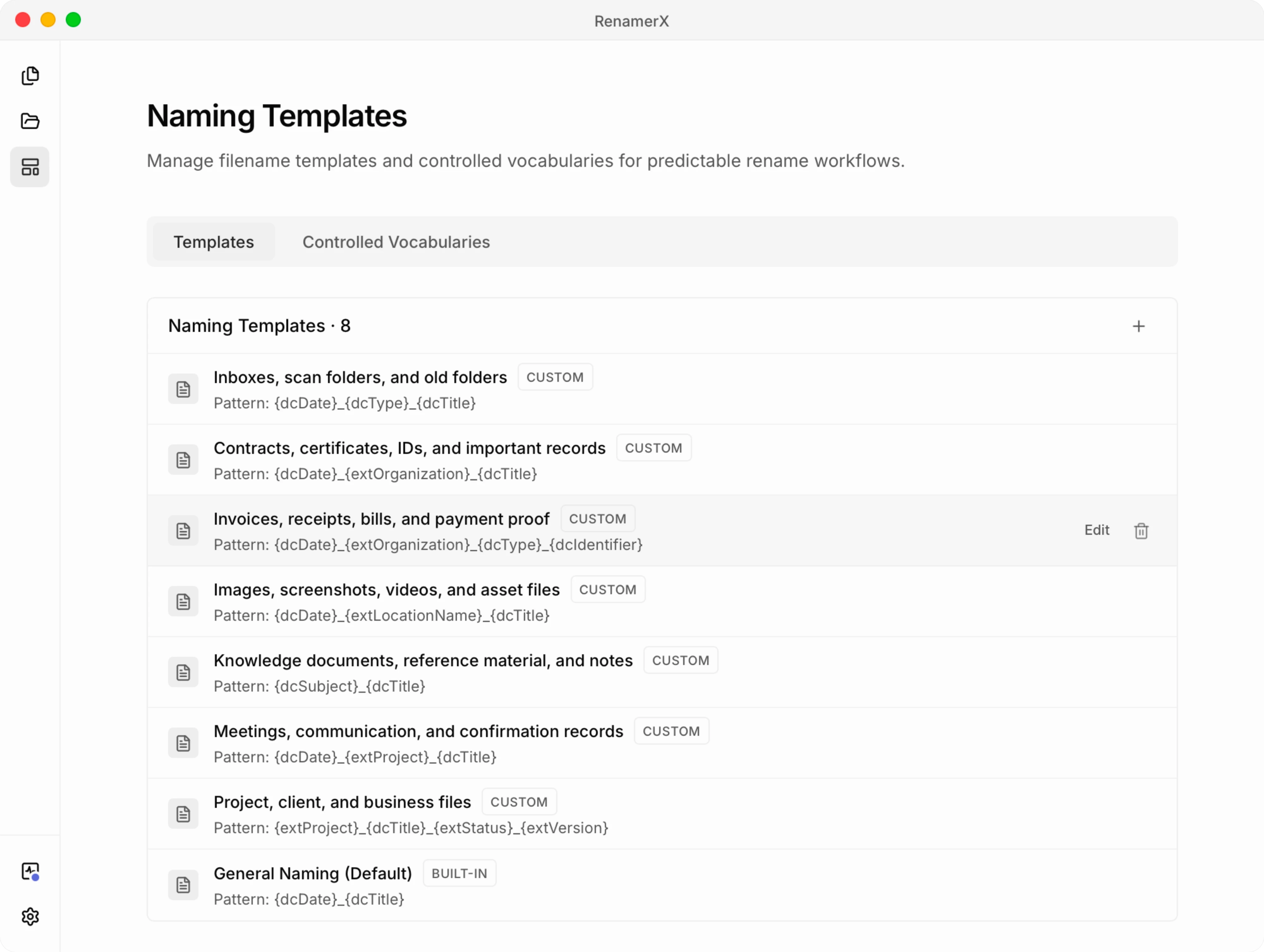
RenamerX reads supported local documents, images, and videos, extracts fields such as date, type, title, organization, identifier, project, status, and version, then applies your template to create suggested filenames. You review the suggestions before anything changes on disk. You can edit weak suggestions, skip uncertain files, apply the batch, and undo applied renames.
This is also how AI file renaming is starting to appear in document workflows. ShareFile describes AI file renaming as analyzing file content and metadata, then suggesting standardized names that users can preview, modify, and approve. Canopy's document workflow starts by setting a naming convention, then uses AI to rename client files according to that structure. ShareFile, Canopy
Batch Rename works best for old folders, mixed downloads, and one-time cleanup. Watch Folder works best when new scans, screenshots, downloads, or customer uploads keep arriving and need the same naming pattern. For the underlying method, see metadata-driven file naming.
Detailed Templates by Scenario
The table above is the quick answer. Use this section when you need to decide how much detail each scenario deserves.
Project, Client, and Business Files
Use these templates when the file belongs to a project, client, campaign, workstream, delivery process, or account.
{project}_{title}
{client}_{title}
{project}_{title}_{status}_{version}
Examples:
BridgeMind-AI-POC_Project-Proposal.docx
Common-Ground-Bikes_Business-Requirements-Research-Report.docx
BridgeMind-AI-POC_Monthly-Progress-Report_Final_v01.pptx
Use the short forms when the folder already belongs to one client or one project. Add status and version when several drafts, final copies, and revisions sit together. status and version belong near the end because they qualify the file rather than define the main group.
Meetings, Communication, and Confirmation Records
Use these templates for meeting notes, call notes, decision logs, approval screenshots, sign-offs, and follow-up records.
{date}_{title}
{date}_{project}_{title}
{date}_{client}_{title}
Examples:
2026-06-21_Brand-Photoshoot-Visual-Direction-Meeting-Notes.pdf
2025-10-06_BridgeMind-AI-POC_Payment-API-Integration-Review-Meeting-Minutes.docx
2025-10-14_Common-Ground-Bikes_Architecture-Review-and-Customer-Feedback-Meeting-Notes.docx
Date-first naming works well here because the file records something that happened on a specific day. Use titles such as Meeting-Notes, Meeting-Minutes, Confirmation, or Email-Thread. Use the short form when the folder already belongs to one client or one project. Add project when one communication folder contains several projects. Add client when the record is tied to a customer relationship, approval, or confirmation, but not to a clear project name.
Knowledge Documents, Reference Material, and Notes
Use these templates for papers, reports, technical notes, course material, SOPs, policy references, checklists, and reusable notes.
{creator}_{date:year}_{title}
{subject}_{title}
{project}_{title}_{version}
Examples:
Vaswani_2017_Attention-Is-All-You-Need.pdf
Research_Energy-Market-Reference-List.docx
BridgeMind-AI-POC_High-Level-Architecture_v01.docx
For papers and reports, author, year, and short title usually do enough work. In the template, {date:year} means "format the meaningful date as a four-digit year." For reusable notes, subject keeps the folder scannable without turning the filename into a tag list. For project-specific reference material, SOPs, checklists, or research notes, use project first and keep version when revisions need to coexist. Do not put the full citation, publisher, DOI, abstract, and notes into the filename. Keep those in your reference manager or metadata.
Images, Screenshots, Videos, and Asset Files
Use these templates for product images, design exports, videos, screenshots, site photos, inspection records, and visual evidence.
{project}_{title}_{version}
{date}_{location}_{title}
{date}_{subject}_{title}
{date}_{title}
Examples:
BridgeMind-AI-POC_High-Level-Architecture-Diagram_v01.png
2026-05-21_Monterey_Ocean-Waves-and-Rocky-Coastline-Aerial-View.mp4
2026-05-20_Travel_Couple-Walking-on-Beach-Near-Cliffs.jpg
2026-05-27_Project-Folder-Screenshot.png
Project assets usually need project first. Location-based photos and inspection records often need date and location first. Screenshot titles should name the UI state and can include Screenshot at the end.
Invoices, Receipts, Bills, and Payment Proof
Use these templates for invoices, receipts, statements, quotes, purchase orders, shipment documents, reimbursements, and payment records.
{date}_{organization}_{type}_{identifier}
{date}_{organization}_{title}
{identifier}_{organization}_{title}
Examples:
2026-05-16_Stripe_Invoice_42558262.pdf
2025-11_Chase_Credit-Card-Statement.pdf
RCPT-20260414-01_GitHub_Copilot-Pro-Receipt.pdf
Do not hide invoice numbers, receipt numbers, quote numbers, purchase order numbers, or shipment numbers inside title. If the number is visible and reliable, treat it as identifier. George Washington University's invoice protocol uses the supplier invoice number when one exists and falls back to date-based rules when it does not. GW Procurement
Contracts, Certificates, IDs, and Important Records
Use these templates for contracts, agreements, signed forms, certificates, proof records, HR files, insurance documents, compliance records, case files, and other files kept because they prove something.
{identifier}_{title}_{status}
{client}_{title}_{status}_{version}
{date}_{organization}_{title}
Examples:
AGR2024042801_Vehicle-Purchase-Agreement_Signed.pdf
Acme-Robotics_Share-Subscription-Agreement_Draft_v01.docx
2025-07-13_BlueRiver-Investors_Denver-Office-Building-LOI.docx
Use a stable record number when it is safe and useful. Use the client-based template for client agreements, signed forms, and drafts that may have several versions. Use date, organization, and title for certificates, proof records, insurance documents, school records, bank letters, and other important files where there is no reliable identifier or the identifier should stay out of the filename. Put words such as agreement, certificate, lease, or LOI in title. Use status for signed, draft, approved, expired, or archived records. Avoid full government ID numbers, full medical details, and unnecessary personal details in filenames. The filename should help retrieval without becoming a privacy leak.
Inboxes, Scan Folders, and Old Folders
Use these templates for email inboxes, Downloads, scan folders, customer uploads, email attachments, camera imports, and old shared folders.
{date}_{type}_{title}
Examples:
25537000000211919494.pdf -> 2025-12-28_Notice_Internet-Service-Outage.pdf
scan0001.pdf -> 2026-04-10_Price-List_Office-Supplies.pdf
Open enough files to see what they are, then label the file kind with a short word such as Invoice, Receipt, Notice, Price-List, Catalog, or Screenshot. After that, move each file into the matching project, finance, media, contract, or reference folder.
Appendix: Common Fields Used in File Naming Templates
These fields are common because they map to how people recognize files. Dublin Core gives a useful vocabulary for metadata such as title, creator, subject, date, type, identifier, source, language, relation, coverage, and rights. For filenames, choose a small subset instead of flattening every metadata field into the name. RFC 5013, DCMI Metadata Basics
| Field | Meaning | Good examples | Use when | Avoid |
|---|---|---|---|---|
{date} | Meaningful file date | 2026-06-21, 20260516 | Time order matters | Using download date when invoice date matters |
{date:year} | Publication or reference year formatted from date | 2017, 2024 | Author-year reference works | Full dates for papers that only need year |
{title} | Short file-specific name | Deployment-Project-Log | A human needs a readable label | Repeating date, ID, version, or extension |
{type} | Broad file kind | Invoice, Receipt, Notice, Price-List | File kind helps people scan or sort | Vague or inconsistent values |
{subject} | Stable topic or category | Research, Travel, Database | Topic helps grouping | Making it a long tag list |
{client} | Client or account | Common-Ground-Bikes, Acme-Robotics | Work is retrieved by client | Using vendor or author as client |
{project} | Project, campaign, matter, or workstream | BridgeMind-AI-POC, Website-Redesign | Work is retrieved by project | Repeating the whole folder path |
{organization} | Vendor, issuer, bank, school, or owner | Stripe, Chase | Issuer or vendor matters | Mixing legal name, short name, and nickname |
{identifier} | Official number or stable ID | 42558262, Q6533211, 303792 | The number is the strongest lookup key | Inventing IDs when none exists |
{creator} | Author, photographer, or creator | Vaswani, Smith | Authorship matters | Guessing a person from weak evidence |
{location} | Place name | Beijing, Tokyo | Photos or field records are location-based | Adding vague locations such as office |
{status} | Workflow state | Draft, Signed, Final | Several states coexist | Starting unrelated files with Final |
{version} | Revision number | v01, v02 | Revisions need to coexist | Using final_final_v3 as a system |
Related Guides
- Start with file naming conventions when you want the full design method behind these templates.
- Use file naming examples when you want more before-and-after names for messy real files.
- Use metadata-driven file naming when you want to understand how file content becomes structured fields before a template generates the filename.
- Use controlled vocabulary for file naming when repeated values such as status, subject, organization, or project drift across a team.
- Use date format in file names when you need to choose between
YYYY-MM-DD,YYYYMMDD,YYYY-MM, andYYYYMM. - Use safe filename characters when files move across Mac, Windows, scripts, URLs, cloud drives, or shared systems.
Sources and Further Reading
- Harvard Biomedical Data Management: File Naming Conventions
- Rhode Island Department of State: Guide for File Naming
- Queen's University: Creating and Maintaining File Naming Standards
- UBC Library Research Commons: File Naming
- NARA Records Express: Best Practices for File Naming
- Minnesota Digital Library: Best Practices for File Naming of Electronic Records
- Microsoft Learn: Naming Files, Paths, and Namespaces
- ISO 8601: Date and Time Format
- RFC 5013: The Dublin Core Metadata Element Set
- DCMI Metadata Basics
- GW Procurement: Invoice Number Protocol
- ShareFile: AI-Powered File Renaming
- Canopy: Automatically Rename Client Files Using AI