Metadata-Driven File Naming: Turn File Content Into Consistent Names
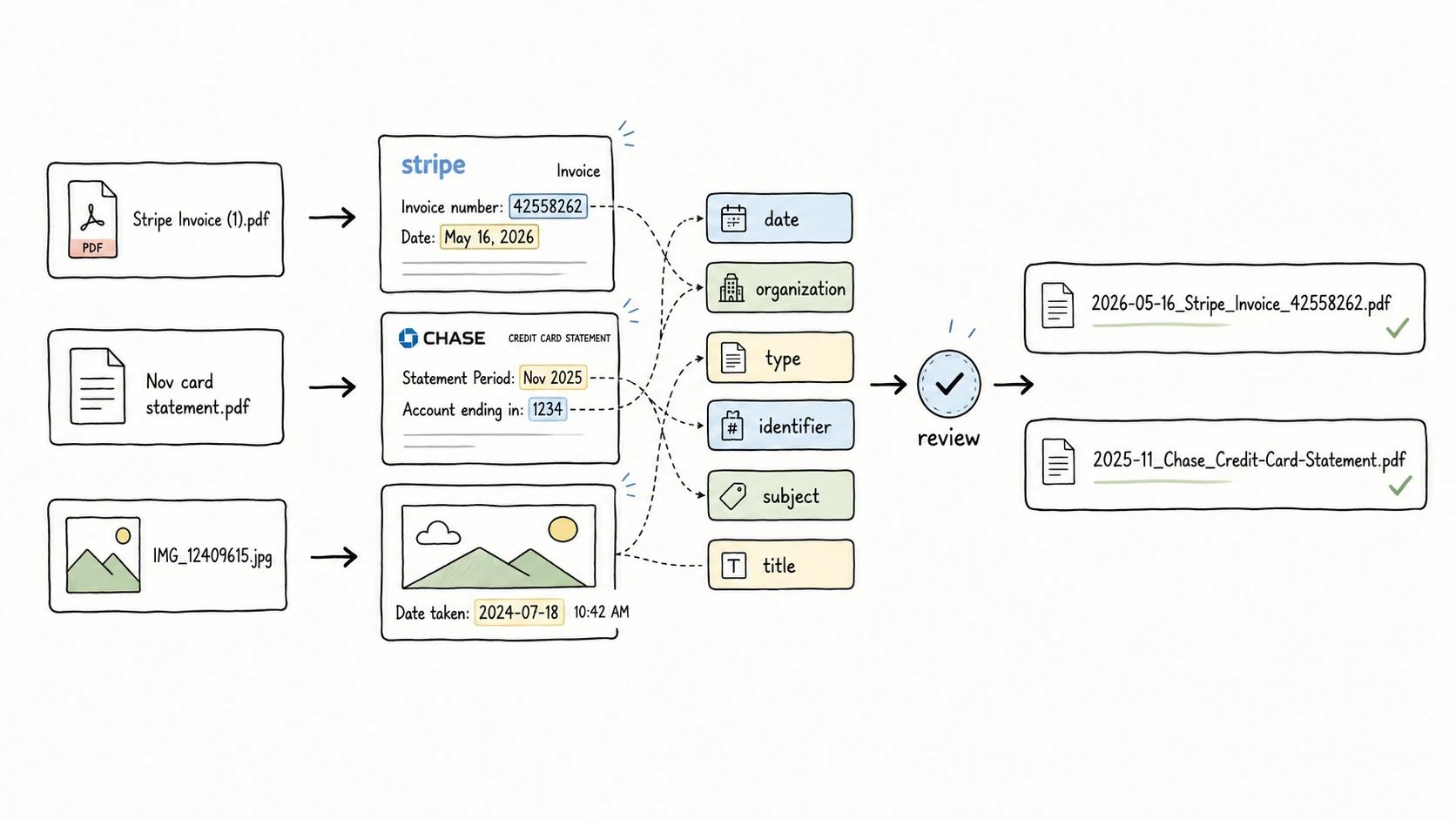
scan0001.pdf, IMG_12409615.jpg, and BridgeMind AI POC monthly progress report FINAL v1.pptx are not bad because they look ugly. They are bad because they hide the information you need later.
You cannot see what the scan is. You cannot search for the invoice number if the number is only inside the PDF. You cannot sort project exports if every version says some variation of final. The file may be on your computer, but the filename is not helping you find it.
Metadata-driven file naming fixes that by treating a filename as a small set of useful fields. A good filename should help someone understand the file at a glance, sort it naturally, search for it, move it across systems without trouble, and distinguish versions or statuses when that matters.
Good filenames are built from fields, not improvised text.
The Short Answer
Metadata-driven file naming means building filenames from structured fields such as date, title, type, creator, organization, project, identifier, status, version, and location.
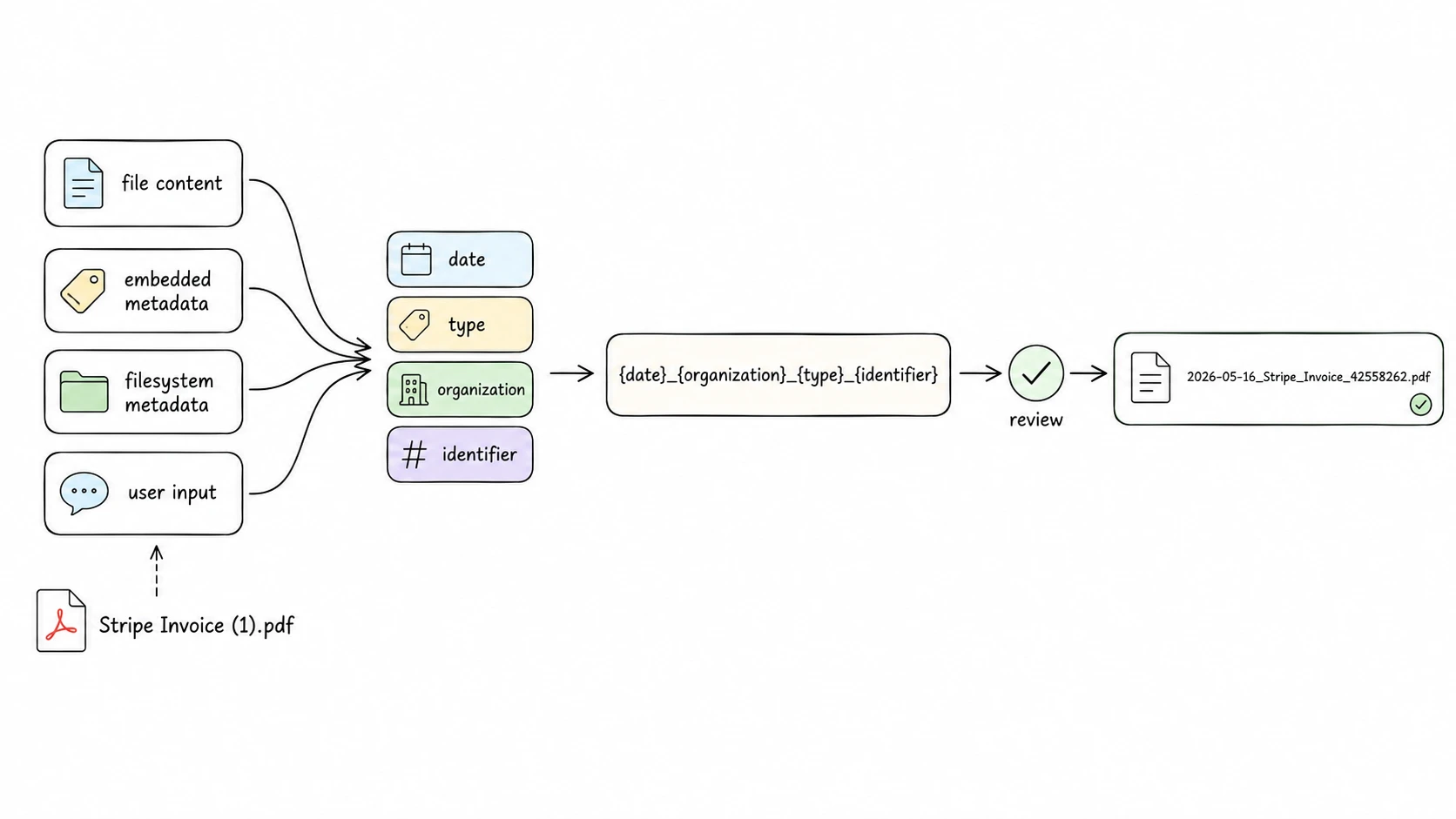
The fields may come from file content, embedded metadata, filesystem metadata, or user input. A template then decides which fields appear, what order they appear in, and how they are formatted.
file content -> metadata fields -> naming template -> reviewable filename
For example:
Stripe Invoice (1).pdf
-> date: 2026-05-16
-> organization: Stripe
-> type: Invoice
-> identifier: 42558262
-> filename: 2026-05-16_Stripe_Invoice_42558262.pdf
The point is not to put every possible detail into the filename. The point is to choose the fields that make the file easier to recognize, search, sort, share, and recover later.
A Filename Is a Small Metadata Profile
A filename is not a complete metadata record. It is a compact naming profile: the few fields that still matter when the file leaves its original folder, cloud drive, database, or app.
That distinction matters. Dublin Core defines 15 broad metadata elements for describing resources in a cross-disciplinary environment, including title, creator, subject, date, type, and identifier. It is a useful field map, but it is not a filename formula. The RFC version of Dublin Core also notes that implementation details belong in application profiles that constrain fields for local or community needs. RFC 5013
Dublin Core Application Profile guidance makes the same point from another angle: an application profile declares which metadata terms a community uses, how those terms are constrained, and how they are interpreted for a specific application. Dublin Core Application Profile Guidelines
For filenames, the "application" is simple: people need to scan, sort, search, and distinguish local files. That means you usually need a smaller field set than a catalog, repository, or records system.
Use the filename for portable minimum metadata. Keep fuller metadata somewhere else.
Which Metadata Fields Should Go Into a Filename?
Start with the retrieval question: how will someone look for this file later?
If people browse by time, put the date near the front. If they search by client, project, issuer, case number, paper author, location, or version, choose those fields instead. Harvard Biomedical Data Management gives a practical version of this rule: identify the metadata needed to locate a specific file, put the most important information first, and provide just enough context. Harvard Biomedical Data Management
These are the fields that most often earn a place in filenames:
| Field | Use when | Example |
|---|---|---|
date | Time order matters, such as meetings, invoices, photos, scans, exports, or reports. | 2026-05-16 |
title | The file needs a short human-readable description. | Monthly-Progress-Report |
type | A folder mixes invoices, receipts, contracts, reports, screenshots, photos, videos, or notes. | Invoice |
subject | A broad topic helps group files without relying only on folders. | Finance |
creator | The author, researcher, photographer, issuer, or responsible person matters. | Vaswani |
organization | The company, vendor, school, agency, or issuer matters. | Stripe |
client | Client context drives search or delivery. | Acme-Robotics |
project | The workstream or campaign matters more than the folder path. | BridgeMind-AI-POC |
identifier | The file has an official number, such as an invoice number, order ID, case number, contract ID, or DOI. | 42558262 |
location | Place matters for photos, videos, inspections, events, or field records. | Monterey |
status | Drafts, signed copies, final exports, or archived records coexist. | Final |
version | Revisions need to be kept separate. | v03 |
DataCite's metadata schema for research outputs is not a file naming standard, but it shows how often the same ideas recur in serious metadata systems: identifier, creator, title, publisher, publication year, subject, date, resource type, version, rights, description, geolocation, and related items all have defined places in the schema. DataCite Metadata Schema 4.5
Not all of those fields belong in filenames. The filename should carry the fields that help at the file-browser level. Description, rights, relationships, source URLs, language, funding details, full abstracts, and audit history usually belong in a metadata system, README, DMS, DAM, citation manager, or reference manager.
Harvard gives a useful warning here: if you are encoding a large amount of metadata in filenames, consider storing that metadata in a master spreadsheet instead. Harvard Biomedical Data Management
In practice, most filenames work best with two to five fields. UBC Research Data Management likewise recommends keeping names concise and ordering their elements to support search. UBC Research Data Management
From Metadata Fields to Naming Templates
Once you choose the fields, the template does the boring work: order, separators, date format, and repeated structure.
{date}_{organization}_{type}_{identifier}
2026-05-16_Stripe_Invoice_42558262.pdf
That template works for invoices because the useful retrieval clues are usually the date, the issuer, the document type, and the invoice number. A project report needs a different profile:
{project}_{title}_{status}_{version}
BridgeMind-AI-POC_Monthly-Progress-Report_Final_v01.pptx
A research paper might need creator, a year-formatted date, and title:
{creator}_{date:year}_{title}
Vaswani_2017_Attention-Is-All-You-Need.pdf
A location-based photo or video often works better with date, place, and a short description:
{date}_{location}_{title}
2026-05-21_Monterey_Ocean-Waves-and-Rocky-Coastline-Aerial-View.mp4
The order should follow how the folder is searched. If time is the first search clue, start with date. If client work is the first search clue, start with client or project. If an official number is the strongest identifier, keep it as its own field instead of hiding it in the title.
After the template, the values still need cleanup. Dates should use a sortable format such as YYYY-MM-DD or YYYYMMDD. Repeated categorical values such as type, subject, status, organization, and project should use a small controlled vocabulary. Filenames should avoid characters that cause trouble across file systems. NARA's file naming guidance recommends unique, consistently structured names, safe characters, hyphens or underscores instead of spaces, and date notation such as YYYY-MM-DD or YYYYMMDD. NARA Records Express
For more examples, see the file naming templates, file naming examples, date format in file names, and safe filename characters guides.
How to Apply Metadata-Driven Naming at Scale
Renaming one file by hand is easy. Renaming hundreds of real files is where the work starts.
photoshoot notes.pdf may need the meeting topic from the first page. Stripe Invoice (1).pdf may need the invoice date and invoice number from inside the PDF. IMG_12409615.jpg may need a visual description. Share Subscription Agreement draft copy.docx may need the client, signing status, and version.
Doing that manually means opening files, reading contents, copying dates and IDs, checking spelling, applying the same vocabulary, and keeping the same template every time. That is the slow part.
A practical metadata-driven workflow looks like this:
- Choose the file set, such as invoices, client deliverables, research papers, screenshots, or media assets.
- Decide how the files will be found later.
- Choose the naming fields.
- Create a template.
- Extract fields from content, embedded metadata, filesystem metadata, or user input.
- Normalize dates, identifiers, versions, and repeated vocabulary.
- Omit or review fields that are uncertain.
- Preview the suggested names.
- Apply the batch only after review, with undo available.
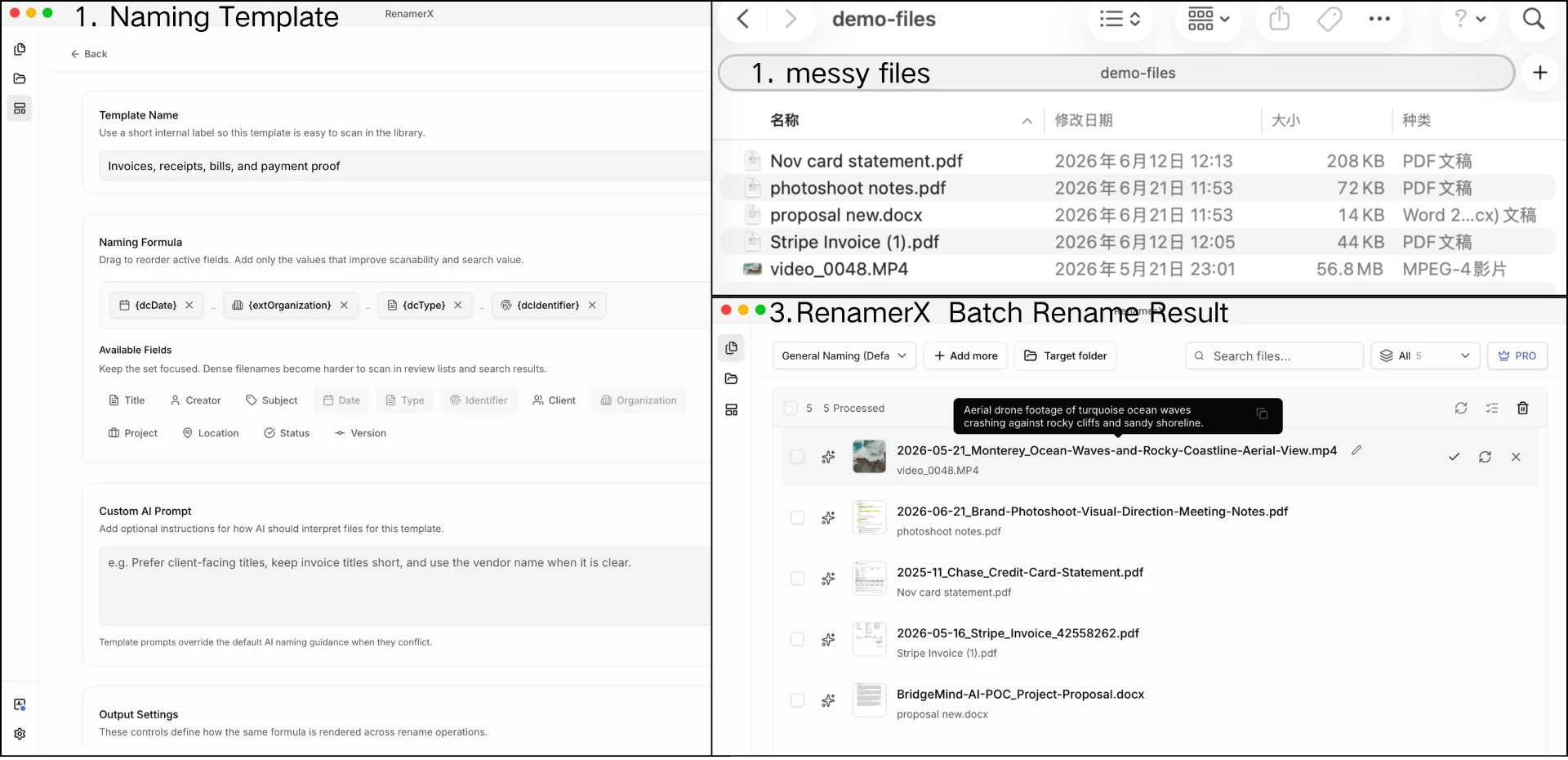
RenamerX is built around that pattern:
file content -> extracted fields -> naming template -> reviewable filename -> apply or undo
RenamerX reads supported local documents, images, and videos, suggests structured fields such as dcTitle, dcDate, dcType, dcIdentifier, extOrganization, extProject, extStatus, and extVersion, then projects those fields through your naming template. The template controls the final filename. You review suggestions before anything changes on disk, edit weak suggestions, skip uncertain files, apply the batch, and undo applied renames when needed.
Core file understanding, rename suggestion, apply, and undo run on your device after the managed resources are installed. Initial resource download, purchases, license validation, and app updates may still use the network.
Metadata-Driven File Naming Checklist
Use this checklist before you rename a folder:
- The filename includes information someone will actually search for.
- The filename is understandable without opening the file.
- The first field matches the main sorting or retrieval task.
- The filename uses two to five useful fields, not every possible field.
- Dates use a consistent sortable format.
- IDs, versions, and statuses stay separate instead of being buried in the title.
- Repeated values use controlled vocabulary where drift would hurt search.
- Long descriptions, rights notes, source URLs, and relationships stay outside the filename.
- The filename avoids unsafe characters and keeps the extension.
- The batch can be reviewed before it changes real files.
Related Guides
- Start with file naming conventions when you want the full design method.
- Use file naming templates when you want reusable patterns for common folders.
- Use file naming examples when you want more before-and-after names.
- Use controlled vocabulary for file naming when repeated values such as type, subject, status, organization, or project need approved terms.
- Use date format in file names when the date field needs
YYYY-MM-DD,YYYYMMDD,YYYY-MM, orYYYY. - Use safe filename characters when files move across operating systems, scripts, URLs, or cloud drives.