File Naming Conventions: Rules, Templates and Examples for Findable Files
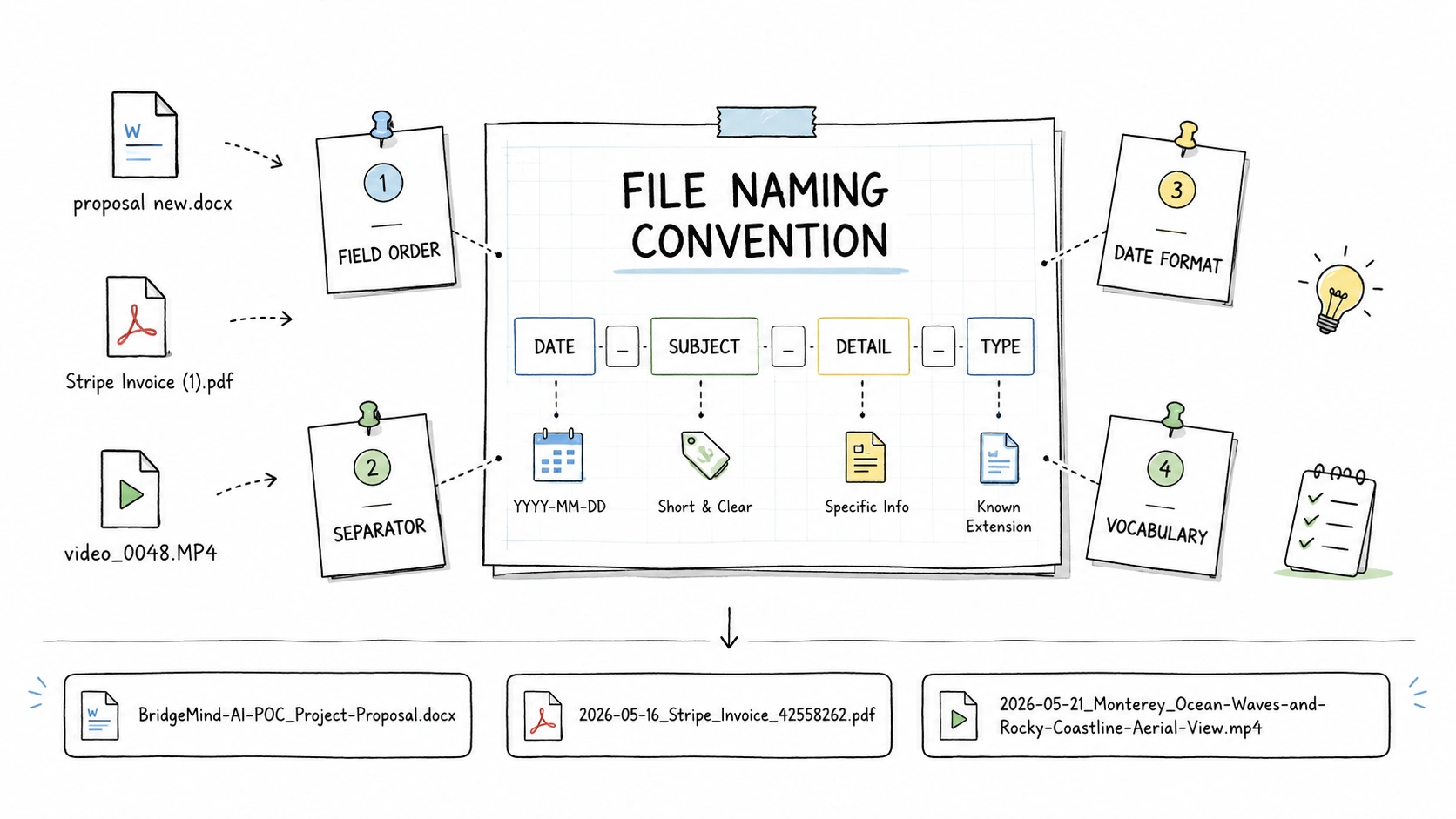
Most messy folders do not need a complex filing system. They need the same kind of files to be named the same way.
For a personal folder, it can be a small habit: invoices use date, issuer, and invoice number; meeting notes use date, topic, and record type; project files start with the project name. The goal is practical: make files easier to read, sort, and find later.
A good filename carries enough context to make sense outside its folder. Months later, someone should be able to tell what the file is without opening five similar files or guessing whether final means the signed copy, the export, or the last draft.
Quick Answer: What Is a File Naming Convention?
A file naming convention is a reusable rule for naming the same kind of files. It tells you what information to include in the filename, what order to put it in, and how to keep dates, separators, repeated words, statuses, versions, and identifiers consistent.
For example, an invoice named:
Stripe Invoice (1).pdf
can follow this convention:
{date}_{organization}_{type}_{identifier}
and become:
2026-05-16_Stripe_Invoice_42558262.pdf
In this example, date, organization, type, and identifier are fields: useful pieces of information that make the file easier to recognize, sort, search, and distinguish from similar files. Common fields include date, title (short descriptive title), type, subject, creator, client, organization, project, identifier, location, status, and version.
Most file naming conventions only need to define five things: which files the rule applies to, which fields appear in the name, what order those fields use, how dates and separators are formatted, and which repeated words stay consistent.
Harvard Biomedical Data Management describes a file naming convention as a framework that explains what files contain and how they relate to one another. In everyday folders, the practical takeaway is lighter: choose which files the rule covers, choose the information needed to find a specific file, put the most useful information first, and write the rule down. Harvard Biomedical Data Management
Do not try to put every detail into the filename. A good name carries the few details someone needs when the file is copied, downloaded, emailed, sorted, searched, or moved outside its original folder.
File Naming Conventions by Scenario
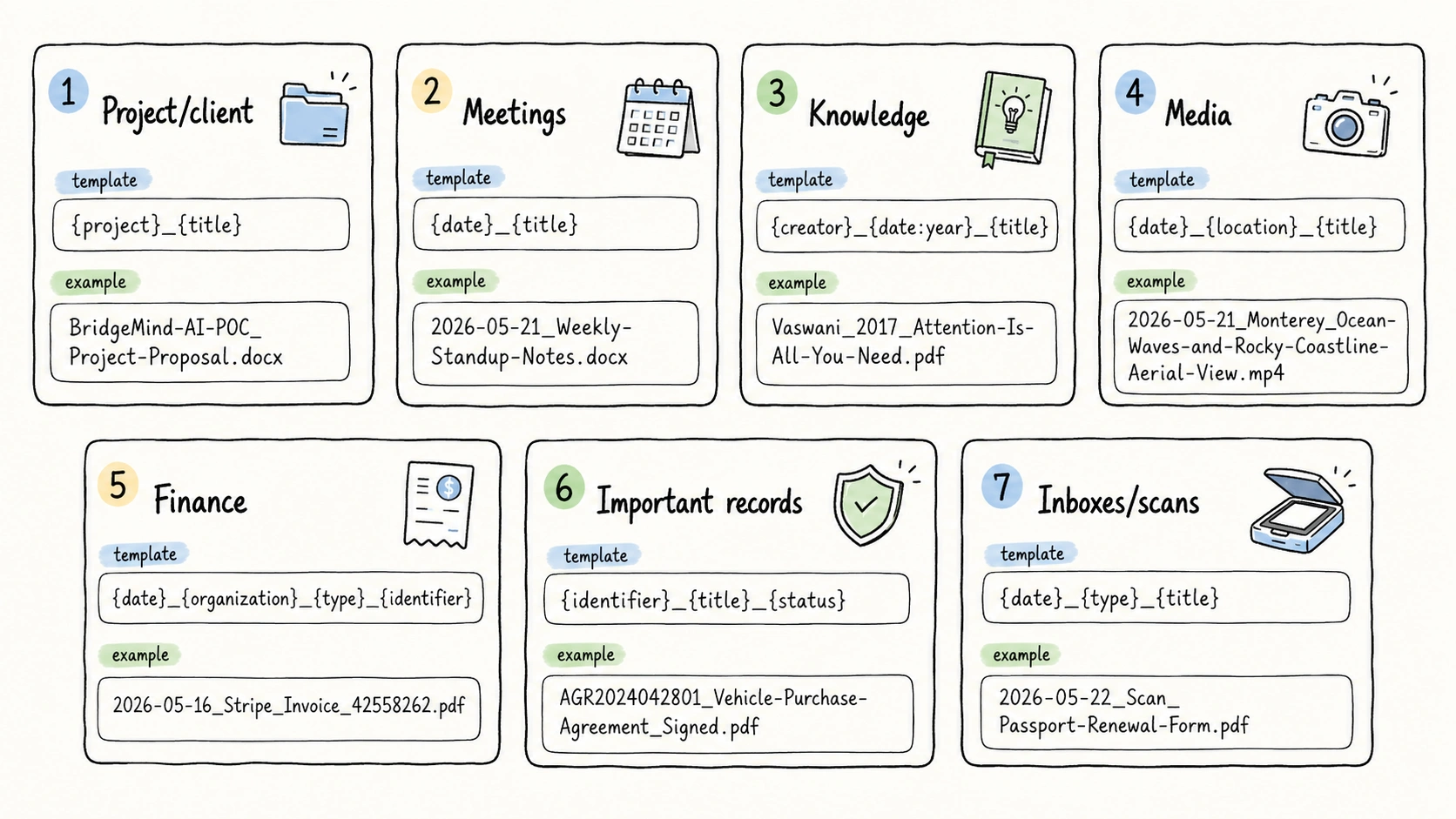
Start with the scenario closest to your folder. Each row shows a messy filename, a reusable template, and a better filename. The examples come from the companion guides to file naming examples and file naming templates.
| Scenario | Before | Template | After |
|---|---|---|---|
| Project, client, and business files | proposal new.docx | {project}_{title} | BridgeMind-AI-POC_Project-Proposal.docx |
| Meetings and confirmation records | photoshoot notes.pdf | {date}_{title} | 2026-06-21_Brand-Photoshoot-Visual-Direction-Meeting-Notes.pdf |
| Knowledge documents and reference files | 1706.03762v7.pdf | {creator}_{date:year}_{title} | Vaswani_2017_Attention-Is-All-You-Need.pdf |
| Images, screenshots, videos, and media assets | video_0048.MP4 | {date}_{location}_{title} | 2026-05-21_Monterey_Ocean-Waves-and-Rocky-Coastline-Aerial-View.mp4 |
| Invoices, receipts, bills, and payment proof | Stripe Invoice (1).pdf | {date}_{organization}_{type}_{identifier} | 2026-05-16_Stripe_Invoice_42558262.pdf |
| Contracts, certificates, IDs, and important records | car sales agreement signed.pdf | {identifier}_{title}_{status} | AGR2024042801_Vehicle-Purchase-Agreement_Signed.pdf |
| Inboxes, scan folders, and old folders | 25537000000211919494.pdf | {date}_{type}_{title} | 2025-12-28_Notice_Internet-Service-Outage.pdf |
What the Bad Filenames Get Wrong
The bad filenames fail for different reasons, but the pattern is consistent:
proposal new.docxuses a temporary adjective instead of the real project and title.photoshoot notes.pdfhides the date and the specific meeting topic.1706.03762v7.pdfpreserves an identifier but hides the author and title most people recognize.video_0048.MP4describes a generic video export, not the video content.Stripe Invoice (1).pdfhints at the issuer but hides the invoice number.car sales agreement signed.pdfsays the record type and status but has no stable identifier.25537000000211919494.pdfis not recognizable without opening the file.
The after filenames are not better because they are longer. They are better because each added field removes a specific uncertainty.
The Pattern Behind Good File Naming Conventions
The examples work because each filename does four jobs at once.
| Job | Question it answers | Fields that often help |
|---|---|---|
| Identify the file | What is this file? | title, type, creator, organization |
| Put it in context | What work, client, topic, or place does it belong to? | project, client, subject, location, organization |
| Support retrieval order | How should files group or sort when someone looks for them? | date, project, creator, identifier |
| Distinguish close copies | Which similar file is this? | identifier, status, version, date |
A meeting record often starts with date because people look for what happened on a day. A project deliverable may start with project because the workstream is the strongest clue. A research paper may start with creator and {date:year} because people recognize it that way. A finance record may need organization, type or title, and identifier because matching the transaction matters later.
This four-part pattern is a synthesis of common guidance. Harvard recommends choosing the metadata needed to locate a specific file and putting the most important information first. UBC Research Data Management frames good filenames as human-readable, machine-readable, and able to support default ordering. NARA adds that filenames should be unique, consistently structured, persistent, and not tied to a changing location. Harvard Biomedical Data Management, UBC Research Data Management, NARA Records Express
Formatting rules make the pattern usable: dates need a consistent format, separators need to be predictable, repeated words need a small vocabulary, and unsafe characters should stay out of the name. That is why a good convention is usually a few scenario-specific patterns governed by one shared logic, not one filename formula applied everywhere.
How to Design a File Naming Convention
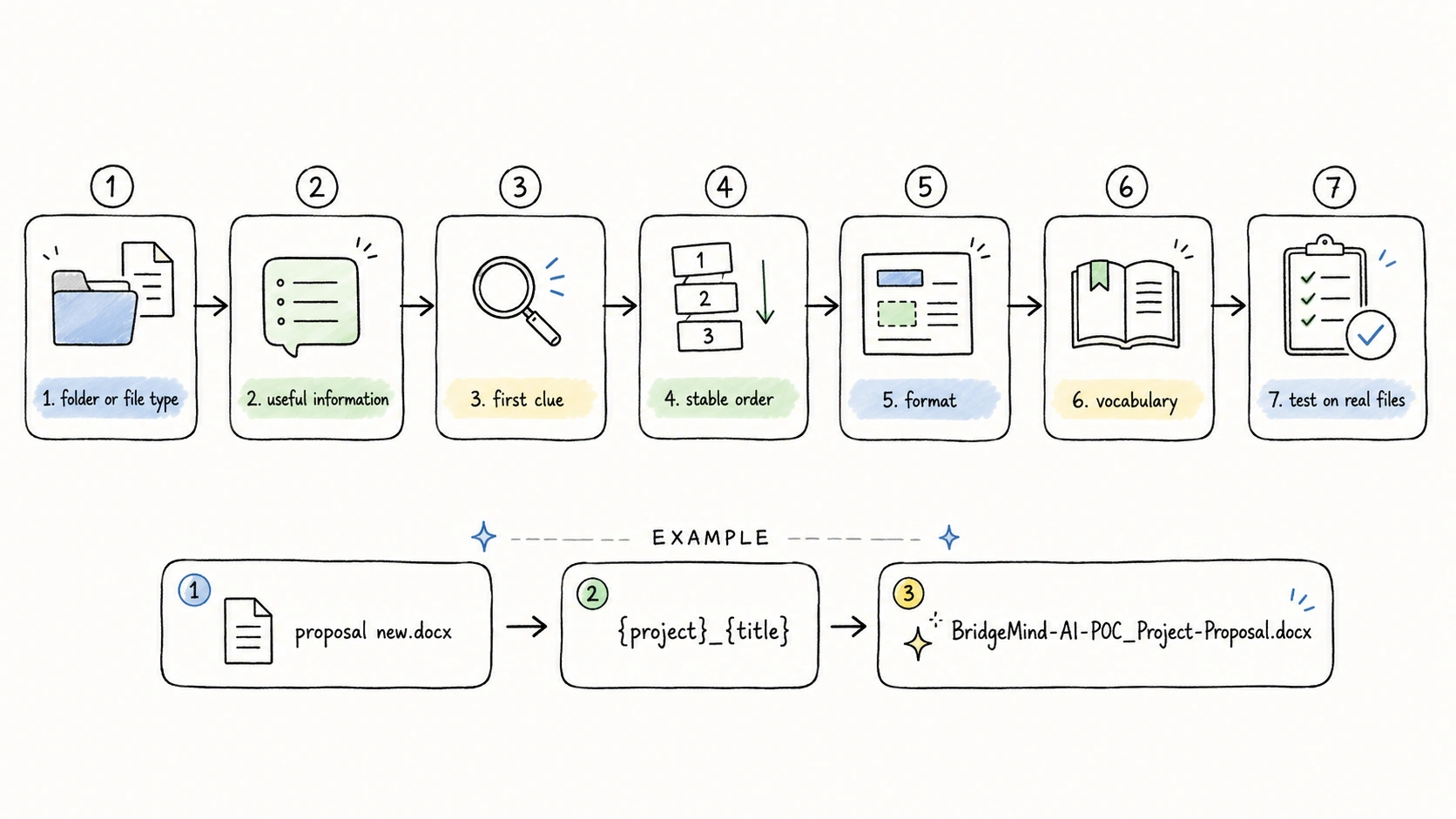
Start with one folder or one kind of file. A convention is easier to design when the files have the same job: invoices, meeting notes, project files, research papers, screenshots, videos, contracts, scans, or downloads. For that group, list the information that would help later, choose the first clue, then make the formatting consistent.
1. Choose One Folder or File Type
A convention needs a clear scope: the files this rule covers. That scope can be a folder, an inbox, a scan folder, a shared drive area, or one recurring workflow.
Start with one group, for example:
- Project and client work.
- Meeting notes and confirmation records.
- Research, knowledge, and reference material.
- Media, screenshots, videos, and design assets.
- Invoices, receipts, bills, and payment records.
- Contracts, certificates, IDs, and important records.
- Downloads, scans, inboxes, and old shared folders.
Do not try to write one rule for every file on the computer. Princeton Research Data Service recommends developing a convention based on the important elements of a project and using consistent, short, descriptive names. Princeton Research Data Service
The practical reason is simple: different kinds of files need different clues. A folder of invoices usually needs dates, vendors, and invoice numbers. A folder of screenshots may need dates, product areas, and short titles.
2. List the Information That Would Help Later
For this group, write down the pieces of information someone may use to recognize, sort, search, share, or distinguish the file. Do not decide the order yet. First list the candidates.
Most filenames work best with two to five fields. UBC Research Data Management gives similar guidance: keep file names concise and order their elements from general to specific for easier searching. UBC Research Data Management
Useful information often includes:
| Field | Use when | Example from the convention |
|---|---|---|
date | Time order, month order, or reference year matters | 2026-06-21, 2017 |
title | The file needs a short readable name | Project-Proposal |
type | The folder mixes file kinds | Invoice |
subject | A stable topic helps grouping | Travel |
creator | Author or creator matters | Vaswani |
client | Work is retrieved by client | Common-Ground-Bikes |
project | Work is retrieved by project | BridgeMind-AI-POC |
organization | Issuer, vendor, bank, or owner matters | Stripe |
identifier | A stable number is the strongest lookup key | 42558262 |
location | Place matters for media or field records | Monterey |
status | Drafts, signed copies, and finals coexist | Signed |
version | Revisions need to coexist | v01 |
Dublin Core is useful here as a vocabulary, not as a filename formula. It defines metadata elements such as title, creator, subject, date, type, and identifier for describing resources. Dublin Core application profile guidance adds a useful constraint: communities adapt shared terms for specific applications. A file naming convention should do the same by selecting a compact subset of those ideas for local retrieval. Dublin Core Metadata Element Set, Dublin Core Application Profile Guidelines
3. Choose the First Clue
Do not start by choosing a universal first field. Start by listing the useful information for this folder or file type. Then decide which piece should come first.
Ask what someone will look at first six months from now:
- If people find the file by time, put
datefirst or near the front. - If people find it by project, client, or case, start with
projectorclient. - If people find it by issuer or organization, start with
organization. - If people find it by invoice number, receipt number, agreement number, or record ID, use
identifierwhen that number is stable and safe to show. - If people browse by file kind, put
typenear the front.
Harvard Biomedical Data Management recommends putting the most important identifying information first so related files sort together. Harvard Biomedical Data Management
4. Put the Remaining Pieces in a Stable Order
After the first clue, add only the pieces that reduce confusion. Remove a piece when it repeats the folder name, exposes unnecessary private details, or makes the filename read like a sentence.
The order should stay predictable:
- Put broad context before narrow description:
client,project,subject, thentitle. - Put official IDs near the front when they are the main lookup clue.
- Put
statusandversionnear the end because they usually qualify the file rather than define it. - Keep the same order for every file in the group.
Practical patterns:
-
Time first when chronological order matters:
2026-06-21_Brand-Photoshoot-Visual-Direction-Meeting-Notes.pdf -
Project first when the workstream is the main clue:
BridgeMind-AI-POC_Project-Proposal.docx -
Creator and
{date:year}first when the file is recognized like a reference:Vaswani_2017_Attention-Is-All-You-Need.pdf -
Identifier first only when the identifier is stable, safe to expose, and truly the strongest lookup key:
AGR2024042801_Vehicle-Purchase-Agreement_Signed.pdf
NARA Records Express gives a similar principle for records: filenames should be unique, consistently structured, persistent, and not dependent on changing folder locations. NARA Records Express
If you cannot choose the first clue, you may be mixing multiple scenarios in one rule. Split the convention into a few patterns instead.
5. Set Formatting Rules Once
Formatting rules should be boring and repeatable:
- Use one separator pattern, usually underscores between fields and hyphens inside multi-word field values.
- Keep the extension unchanged.
- Use
YYYY-MM-DDorYYYYMMDDwhen dates need to sort chronologically. - Use leading zeros for months, days, and sequence numbers.
- Avoid unsafe characters, especially
<,>,:,",/,\,|,?, and*. - Avoid filenames that end with a space or period.
- Keep names short enough to scan in file explorers and cloud drives.
ISO 8601 uses year-month-day order, which avoids regional ambiguity and sorts predictably when written consistently. ISO 8601
Microsoft lists reserved filename characters for Windows, including <, >, :, ", /, \, |, ?, and *, and warns against names that end in a space or period. Microsoft Learn
For deeper rules, use the companion guides to date formats in file names and safe filename characters.
6. Control Repeated Words
The part many teams forget is vocabulary.
If one person writes Invoice, another writes Bill, and another writes inv, the convention will drift even if the date format is perfect. Repeated values should use agreed terms:
- File types:
Invoice,Receipt,Notice,Price-List,Meeting-Notes,Screenshot. - Statuses:
Draft,Final,Signed,Approved,Archived. - Subjects:
Research,Travel,Finance. - Organizations, clients, and projects: one approved spelling per entity.
ISO Helpdesk's document naming guidance separates a clear document title from metadata such as projects, meetings, ballots, and tags. That distinction is useful for ordinary folders too: the filename should be readable, while repeated labels should be controlled. ISO Helpdesk
For a deeper method, see controlled vocabulary for file naming.
7. Test the Convention on Real Messy Files
Before applying a convention to a real folder, test it on 20 to 50 real files from that folder. Include clean files, scans, downloads, duplicates, drafts, final copies, old exports, media files, and records with missing fields.
Ask:
- Does the filename still make sense outside its folder?
- Can a person tell what the file is without opening it?
- Does sorting by name create useful groups?
- Are similar files distinguishable?
- Are private details avoided?
- Are missing fields handled gracefully?
- Can the convention be explained in one short table?
If the rule needs a long paragraph of exceptions, simplify it.
When the Useful Fields Are Inside the File
Many messy filenames are not messy because someone lacked discipline. The useful fields were inside the file.
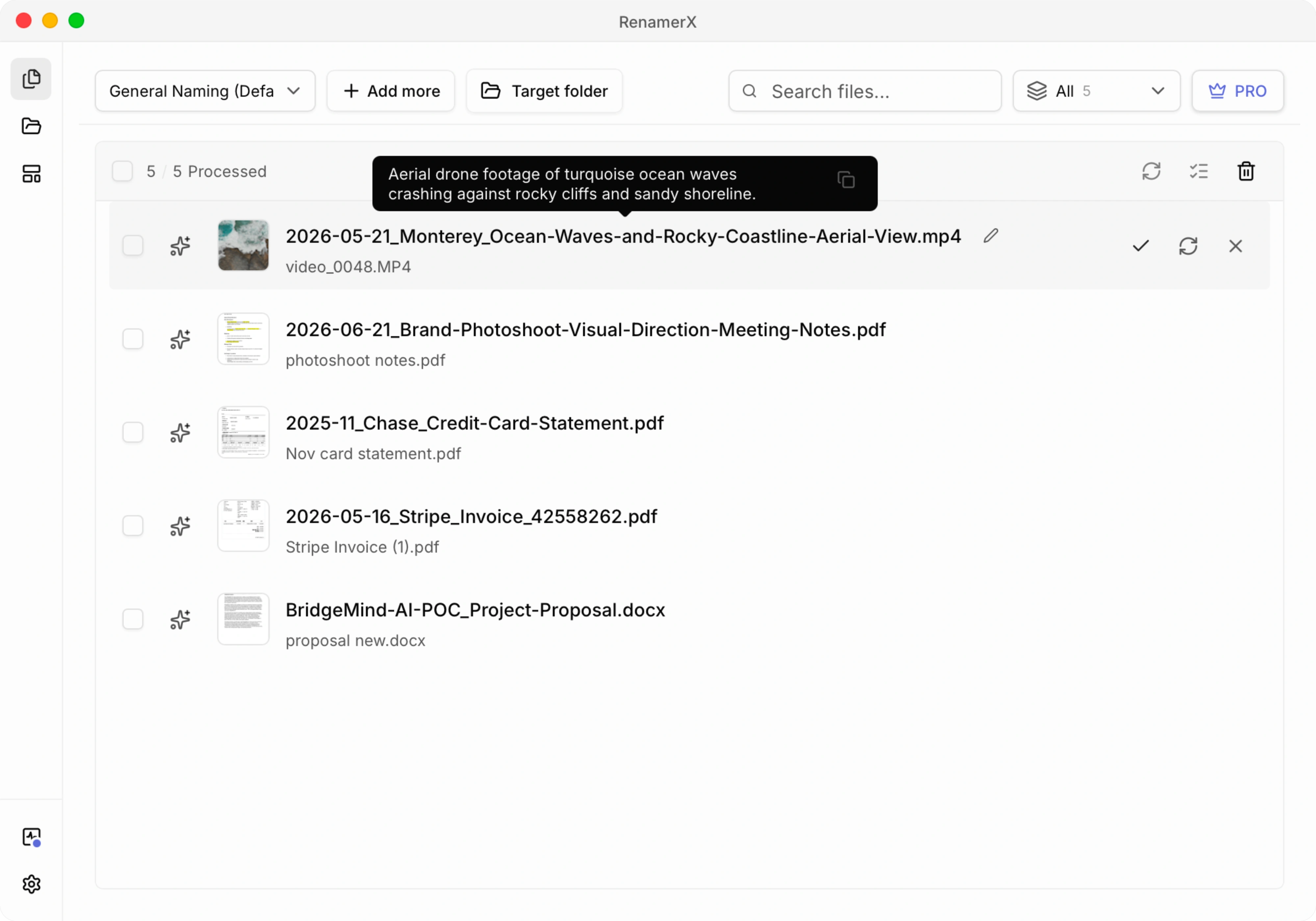
Stripe Invoice (1).pdf needs the invoice number from the document. 25537000000211919494.pdf needs the date, type, and title from the scan. video_0048.MP4 needs a description of what the video shows. 1706.03762v7.pdf may be easier to recognize by creator, year, and title than by a downloaded ID.
When fields live inside the file, metadata-driven file naming matters.
file content -> extracted fields -> naming template -> reviewable filename -> apply or undo
RenamerX reads supported local documents, images, and videos, extracts structured fields, applies your naming template, and shows suggested filenames before anything changes on disk. You can edit suggestions, skip uncertain files, apply the batch, and undo applied renames.
The important design choice is that the model does not get to invent a final naming system each time. It suggests fields such as title, date, type, organization, identifier, project, client, status, and version. The template decides what the filename becomes.
That review-first pattern is becoming common in AI-assisted document workflows. ShareFile describes AI file renaming as analyzing content and metadata, then suggesting standardized names that users can preview, modify, and approve. Canopy's client-document workflow starts by creating a naming convention, then uses AI to rename files according to that structure. ShareFile, Canopy
Use Batch Rename first when you are cleaning a messy folder, testing a template, or building trust. Use Watch Folder later when new scans, downloads, screenshots, or customer uploads keep arriving and the convention is already stable.
RenamerX is local-first after required resources are installed: core file understanding, rename suggestions, apply, and undo happen on your device. Resource downloads, purchase flows, license validation, and updates can use network access.
Common Mistakes Before a Large Batch Rename
Most broken conventions fail in predictable ways.
Starting every filename with the same weak word. If many files begin with Final, Draft, New, Meeting, or Scan, sorting by name becomes less useful. Status and type are helpful, but they are often not the best first field.
Using dates without deciding what the date means. A file can have a meeting date, invoice date, publication date, scan date, download date, modified date, or creation date. Choose the semantic date that helps retrieval.
Hiding identifiers inside titles. Invoice numbers, receipt numbers, contract IDs, agreement numbers, and stable record IDs should be their own field when they matter.
Letting vocabulary drift. Invoice, Bill, inv, and billing doc may all mean similar things to people, but search and sorting will treat them differently.
Overloading the filename. A filename is not a database record. If the name needs a full abstract, full citation, source URL, rights note, and relationship history, store that information in metadata, a README, a document system, or a reference manager.
Depending entirely on folders. Folder names help, but files get copied, attached, downloaded, and moved. A useful filename carries enough context to survive outside its original location.
Checklist Before Applying a Convention to a Large Batch
Use this checklist before applying a file naming convention to a large batch of real files:
- Write the convention as a table, not a paragraph.
- List the file scenarios it covers.
- Define the allowed fields and field order for each scenario.
- Choose date format, separator, capitalization, and length rules.
- Define approved words for repeated values.
- Keep examples next to each template.
- Test on real files with missing, ambiguous, and duplicate fields.
- Decide who can edit exceptions.
- Rename in batches with review before applying.
- Keep an undo path for the first large batch.
A naming convention becomes useful when people can apply it without interpreting a policy from scratch every time.
Related Guides
- Use file naming examples when you want more before-and-after filenames for messy real files.
- Use file naming templates when you want reusable patterns by scenario.
- Use metadata-driven file naming when the useful fields live inside the file.
- Use date format in file names when you need to choose between
YYYY-MM-DD,YYYYMMDD,YYYY-MM, andYYYYMM. - Use safe filename characters when files move across Mac, Windows, scripts, URLs, cloud drives, or shared folders.
- Use controlled vocabulary for file naming when repeated values drift across a team.
Sources and Further Reading
- Harvard Biomedical Data Management: File Naming Conventions
- Princeton Research Data Service: File Organization
- NARA Records Express: Best Practices for File Naming
- UBC Research Data Management: File Naming
- Microsoft Learn: Naming Files, Paths, and Namespaces
- ISO 8601: Date and Time Format
- Dublin Core Metadata Element Set, Version 1.1
- Dublin Core Application Profile Guidelines
- ISO Helpdesk: Document Naming Convention
- ShareFile: AI-Powered File Renaming
- Canopy: Automatically Rename Client Files Using AI