Date Format in File Names: Why YYYY-MM-DD Usually Works Best
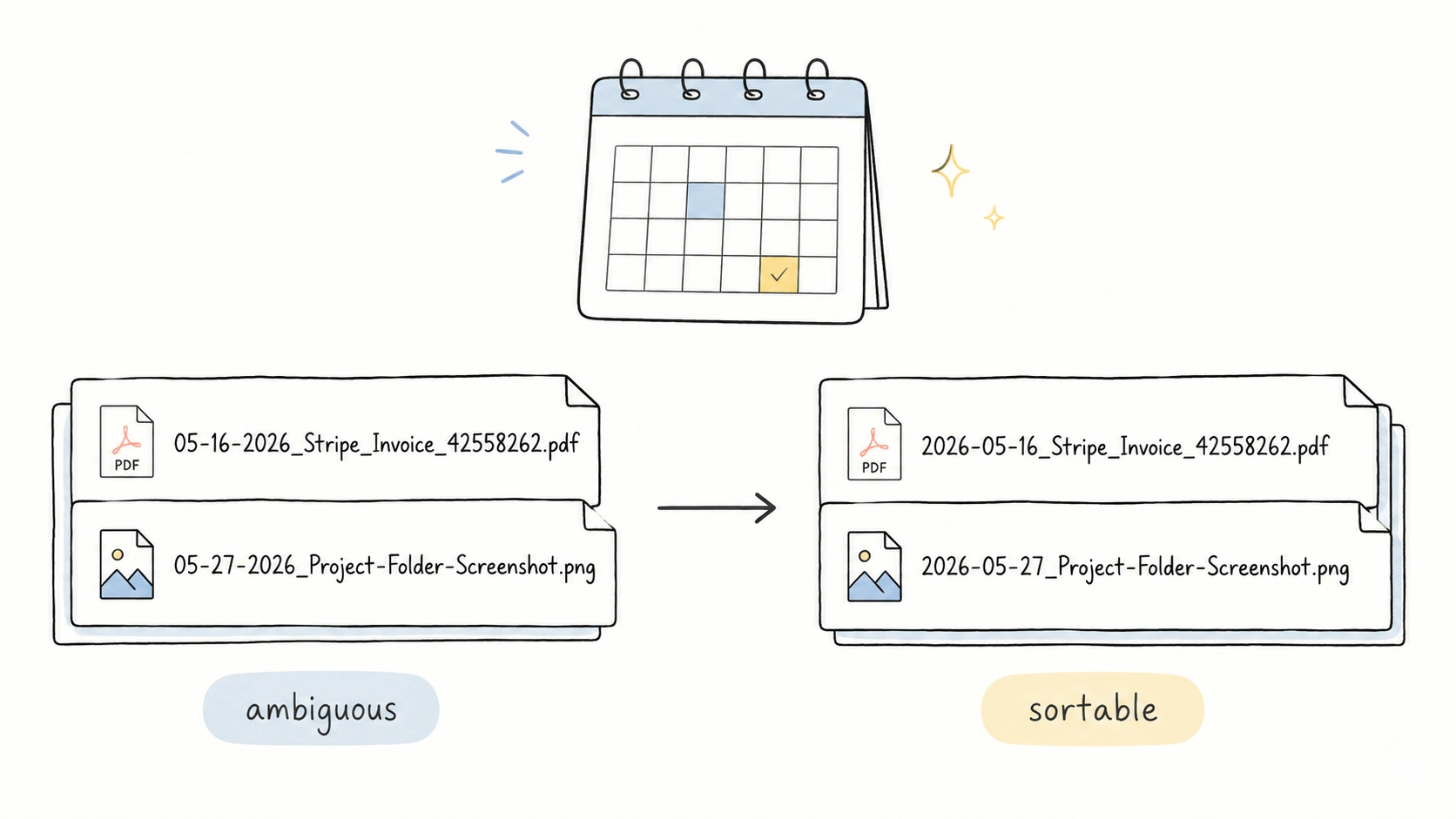
Use YYYY-MM-DD for most file names:
2026-05-16_Stripe_Invoice_42558262.pdf
That format does three useful things at once. It sorts correctly by name, it is readable, and it avoids the regional confusion of dates like 05-06-2026, which can mean May 6 or June 5 depending on where the reader lives. ISO describes YYYY-MM-DD as an internationally agreed way to represent dates and orders the parts from year to month to day. ISO 8601 exists largely to remove that ambiguity.
If you want a more compact style, YYYYMMDD also works:
20260516_Stripe_Invoice_42558262.pdf
The worse choice is switching between date styles inside the same folder. 2026-05-16, 05-16-2026, 16-05-2026, and May 16 2026 may all be understandable to a person in isolation. In a real folder, they stop sorting as one system.
The filenames in this article follow the same scenario library used in the companion guides to file naming templates and file naming examples. The standards and guidance cited here support the rules behind those examples: use an unambiguous date, keep a consistent structure, avoid unsafe filename characters, and choose fields that help people find the file later.
The Best Date Format for File Names
For a durable filename date:
- Use a four-digit year.
- Use two-digit months and days.
- Put the largest time unit first: year, then month, then day.
- Use one format across the whole folder or template family.
- Avoid slashes, colons, and regional date orders.
Good:
2026-05-16_Stripe_Invoice_42558262.pdf
2025-11_Chase_Credit-Card-Statement.pdf
2026-05-27_Project-Folder-Screenshot.png
Weak:
05-16-26_Stripe_Invoice_42558262.pdf
16/05/2026_Stripe_Invoice_42558262.pdf
November 2025 Chase Credit Card Statement.pdf
2026_5_27_Project-Folder-Screenshot.png
The National Archives' Records Express guidance also recommends international standard date notation, either YYYY-MM-DD or YYYYMMDD, alongside consistent structure, short names, and hyphens or underscores instead of spaces. Records Express, NARA
Why YYYY-MM-DD Sorts Better
File managers usually sort names from left to right. A filename that starts with year, then month, then day follows the same order as the calendar.
These sort correctly:
2025-11_Chase_Credit-Card-Statement.pdf
2026-05-16_Stripe_Invoice_42558262.pdf
2026-05-27_Project-Folder-Screenshot.png
Month-first strings can look understandable to people:
11-2025_Chase_Credit-Card-Statement.pdf
05-16-2026_Stripe_Invoice_42558262.pdf
05-27-2026_Project-Folder-Screenshot.png
But when the same files are sorted by name, the dates can group in the wrong order:
05-16-2026_Stripe_Invoice_42558262.pdf
05-27-2026_Project-Folder-Screenshot.png
11-2025_Chase_Credit-Card-Statement.pdf
Now May 2026 comes before November 2025. The filename is doing exactly what alphabetical sorting asks it to do. The date format is the part that failed.
YYYY-MM-DD or YYYYMMDD?
Both are practical. Choose based on how people will read and use the folder.
| Format | Example | Best for | Tradeoff |
|---|---|---|---|
YYYY-MM-DD | 2026-05-16_Stripe_Invoice_42558262.pdf | Shared folders, invoices, documents, photos, scans | Slightly longer |
YYYYMMDD | 20260516_Stripe_Invoice_42558262.pdf | Compact archives, export systems, dense data folders | Less readable at a glance |
YYYY-MM | 2025-11_Chase_Credit-Card-Statement.pdf | Monthly statements, monthly reports, recurring summaries | No day-level precision |
YYYYMM | 202511_Chase_Credit-Card-Statement.pdf | Compact monthly archives | Less readable |
YYYY | 2017_Attention-Is-All-You-Need.pdf | Research papers, annual reports, and year-level archives | No month- or day-level precision |
The compact examples use the same fields as the scenario examples. Only the date formatting changes.
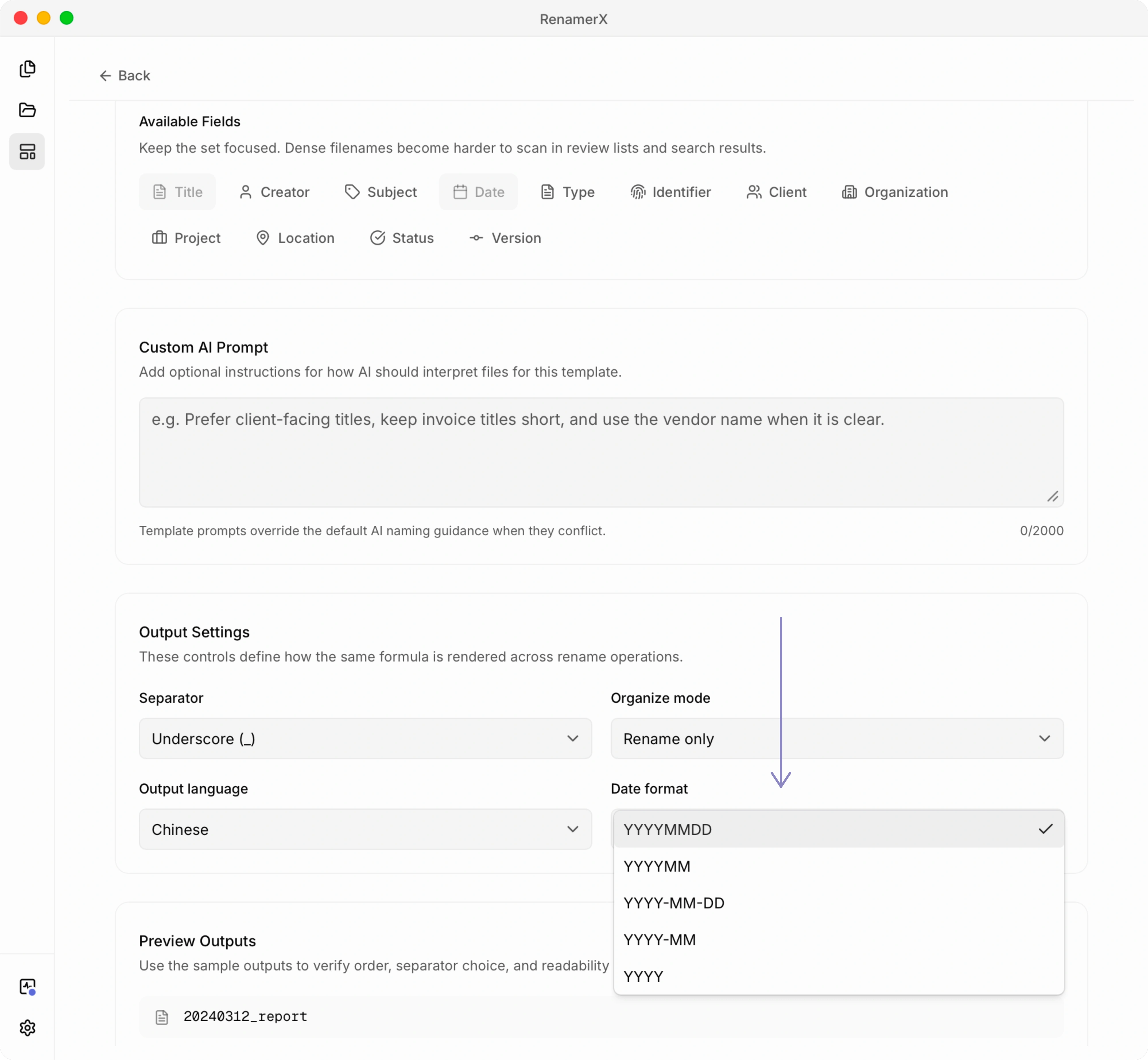
RenamerX templates currently support these five dcDate output formats: YYYYMMDD, YYYYMM, YYYY-MM-DD, YYYY-MM, and YYYY. The default new template uses YYYY-MM-DD, which is the safest general-purpose choice for human-readable folders. See the product reference on date formatting for the supported template formats.
Where the Date Should Go
Put the date first when time is the main way you browse the folder.
Good date-first cases:
2026-05-16_Stripe_Invoice_42558262.pdf
2026-05-27_Project-Folder-Screenshot.png
2025-11_Chase_Credit-Card-Statement.pdf
Put project, client, subject, or identifier first when that is how the folder is scanned.
BridgeMind-AI-POC_Project-Proposal.docx
Vaswani_2017_Attention-Is-All-You-Need.pdf
AGR2024042801_Vehicle-Purchase-Agreement_Signed.pdf
RCPT-20260414-01_GitHub_Copilot-Pro-Receipt.pdf
There is no universal first field. A meeting folder often wants date first. A project folder may want project first. A reference library may want creator and year first. A receipt folder may use a receipt identifier first when that number is the strongest lookup clue. The rule is to make the first field match the way the folder is browsed.
Which Date Should the Filename Use?
Use the date that describes the file's content, not whatever timestamp happened to be easiest to extract.
| File scenario | Better date field | Example |
|---|---|---|
| Invoice | Invoice date | 2026-05-16_Stripe_Invoice_42558262.pdf |
| Contract or important record | Signed date, effective date, document date, or stable record date | 2025-07-13_BlueRiver-Investors_Denver-Office-Building-LOI.docx |
| Meeting notes | Meeting date | 2025-10-06_BridgeMind-AI-POC_Payment-API-Integration-Review-Meeting-Minutes.docx |
| Photo, video, or screenshot | Capture date or screenshot date | 2026-05-21_Monterey_Ocean-Waves-and-Rocky-Coastline-Aerial-View.mp4 |
| Monthly statement | Statement month | 2025-11_Chase_Credit-Card-Statement.pdf |
| Research paper | Publication year | Vaswani_2017_Attention-Is-All-You-Need.pdf |
| Scan folder item | The date printed in the scanned document | 2026-04-10_Price-List_Office-Supplies.pdf |
Dublin Core defines date as a point or period of time associated with an event in the lifecycle of a resource, and its guidance allows different granularities such as YYYY-MM-DD, YYYY-MM, or YYYY. DCMI Date That is a useful mental model for filenames too. The date should mean something about the file.
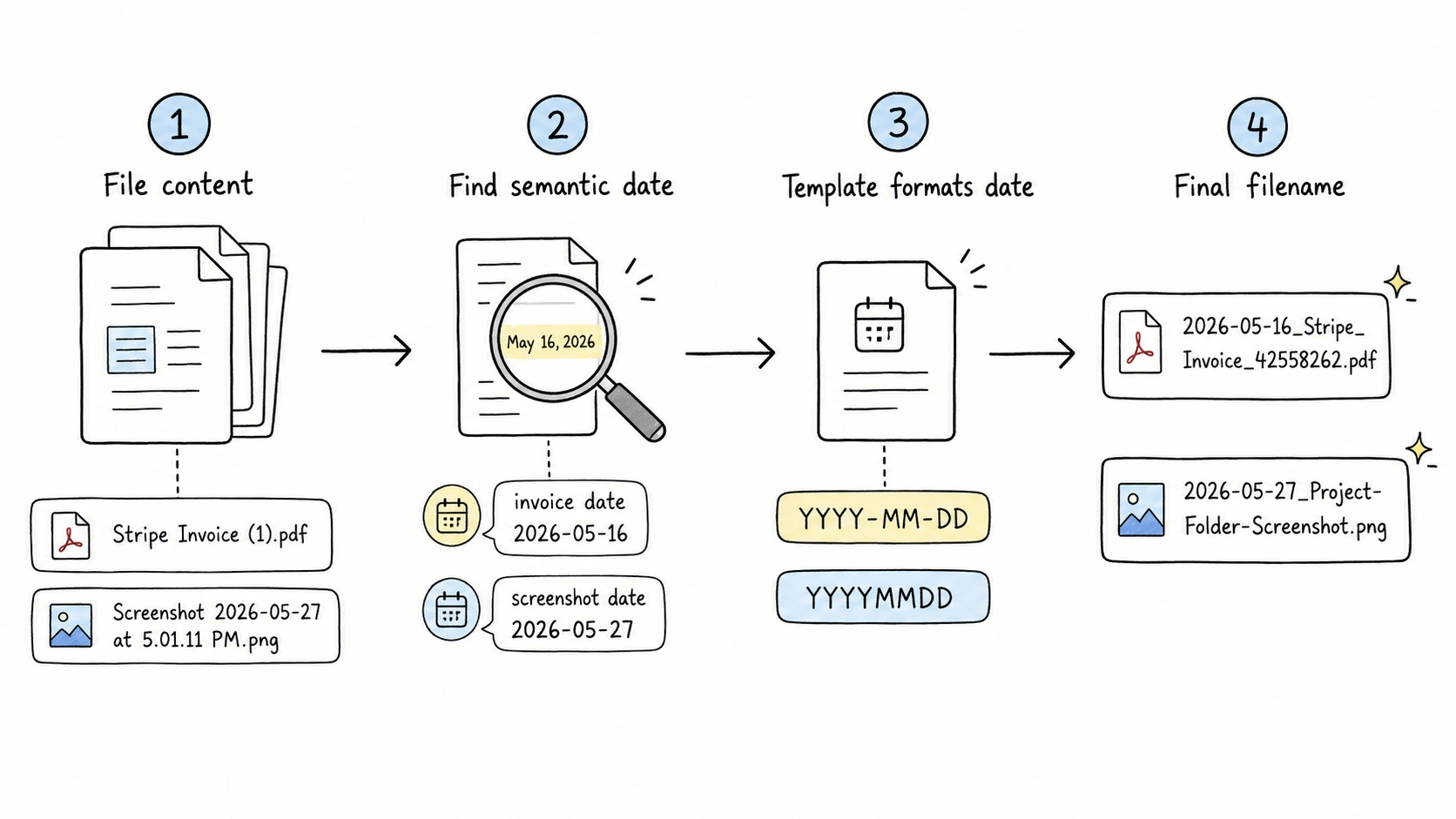
In RenamerX, this is why the app separates extraction from formatting. AI can infer a semantic date such as invoice date, meeting date, capture date, statement month, or publication year. The naming template then decides whether that date appears as 2026-05-16, 20260516, 2025-11, or 202511. This is the same principle behind metadata-driven file naming. For the metadata model behind this, see Dublin Core Metadata in RenamerX.
Avoid Slashes, Colons, and Raw Timestamps
Do not use slash dates in filenames:
2026/05/16_Stripe_Invoice_42558262.pdf
05/16/2026_Stripe_Invoice_42558262.pdf
Slashes are path separators in file systems and URLs. They are not a good filename character.
Also be careful with full timestamps copied from web or database formats:
2026-05-27T17:01:11+08:00_Project-Folder-Screenshot.png
That is a valid style in contexts such as internet timestamps, but colons are not safe in Windows filenames. Microsoft lists reserved Windows filename characters including <, >, :, ", /, \, |, ?, and *. Microsoft Learn
If you need time in a filename, use a file-safe timestamp:
2026-05-27_1701_Project-Folder-Screenshot.png
2026-05-21_1430_Monterey_Ocean-Waves-and-Rocky-Coastline-Aerial-View.mp4
Use time only when the day is not precise enough. Screenshots, recordings, logs, and exports may need it. Monthly statements and contracts usually do not.
What About Date Ranges?
Keep date ranges readable and file-safe.
Good:
{start-date}_to_{end-date}_{title}
{start-date}_to_{end-date}_{type}_{title}
Avoid:
{start-date}/{end-date}_{title}
{month-name-range}_{title}
Dublin Core allows date ranges in metadata using ISO period notation with a slash, but that slash is a bad fit for filenames because it conflicts with path syntax. Keep the richer date logic in metadata when needed. Use a simpler filename-safe expression for the actual name.
A Simple Date Format Checklist
Use this checklist before you rename a folder:
- If users sort the folder by time, start with
YYYY-MM-DD. - If users sort by client, project, or subject, put that field first and keep the date second only when the date helps retrieval.
- Use
YYYY-MMfor monthly files. - Use
YYYYfor year-level reference files. - Add time only when multiple files from the same day need ordering.
- Avoid two-digit years.
- Avoid month names unless the filename is meant for display, not sorting.
- Avoid
/and:in the actual filename. - Pick one date format per naming system.
- Do not use file modified time unless it is the best available date.
How RenamerX Helps Keep Dates Consistent
Dates are easy to get right once. They are harder to keep consistent across hundreds of PDFs, screenshots, invoices, contracts, and exports.
RenamerX handles this as a template problem. The AI reads the file and extracts structured fields such as date, title, subject, type, identifier, project, organization, location, status, and version. The template controls field order, the dcDate output format, separator, output language, and light organization rules. For repeated values such as type, organization, project, or status, a controlled vocabulary for file naming can keep suggestions consistent across a team. You review the suggested filenames before anything changes on disk, edit weak suggestions, and undo applied renames if needed.
The practical benefit is boring in the best way: one date rule, applied every time.
Related Guides
- Start with file naming conventions when you want the full naming system.
- Use file naming templates when you need scenario-based patterns that include date fields.
- Use file naming examples when you want before-and-after filenames that show dates in context.
- Use metadata-driven file naming when the right date must be extracted from file content or metadata.
- Use controlled vocabulary for file naming when repeated values around the date, such as type, status, organization, or project, need consistency.
- Use safe filename characters when date separators, timestamps, or punctuation may cause problems across systems.