Video File Renamer: How to Rename Videos by Content and Metadata
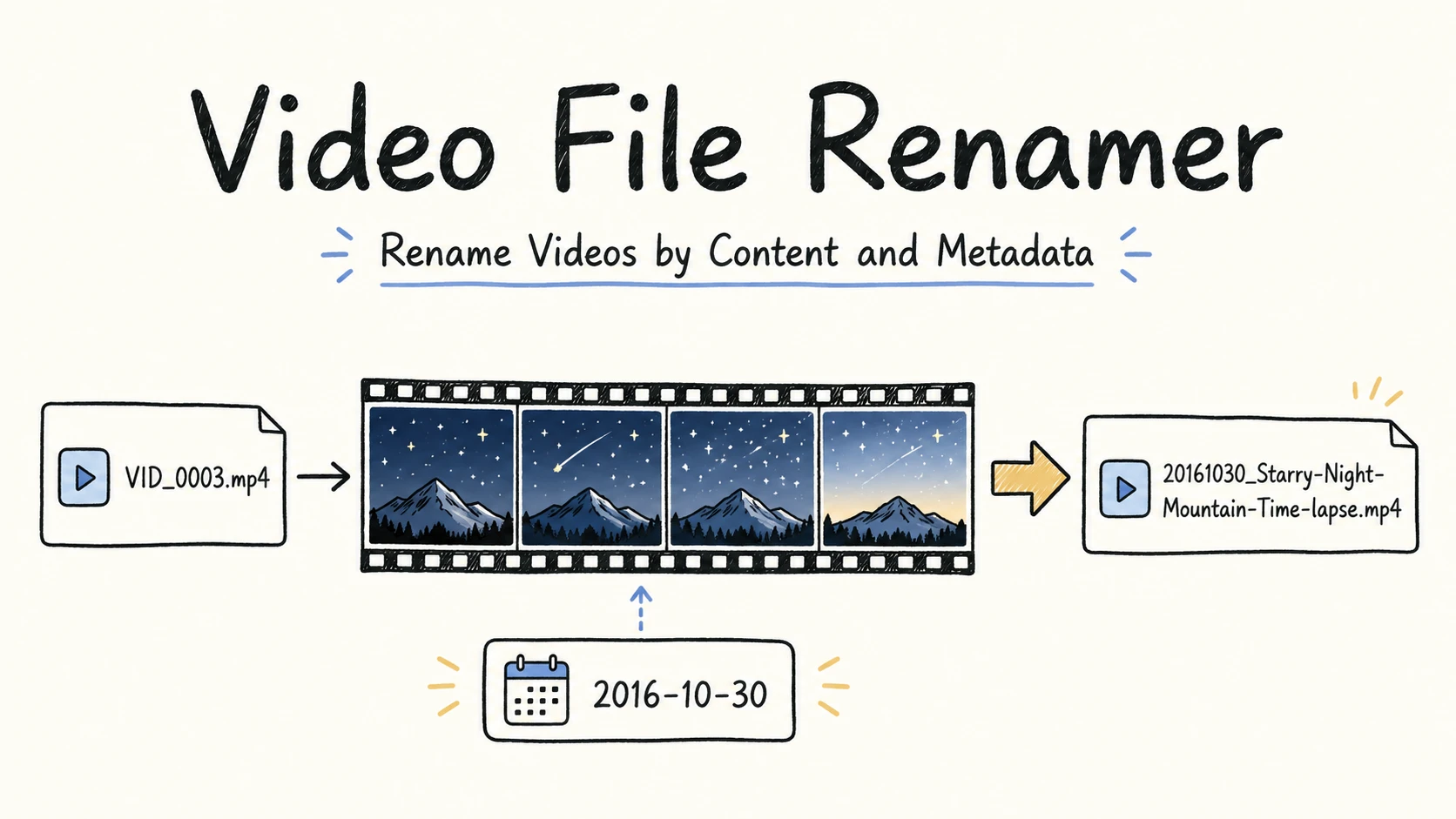
VID_0003.mp4 and video_0048.mp4 tell you only that two files came from a numbered sequence. Screen Recording 2026-07-18 at 14.32.09.mp4 records when the capture started, but not what happened on screen. final_final_v2.mp4 suggests that someone revised the file, but it does not identify the video or the project.
A video file renamer can bring the missing clues into the filename:
| Before | After |
|---|---|
VID_0003.mp4 | 20161030_Starry-Night-Mountain-Time-lapse.mp4 |
video_0048.mp4 | 20180911_Coastal-Cliff-Aerial-View.mp4 |
Screen Recording 2026-07-18 at 14.32.09.mp4 | 2026-07-18_RenamerX_Watch-Folder-Setup.mp4 |
final_final_v2.mp4 | 20251129_Solar-Panel-Installation-Video_v02.mp4 |
Each new name exposes details that can be scanned or searched without opening the video. A date and short description work well for many clips. Screen recordings may also need a product or project name, while edited exports may need a version.
Quick Answer
To rename video files by content and metadata, decide which clues will help you find each video later. Most clips need only a useful date and a short description of what they show. Add a project, type, identifier, status, or version only when it helps distinguish or trace the file.
Use one file naming convention for the same kind of video. The convention defines which information appears in the filename, what order it follows, and how dates and separators are formatted. A naming template writes that convention as a reusable pattern. For example, {date}_{title} places the date first and a short descriptive title second:
{date}_{title}

20161030_Starry-Night-Mountain-Time-lapse.mp4
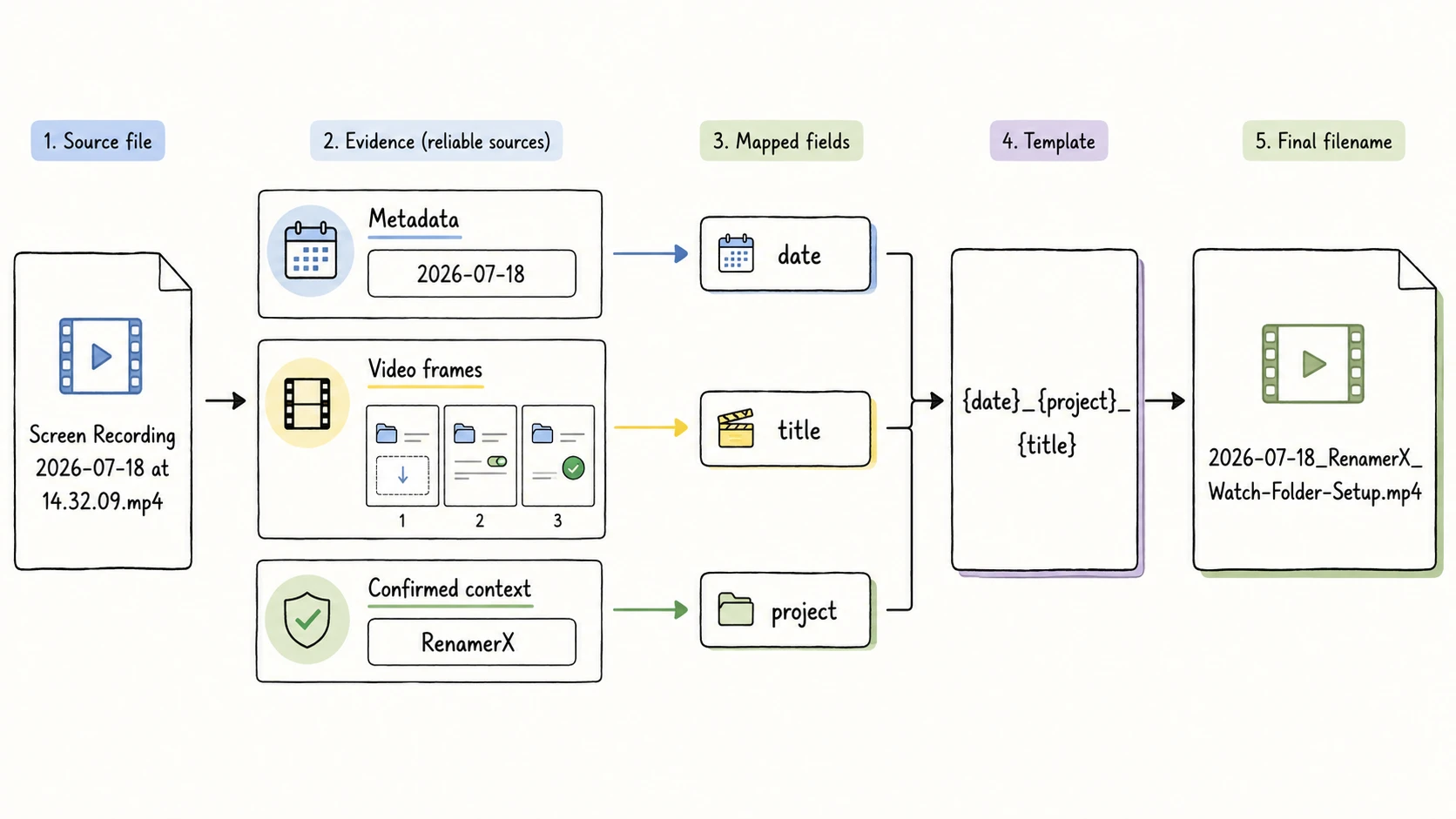
The date can come from reliable metadata. The title can come from visible content. Project names and versions usually come from the folder or production workflow. Review the complete names before applying them to the batch.
Video Filename Templates for Common Workflows
A naming template is built from fields. Each field represents a useful piece of information that helps you recognize, sort, search, or distinguish a file. In {date}_{title}, date is a reliable date associated with the video and title is a short description of the visible content. Choose fields by the video's job and the way you expect to retrieve it. An MP4 screen recording and an MP4 camera clip share a file format, but they may need different clues.
| Video workflow | Useful fields | Starting template | Example |
|---|---|---|---|
| General clips and personal footage | Date, short title | {date}_{title} | 20191002_Person-Walking-on-Winding-Road.mp4 |
| Source footage that needs traceability | Date, short title, original clip identifier | {date}_{title}_{identifier} | 20161030_Starry-Night-Time-lapse_VID-0003.mp4 |
| Screen recordings | Date, project, short task title | {date}_{project}_{title} | 2026-07-18_RenamerX_Watch-Folder-Setup.mp4 |
| Mixed media folders | Date, type, short title | {date}_{type}_{title} | 2026-07-18_Screen-Recording_Watch-Folder-Setup.mp4 |
| Edited deliverables | Project, short title, status, version | {project}_{title}_{status}_{version} | GreenEnergy_Solar-Panel-Installation-Video_Final_v01.mp4 |
A general footage folder may need only {date}_{title}:
VID_0004.mp4
-> 20191002_Person-Walking-on-Winding-Road.mp4

VID_0006.mp4
-> 20210112_Walking-on-Beach.mp4
Add a field when it removes a real uncertainty. If a clip must stay connected to its source, keep the useful part of the original camera number as identifier. If several revised exports coexist, keep status and version. If every file already sits inside a stable GreenEnergy project folder, repeating the project in every name may add little unless the files will be shared outside that folder.
The first field should match the main browsing pattern. Put date first when chronological sorting matters. Put project first when you browse by client work or campaign. Use title for a short description such as Server-Room-Footage, Solar-Panel-Installation-Video, or Starry-Night-Mountain-Time-lapse.
The examples above use fields supported by RenamerX, including date, title, type, project, identifier, status, and version. The metadata-driven file naming guide explains the wider field set, while the file naming templates guide covers more scenarios.
How to Rename Video Files by Content and Metadata
For a few files, you can follow this workflow by hand. For a larger batch, RenamerX uses local AI to examine video content and available metadata, then suggests clear, searchable filenames that follow your naming convention. You can review and edit the suggestions before applying them, and undo applied renames if needed.
Step 1: Choose the videos you want to rename
If a folder contains camera footage, B-roll, screen recordings, and edited exports, grouping similar videos can make later choices easier. Videos with the same job are more likely to need the same information in their filenames.
Grouping is optional. If you want a simple starting point, use {date}_{title} across the folder. A reliable date and short visible description produce clear, sortable filenames for many camera clips, screen recordings, and exports. Split the batch or choose another template only when a group needs extra information, such as an identifier for source footage or status and version for edited exports.
Step 2: Choose the fields and create a template
Pick the details you will use to scan, search, sort, or distinguish the files. Keep the set small.
For a collection of standalone footage:
{date}_{title}
For footage that needs a route back to the camera sequence:
{date}_{title}_{identifier}
For screen recordings related to a product or project:
{date}_{project}_{title}
For edited deliverables:
{project}_{title}_{status}_{version}
Set the date precision, separator, and output language once. The file naming conventions guide explains how to test a pattern against real messy files before adopting it.
Step 3: Gather the information required by the template
Check technical and embedded metadata for recorded dates or other useful facts. Inspect the video for a concise visible description. Add project, client, status, and version only when the folder or workflow confirms them.
For example, the visual content may support the title Solar-Panel-Installation-Video, while available metadata supplies 2025-11-29:
GreenEnergy_v1.mp4
-> 20251129_Solar-Panel-Installation-Video.mp4
If GreenEnergy is a confirmed project and versions still matter, a project template could instead produce:
GreenEnergy_Solar-Panel-Installation-Video_Final_v01.mp4
Both names can be valid. The right one depends on how that file will be found and whether the version belongs in the filename.
Step 4: Generate complete filename suggestions
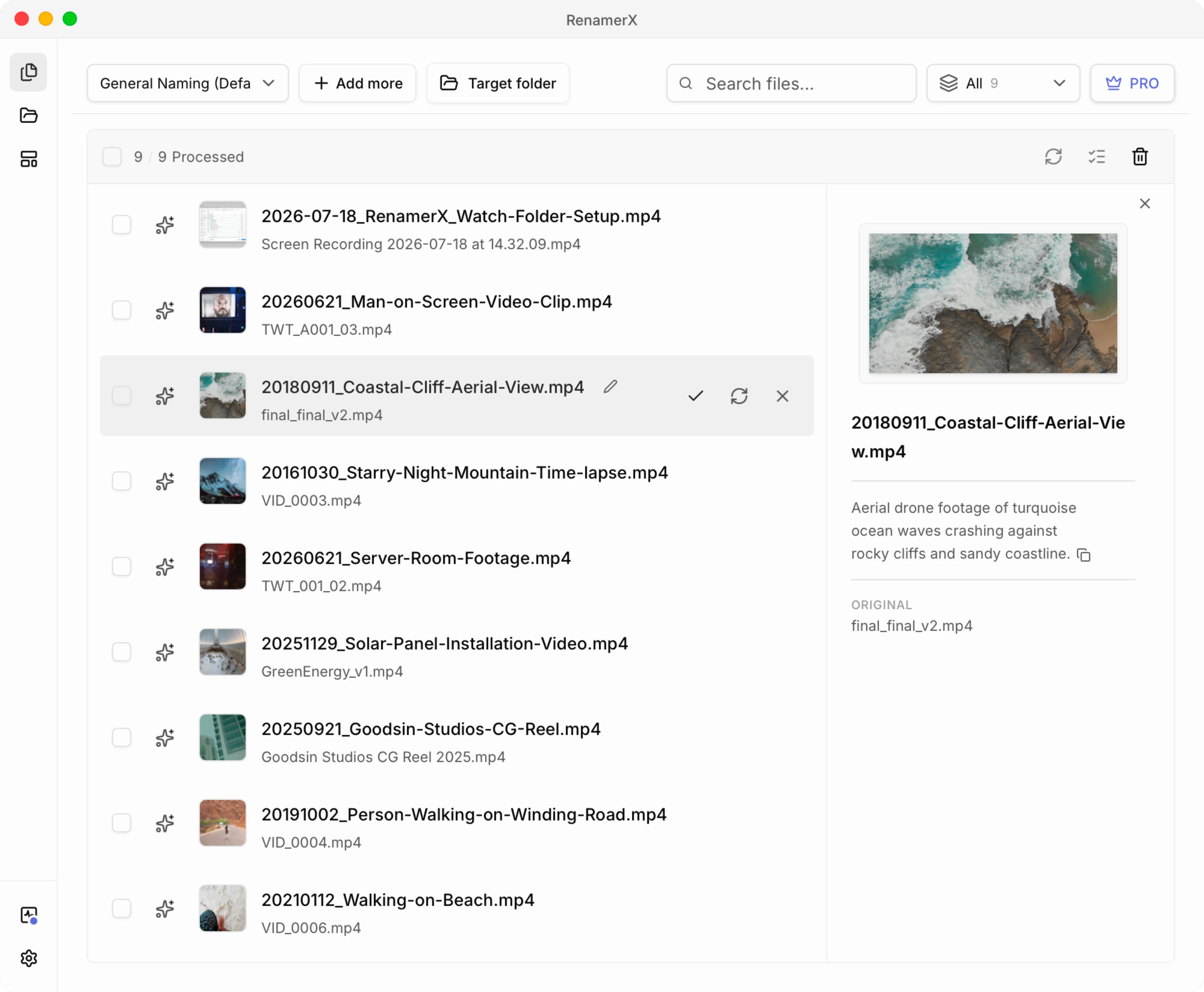
For a larger batch, RenamerX can examine several representative frames from each video, combine the visible content with available metadata, and suggest names in the pattern you chose. The original and suggested filenames stay together for review.
For example:
| Original filename | Suggested filename |
|---|---|
video_0012.mp4 | 20260621_Server-Room-Footage.mp4 |
Goodsin Studios CG Reel 2025.mp4 | 20250921_Goodsin-Studios-CG-Reel.mp4 |
VID_0003.mp4 | 20161030_Starry-Night-Mountain-Time-lapse.mp4 |
Step 5: Review the batch
Compare the original and suggested names side by side. Check whether the title describes the useful part of the video, the date has the intended meaning, repeated project and type values stay consistent, and similar clips remain distinguishable.
RenamerX keeps suggestions editable before anything changes on disk. You can edit a weak result, retry it, ignore a file, or exclude it from the batch.
Step 6: Apply a small batch and verify it
Apply a few approved suggestions first. Check the destination folder, filename sorting, extensions, duplicate handling, and any process that expects the old paths. Continue with the rest only after the names work in the actual folder.
RenamerX preserves the extension, resolves naming conflicts with a numeric suffix, and supports Undo while the original path remains available. After the required resources are installed, video analysis and renaming run on the device. Initial resource downloads, licensing, purchases, and updates still use their documented network connections.
Where a Video Filename Gets Its Information
A useful video name can combine several sources. Knowing which source supports each field makes the result easier to review.
| Information source | What it can provide | Filename use |
|---|---|---|
| Technical and embedded metadata | Duration, dimensions, embedded tags, and some dates | Recorded facts and useful dates |
| Representative video frames | Visible subject, action, environment, or interface step | A short descriptive title |
| Confirmed workflow context | Project, client, intended use, status, or version | Production and delivery fields |
| Existing filename or camera sequence | Camera code, device sequence, or export identifier | A traceable identifier |
Metadata supplies recorded facts
Some video files carry embedded dates, titles, locations, camera information, and technical details. Check what a date means before putting it in a filename. Capture time, filesystem creation time, modification time, and export time can describe different events.
Technical metadata does not describe a starry mountain scene or a person walking on a beach. Those details require a visual source.
Representative frames support a short title
RenamerX samples representative frames so it can suggest a title such as Coastal-Cliff-Aerial-View, Server-Room-Footage, or Walking-on-Beach.
The title should remain concrete and short. It does not need to describe every scene, object, or event. If a key action appears briefly or only near the end, compare the suggestion with the video and edit the title when needed.
Confirmed context supplies project and workflow fields
Pixels may show solar panels, but they do not prove that a clip belongs to the GreenEnergy project, is ready for client review, or is version v01. Use project, client, status, and version only when the folder, export settings, project records, or the user confirms them.
This is also where a controlled vocabulary helps. Repeated type, subject, status, organization, and project values should keep one approved spelling across the batch.
Choose a Renaming Method by Where the Name Comes From
Content analysis adds value when the useful name depends on what the video shows. Many video renaming jobs have a simpler source.
| What the new name needs | Good starting method | Example |
|---|---|---|
| Replace text, add a prefix, or number files | Finder, Explorer, PowerRename, or another rule-based renamer | clip-001.mp4, clip-002.mp4 |
| Use known technical or embedded tags | A metadata-capable renamer | 20260718_3840x2160_C0048.mp4 |
| Describe visible subjects, actions, scenes, or screen-recording tasks | A content-aware video file renamer | 20180911_Coastal-Cliff-Aerial-View.mp4 |
| Combine visual descriptions with project or workflow fields | A structured content-aware workflow with templates | 2026-07-18_RenamerX_Watch-Folder-Setup.mp4 |
Use a rule-based tool when the current filenames already contain the text you need. Use a metadata tool when the target name is a direct tag-to-filename mapping. Use RenamerX's content-based file renaming workflow when the missing title must come from the video itself, especially when it also needs to follow the same pattern as known dates, projects, identifiers, statuses, or versions.
The guide to batch renaming files on Mac compares Finder, Shortcuts, Automator, Terminal, metadata tools, and content-based renaming. Windows users can use the corresponding Windows batch rename guide.
Review Video Details Before Applying the Batch
A short review protects the three reasons for renaming the videos in the first place: faster recognition, reliable search, and clear relationships between files.
Keep an identifier when source traceability matters
Camera-generated names can preserve sequence and provenance even when they say nothing about the scene. WITNESS recommends retaining the original filename when renamed video must preserve a connection to its source and original order. WITNESS video archiving guidance
You do not need to keep every original basename in every finished export. For source footage, an identifier can preserve the useful part:
VID_0003.mp4
-> 20161030_Starry-Night-Mountain-Time-lapse_VID-0003.mp4
Rename source media before importing it into an editor
Adobe explains that files moved or renamed after import may need to be relinked in Premiere Pro. Adobe Premiere Pro media relinking Apple gives similar guidance for relinking source media in Final Cut Pro. Apple Final Cut Pro media relinking
Rename source footage before importing it into an editing project when possible. If an active project already references the files, back up the project and plan the relink instead of treating the batch as an isolated folder cleanup.
Keep related files matched
Proxies, subtitle files, sidecars, or separately recorded audio may use the same basename or a known mapping. Rename related files as a set, or keep the original names until you confirm how the application matches them.
Check dates and similar clips
Confirm whether the date represents capture, creation, modification, or export. Review similar clips closely because several shots of the same location can produce the same short title. Add identifier, version, or another useful field when two filenames would otherwise collide.
Video File Renaming Checklist
- The batch contains videos with the same general job.
- The filename exposes details you will use to find the video later.
- Similar videos follow the same order for dates, descriptions, projects, identifiers, statuses, and versions.
- The most useful browsing clue appears near the front.
- The
titleis short, concrete, and supported by the video frames. - Dates and project or workflow values have been checked.
- Source footage keeps an
identifierwhen traceability matters. - Proxies, subtitles, sidecars, and separate audio remain matched.
- An active editing project will not lose its media links unexpectedly.
- Duplicate names, extensions, and destination paths have been reviewed.
- A small applied batch works before the remaining files are renamed.
Make the Video Folder Readable Before Opening a Clip
Start with the way you will look for the videos later. Choose a few useful clues, draw them from reliable metadata, visible content, and confirmed project context, then keep their order consistent across similar files.
For a few files, you can do this by hand. For a larger folder whose useful descriptions are missing from the filenames, RenamerX can suggest reviewable names locally after setup. Test it on a small folder of video files that are not linked to an active editing project, review the names, then apply the approved batch.