AI File Renamer: Rename Files by Content
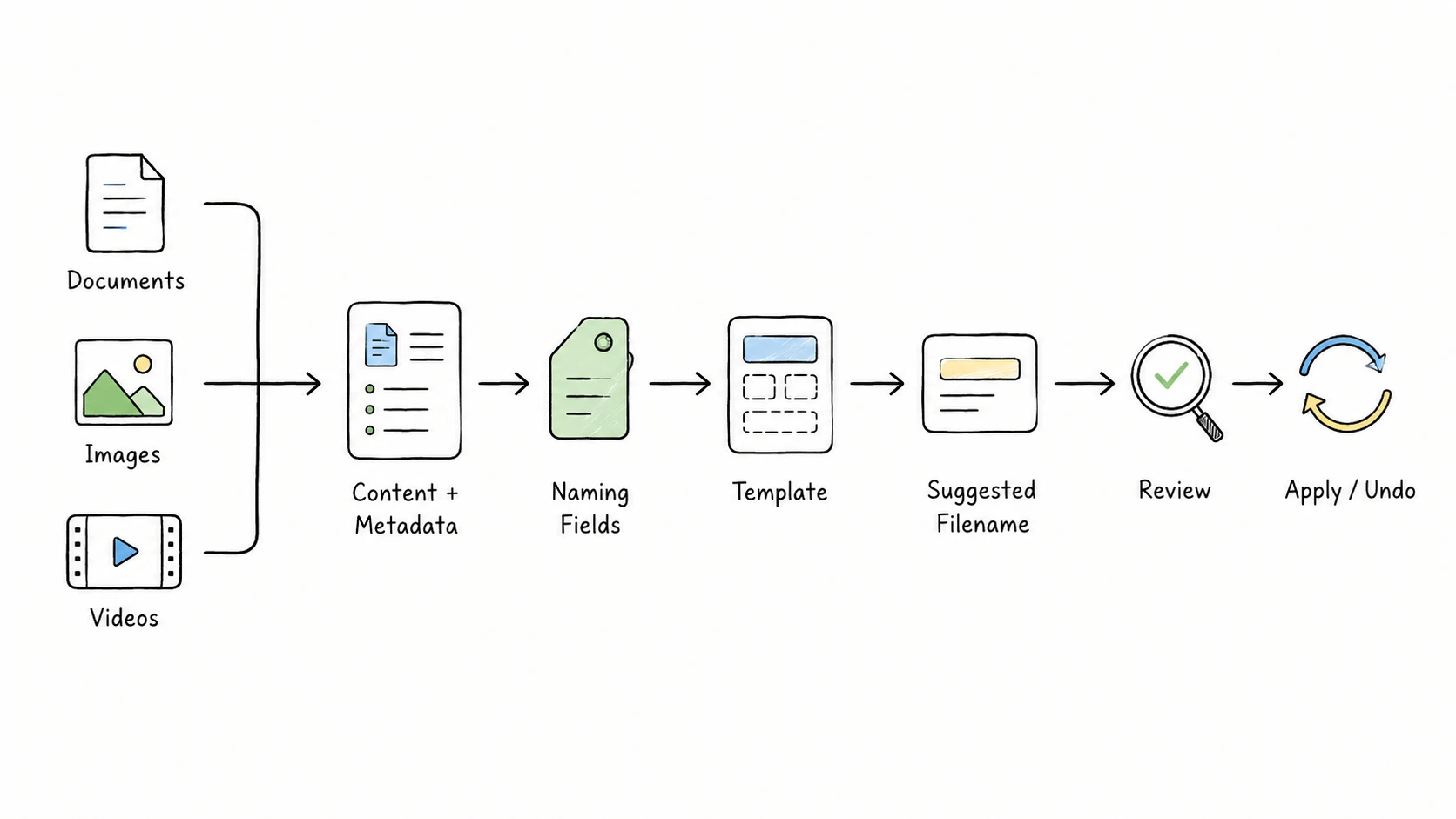
An AI file renamer can turn names that reveal almost nothing into names that describe the file itself:
1706.03762v7.pdf
-> Vaswani_2017_Attention-Is-All-You-Need.pdf

IMG_12409615.jpg
-> 2026-05-20_Travel_Couple-Walking-on-Beach-Near-Cliffs.jpg

video_0048.MP4
-> 2026-05-21_Monterey_Ocean-Waves-and-Rocky-Coastline-Aerial-View.mp4
Each result comes from a different kind of content. The paper has readable text and publication details. The photo has a visible subject, a scene, and possibly embedded camera or location metadata. The video has technical metadata and a sequence of visual scenes. Renaming them well requires more than asking AI for a plausible title.
Quick Answer
To rename files by content, an AI file renamer reads usable text, visual information, and metadata, turns the useful details into structured fields, then applies a naming template. The template keeps field order, dates, separators, vocabulary, and filename safety consistent. You review the suggestion before any approved rename is applied.
A useful result depends on five things: reading each file type correctly, choosing the right naming fields, following the folder's naming convention, formatting the filename safely, and holding the change for review.
How Does an AI File Renamer Work?
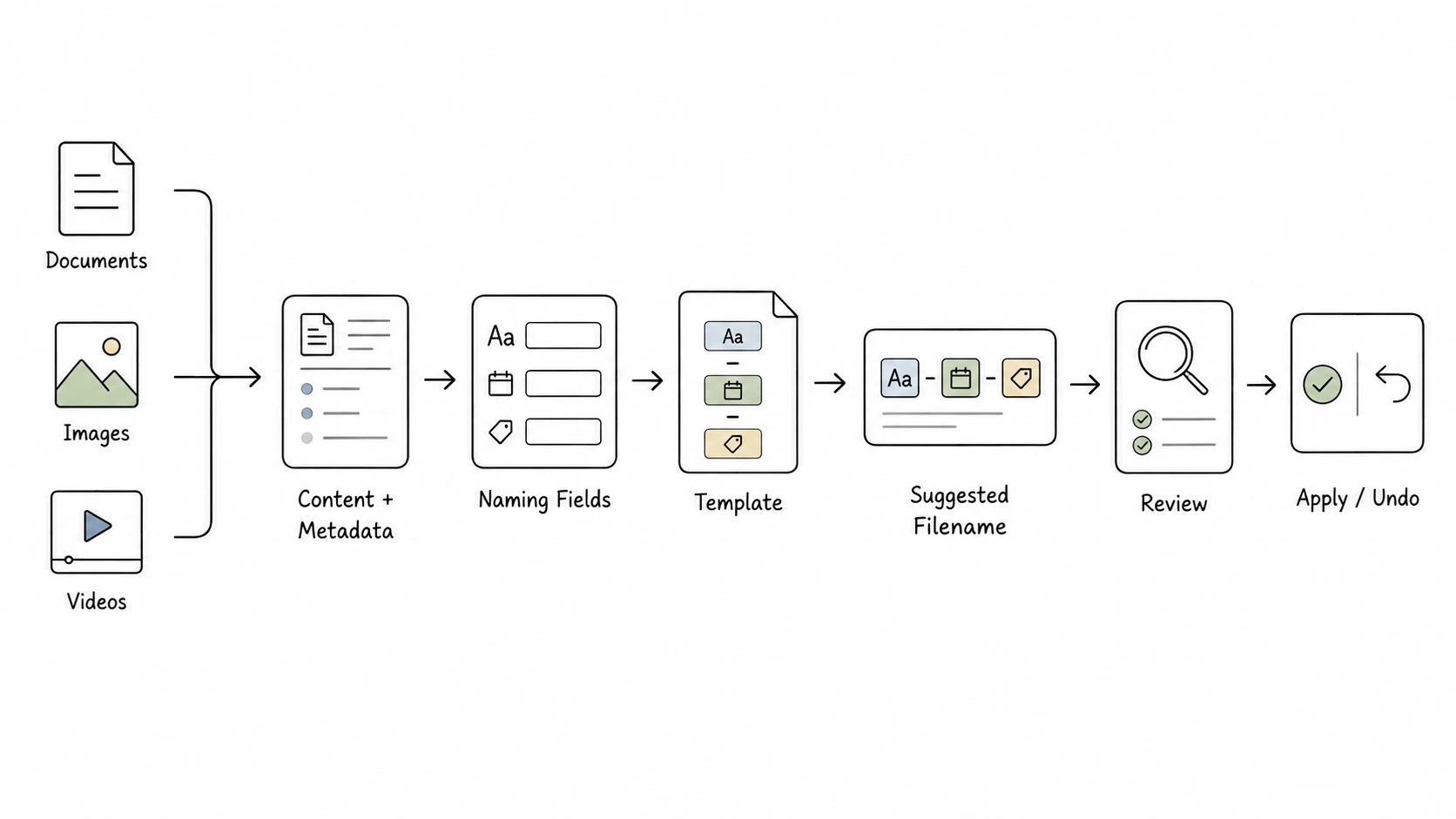
A useful content-based file renaming workflow has five stages.
1. Read content and metadata
The usable information depends on the file type. Documents can provide titles, authors, dates, organizations, document types, and identifiers through readable text and embedded metadata. For images, the app analyzes a preview to identify the subject and scene, then adds capture date, camera, or GPS data when available. For videos, it combines technical metadata with frames sampled across the recording to identify a broad subject or scene.
Content and metadata answer different questions. Content may reveal what appears in the file. Metadata may reveal when, where, or by whom it was created. The metadata-driven file naming guide explains how those sources can work together.
2. Extract useful naming fields
Free-form AI output is difficult to keep consistent. The same organization, document type, and date can appear in different orders or with different wording, and a useful identifier can disappear inside a broad summary.
A structured system asks for fields instead:
| Field | What it can capture |
|---|---|
title | A short description of the file |
creator | Author, photographer, or other creator |
subject | A broad topic or category |
date | Publication, issue, capture, or relevant event date |
type | Invoice, paper, photo, video, report, or another document type |
identifier | Invoice number, order ID, case number, DOI, or another official ID |
client, organization, project | Business or project context |
location | A useful place name |
status, version | Lifecycle and revision information |
Many of these fields match established metadata concepts. The Dublin Core Metadata Initiative uses title, creator, subject, date, type, identifier, and description to describe resources across domains. A filename needs only the small subset that helps people recognize, sort, search, or distinguish the file.
In RenamerX, AI returns structured descriptive fields. It does not return a target path or rename the file itself. The How RenamerX Works documentation explains how file operations remain a separate, controlled step.
3. Apply a naming convention
Structured fields still need a rule that says which ones belong in the filename and where they go. That rule is the naming template.
Consider an invoice:
Original: Stripe Invoice (1).pdf

date: 2026-05-16
organization: Stripe
type: Invoice
identifier: 42558262

Template: {date}_{organization}_{type}_{identifier}
Result:   2026-05-16_Stripe_Invoice_42558262.pdf
The AI supplies candidate values. The template controls the structure. Every invoice processed with the same template uses the same field order and separator, so the structure does not change when the AI's wording changes.
Different folders need different templates. Research papers may work well with {creator}_{date:year}_{title}. Travel photos may use {date}_{subject}_{title}. Location-based videos may use {date}_{location}_{title}. The file naming templates guide shows how to choose a pattern by scenario rather than forcing one universal format on every file.
4. Generate a safe, consistent filename
Even accurate fields can produce a poor filename if each value is formatted differently. The filename generator should handle the mechanical rules in code rather than asking the AI to remember them every time.
RenamerX skips empty fields, applies the selected date format and separator, sanitizes unsafe characters, keeps the original extension, and limits the generated base name to 140 characters. If an approved target name already exists when the rename is applied, a numeric suffix such as -01 or -02 avoids overwriting the existing file.
Repeated categories also need stable wording. If the same concept appears under several near-synonyms, search becomes less predictable even when each phrase seems reasonable. A controlled vocabulary keeps fields such as subject, type, status, organization, and project within an approved set of terms.
Cross-platform safety matters too. Microsoft's filename documentation lists the characters Windows reserves in filenames, including <, >, :, ", /, \, |, ?, and *, along with reserved device names and restrictions on trailing spaces or periods. The safe filename characters guide turns those constraints into practical naming rules.
5. Review before applying
Content understanding is probabilistic. A date may be a publication date, download date, invoice due date, or capture date. A photo location may be missing. Sampled video frames may not reveal the main event. A scanned PDF may contain too little readable text.
The suggestion should therefore be reviewable. A person needs to see the original name beside the proposed name, inspect or edit uncertain values, retry when the analysis is weak, and leave a file unchanged when the available details are not good enough.
File naming guidance from the Princeton Research Data Service recommends short but descriptive names, consistent conventions, sortable dates, and documented version rules. AI can reduce the work required to extract the details, but review is what connects those details to the naming convention a folder actually uses.
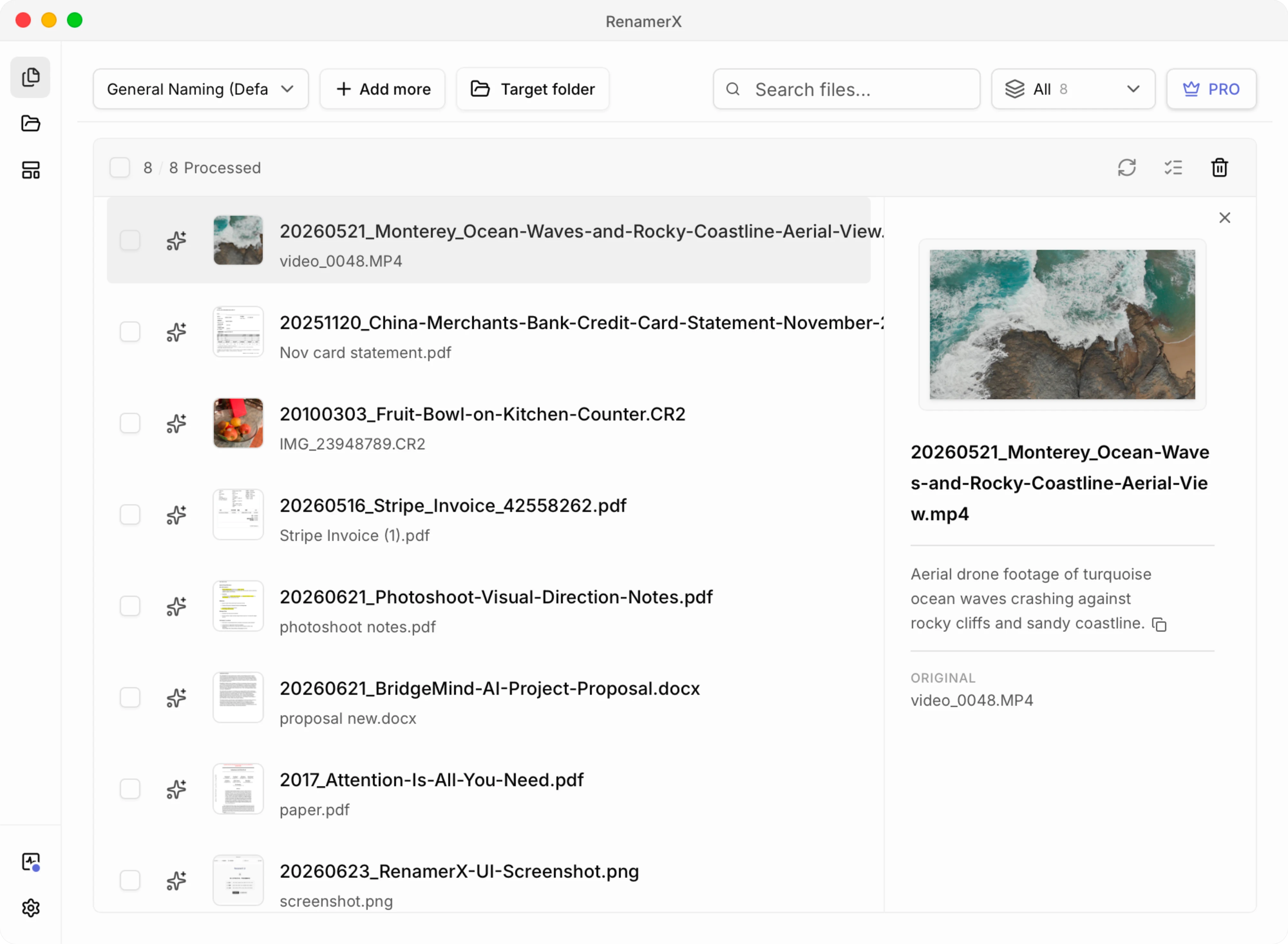
In RenamerX, the workspace shows suggestions before the original files change. You can edit, retry, ignore, search, filter, and select items. Only selected items with a suggested name are applied. Applied renames can be undone when the original path is available.
Content-Based File Naming Examples
The best fields depend on what the file contains and how the folder will be searched. These examples come from the RenamerX file naming examples and file naming templates libraries.
| File type and scenario | Original filename | Useful naming fields | Template | Suggested filename |
|---|---|---|---|---|
| Research paper | 1706.03762v7.pdf | creator, year, title | {creator}_{date:year}_{title} | Vaswani_2017_Attention-Is-All-You-Need.pdf |
| Travel photo | IMG_12409615.jpg | date, subject, title | {date}_{subject}_{title} | 2026-05-20_Travel_Couple-Walking-on-Beach-Near-Cliffs.jpg |
| Location-based video | video_0048.MP4 | date, location, title | {date}_{location}_{title} | 2026-05-21_Monterey_Ocean-Waves-and-Rocky-Coastline-Aerial-View.mp4 |
| Invoice | Stripe Invoice (1).pdf | date, organization, type, identifier | {date}_{organization}_{type}_{identifier} | 2026-05-16_Stripe_Invoice_42558262.pdf |
The title field also changes by scenario. For a paper, it can preserve the published title. For a photo or video, it is a concise description of the visible scene. For an invoice, the identifier is more useful than a long title, so the template gives that official number its own position.
How to Rename Files by Content With RenamerX
RenamerX combines local file understanding with templates and a review-first batch workflow.
- Choose a naming template: Select the fields, their order, the separator, the date format, and the output language. Start with the file naming conventions guide if the folder does not yet have a rule.
- Add files or folders: Supported documents, images, and videos enter the Batch Rename workspace. Unsupported extensions are skipped during intake.
- Review and edit the suggestions: RenamerX extracts usable content and metadata, suggests structured fields, and projects them through the selected template. Compare the original and suggested names, edit weak fields, retry the analysis, or ignore an uncertain item.
- Apply the selected names: The original file changes only when you apply an approved suggestion. If a target name already exists, RenamerX adds a numeric suffix. You can undo an applied rename when the original path is still available.
The Batch Rename documentation covers the workspace controls in more detail. For rule-based methods that do not need content understanding, see how to batch rename files. AI proposes structured information, the template produces the filename, and you decide which suggestions reach the filesystem.
Supported Files and Current Limitations
RenamerX currently supports defined sets of documents, images, and videos. The Supported File Types documentation lists every accepted extension, including common office documents, PDFs, text formats, standard images, HEIC and HEIF, selected camera RAW formats, and common video containers.
For format-specific naming patterns and review checks, use the focused guides for Office documents, PDFs, photos, screenshots, and videos.
Support for an extension does not guarantee that every file will produce an equally strong name. The result depends on what the file makes available:
- Documents need usable text. RenamerX extracts text from supported document formats. For PDFs with very little text, it may also inspect a first-page image as visual context. It does not currently provide OCR as a separate feature, so image-only scans may produce weaker suggestions.
- Images vary in visual and embedded detail. A clear subject can support a descriptive title. Dates and locations depend on metadata being present and reliable. HEIC, HEIF, and supported camera RAW files use specialized preview paths before visual analysis.
- Videos are sampled. RenamerX uses technical metadata and a storyboard built from sampled frames. A short event that does not appear in the sample may not influence the suggestion, and the workflow should not be treated as full-video transcription.
- Metadata can be absent or wrong. Exporting, editing, messaging, or downloading a file can remove or change embedded metadata. When content and metadata disagree, the suggestion needs review.
- AI suggestions can be uncertain. A model may choose the wrong date, subject, type, organization, or level of detail. Templates improve consistency; they do not make every extracted value correct.
Unsupported extensions are skipped before processing. Formats such as SVG, PSD, JXL, and the generic .raw extension are outside the current support matrix.
Privacy and Local Processing
Content-based renaming may read document text, decode an image preview, inspect embedded metadata, or sample frames from a video. Where that processing happens matters because the feature reads more than the original filename.
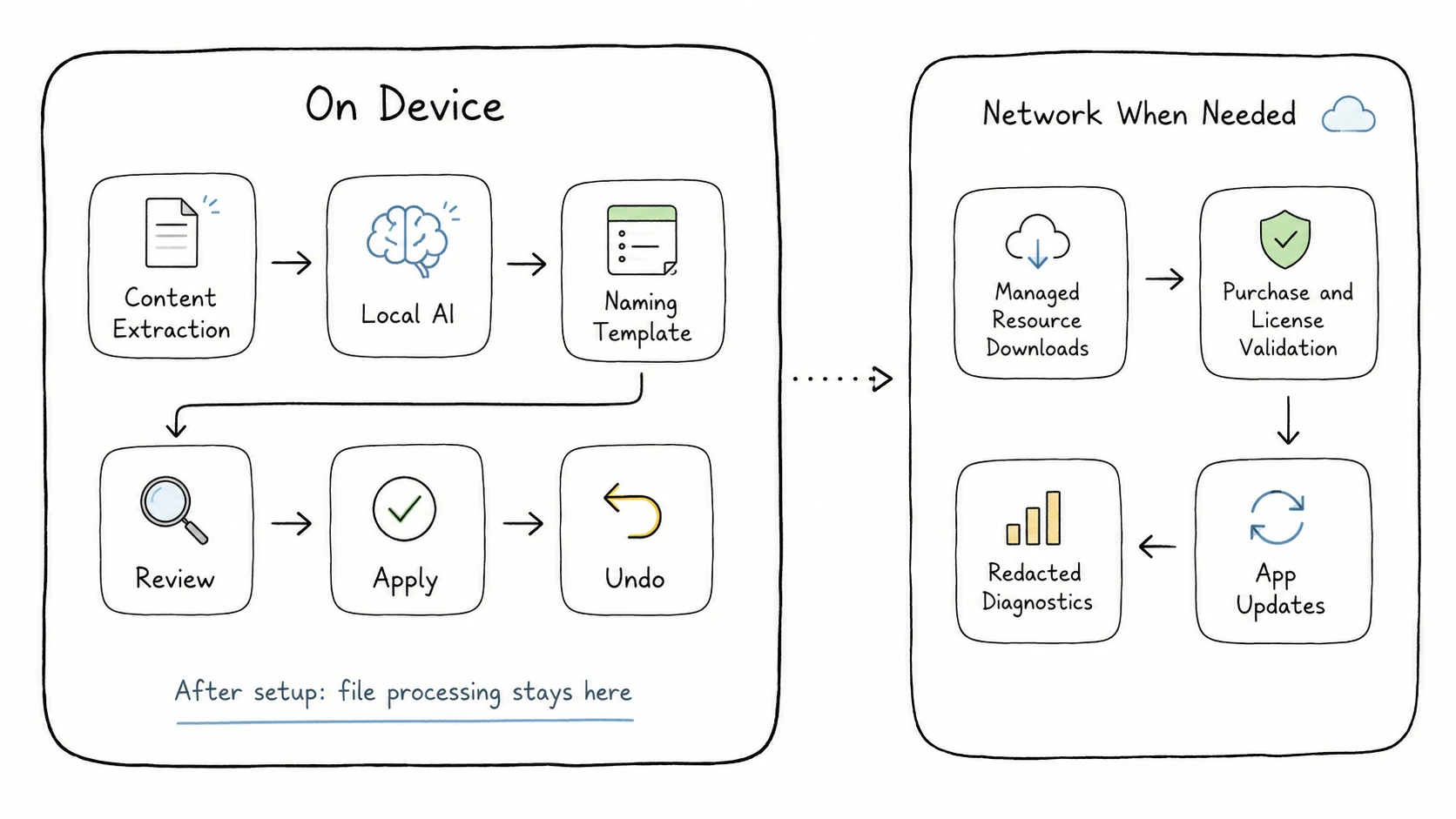
RenamerX runs core file understanding, AI field extraction, filename generation, review, apply, and undo locally on your device after the required managed resources are installed. AI output contains descriptive fields; it does not receive authority to choose a target path or perform filesystem operations.
Local-first does not mean the app never uses a network connection. Initial resource downloads, purchases, license activation and validation, and app updates may require network access. Diagnostics and error reporting also follow defined redaction boundaries. The current details are documented in Security and Privacy and Local AI Runtime.
Turn File Content Into Names You Can Use
If you want to rename files by content, start with one naming template and a small mixed batch. Check whether each suggestion helps you recognize and find the file, edit weak fields, then apply only the names you would keep.
RenamerX lets you test that workflow in one local-first workspace for supported documents, images, and videos, with review before Apply and Undo when the original path is available.
If you are still choosing a product, the AI file renamer comparison explains how to test format coverage, privacy, template control, review, recovery, automation, and price against the files you actually need to rename.