Photo Renamer: How to Rename Photos by Content and Metadata
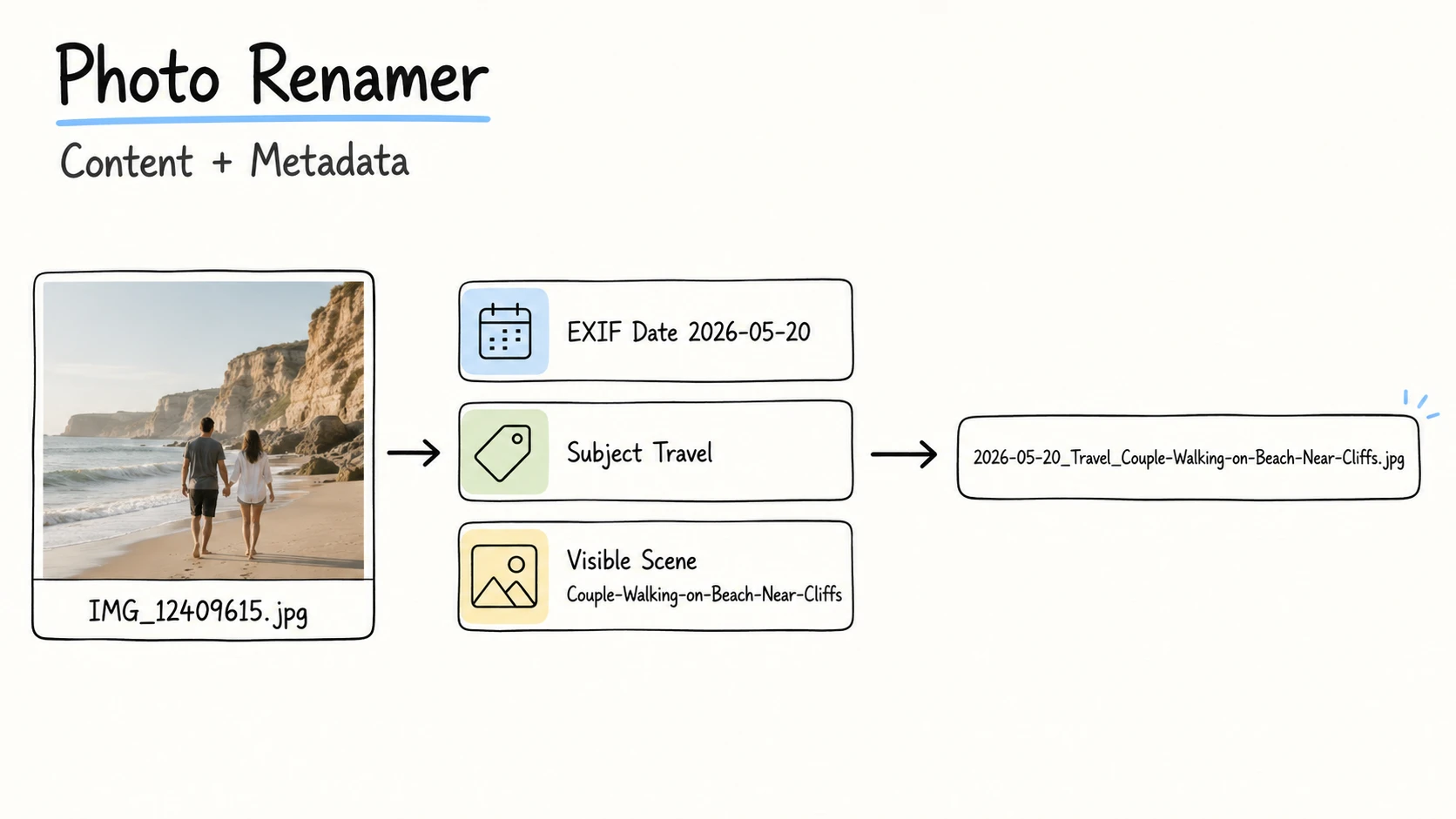
Camera-generated names such as IMG_9615.jpg and DSC_4827.nef can distinguish files within an import or camera sequence, but they do not tell you what the photo shows. Weeks or years later, you are more likely to look for a place, event, subject, photographer, or project than a camera counter.
The same photos become easier to recognize when their names reflect how you expect to find them:
| Original filename | Useful filename | Information used |
|---|---|---|
IMG_12409615.jpg | 2026-05-20_Travel_Couple-Walking-on-Beach-Near-Cliffs.jpg | Date, subject, visible scene |
IMG_9615.jpg | 2026-06-17_Xinjiang_Mount-Muztaghata-Peak-Sign.jpg | Date, verified location, visible scene |
IMG_5378.jpg | 2026-06-23_BridgeMind-AI-POC_Design-Workshop-Whiteboard.jpg | Date, confirmed project, visible scene |
Quick Answer
Choose what belongs in a photo filename by asking how you will find, sort, or browse that collection later. Then get each useful detail from the strongest available source: visible content for a short scene description, EXIF for capture data, IPTC/XMP for descriptive or creator information, and confirmed context for a project or event. Use one consistent template and review every complete filename before applying it.
Take the travel photo IMG_12409615.jpg. The image supports the description Couple-Walking-on-Beach-Near-Cliffs, while EXIF may provide the capture date 2026-05-20. If date and visible scene are the clues you use later, the photo can be named 2026-05-20_Couple-Walking-on-Beach-Near-Cliffs.jpg. Add a subject such as Travel only when that category helps you browse the collection.
Choose Filename Information by How You Will Find the Photos
Start with the collection, not the file format. A JPEG in a travel album and a JPEG in a photographer's client archive have the same extension but different retrieval needs.
| How the collection is found later | Information that may help | Starting pattern | Example |
|---|---|---|---|
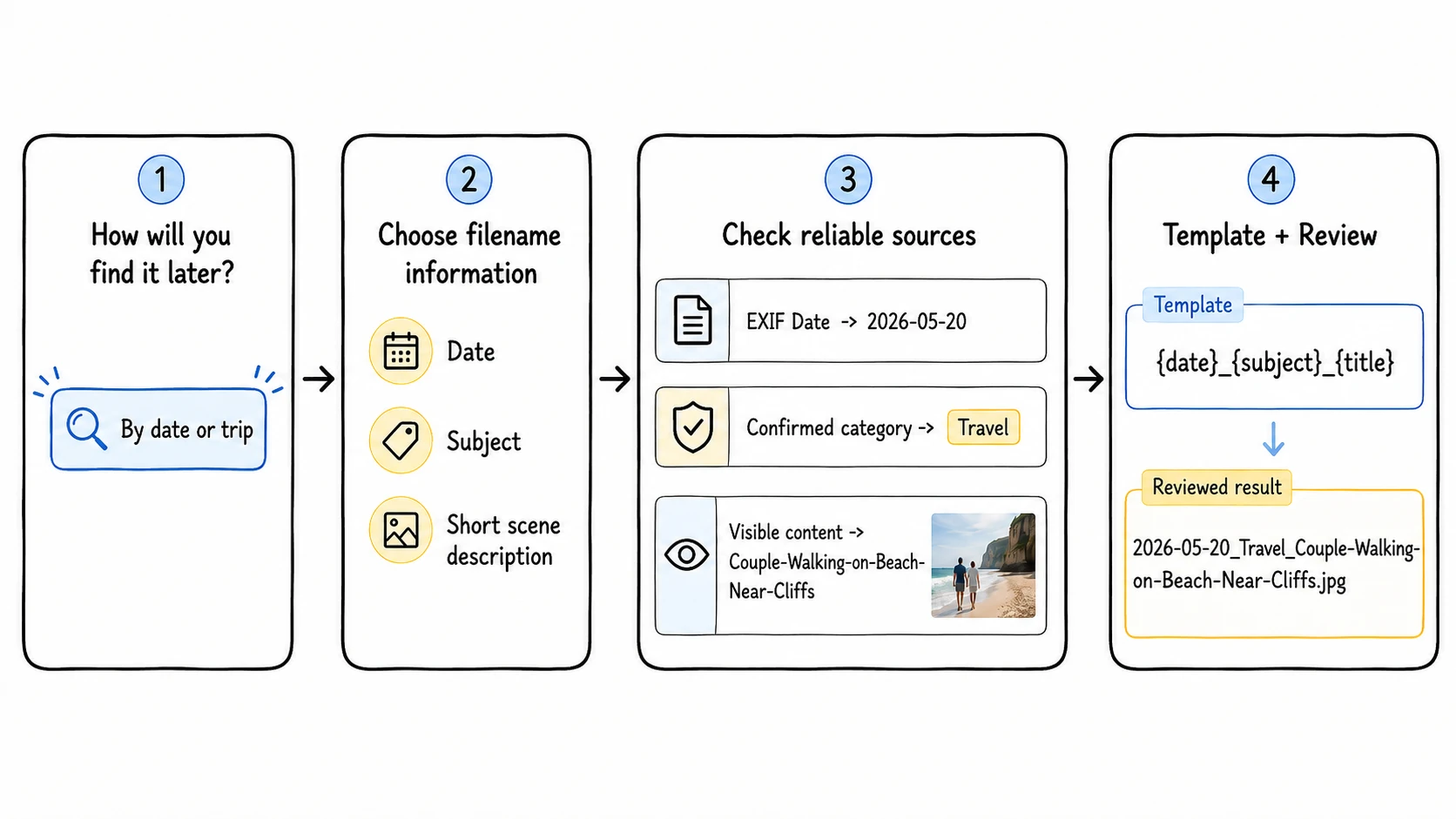
| By date or trip | Capture date, subject, short scene description | {date}_{subject}_{title} | 2026-05-20_Travel_Couple-Walking-on-Beach-Near-Cliffs.jpg |
| By place | Capture date, verified location, short scene description | {date}_{location}_{title} | 2026-06-17_Xinjiang_Mount-Muztaghata-Peak-Sign.jpg |
| By project or assignment | Date, project, short scene description | {date}_{project}_{title} | 2026-06-23_BridgeMind-AI-POC_Design-Workshop-Whiteboard.jpg |
| By photographer or creator | Creator, date, short scene description | {creator}_{date}_{title} | Use when attribution is a real lookup clue |
The first part of the filename should match the collection's main browsing pattern. Put the date first when chronological order matters. Put a location, creator, or project first when that is how the folder is usually scanned. The broader file naming conventions guide explains how to choose the strongest first clue.
Add information only when it removes a real uncertainty. If every photo in a project folder belongs to BridgeMind-AI-POC, repeating the project in every filename may add little. Keep it when the files will leave that folder, enter a mixed asset library, or be shared without the folder context. Most useful photo names contain two to five pieces of information rather than a complete caption.
Content, date, EXIF, and IPTC/XMP are not competing naming methods. They are possible sources for the information you selected. The retrieval task decides what the filename needs; the available evidence determines where those details come from.
Where Photo Filename Information Can Come From
After choosing what the name should contain, check the most reliable source for each detail.
| Information needed in the filename | Sources to check | What to verify |
|---|---|---|
| Short scene description or subject | Visible content, an existing caption, confirmed notes | Describe what is visible without guessing a person's identity, an event, or a precise place |
| Capture date | EXIF capture tags, a synchronized camera log, confirmed event records | Camera clock, timezone, and whether the value is capture time rather than edit or export time |
| Location | EXIF GPS, IPTC/XMP location values, confirmed field or event context | Coordinate accuracy, place-name precision, and location privacy |
| Creator | IPTC/XMP creator values, catalog records, confirmed assignment information | The value identifies the photographer or creator of this image, not the subject in the photo |
| Project or event | Confirmed folder context, job records, assignment notes, user-supplied context | The value applies to every selected photo, especially in a mixed folder |
| Sequence or frame identifier | Original filename, capture sequence, sufficiently precise time | Similar frames remain unique and can still be matched with related files |
| Fallback date | Filesystem creation or modification time | The timestamp may describe a copy, download, export, restoration, or edit |
Visible content tells you what the photo shows
Visual analysis can support a short description such as Couple-Walking-on-Beach-Near-Cliffs or Design-Workshop-Whiteboard. Keep it concrete and visible. A model can describe a person beside a mountain sign, but it should not name the person or infer an event that the image does not establish.
The title used in a filename should be shorter than a caption. It should distinguish the frame at a glance, not record every object, color, or possible interpretation.
EXIF often supplies capture details
EXIF is designed to store image data written by cameras and related systems, including timestamps and, when available, GPS and technical information. DateTimeOriginal is often more useful than a filesystem date for chronological photo collections, provided the camera clock was correct. The CIPA Exif specification documents the capture and GPS tag families used in digital still images. CIPA Exif 3.1 specification
Camera model, lens, exposure, and focal length can be valuable metadata without being useful filename information. Include them only in a specialized technical workflow that searches by those details.
IPTC/XMP can supply descriptive and workflow context
The IPTC Photo Metadata Standard covers creator, description, keywords, dates, locations, rights, and administrative information, commonly carried in XMP or related image metadata. IPTC Photo Metadata Standard
Those values may have been added by a photographer, editor, agency, or metadata template. Check that they belong to the current image and have not been copied forward incorrectly. Copyright notices, contact details, full captions, rights terms, and long keyword lists should stay in metadata or a digital asset management system rather than in the filename.
Confirmed context supplies what the pixels cannot show
A photo may clearly show a workshop but not whether it belongs to BridgeMind-AI-POC, another client, or an internal exercise. Project, event, client, and assignment information often comes from the workflow around the image. Use it only when the context is known and applies to the selected files.
This division of labor is useful: visible content describes the frame, embedded metadata supplies recorded facts, and confirmed context explains why the image belongs to a particular collection. The guide to metadata-driven file naming covers the same principle across documents, images, and videos.
How to Rename a Photo Collection
Step 1: Choose one collection and its retrieval pattern
Work with one coherent group, such as a trip, field inspection, photo assignment, or project workshop. Decide whether the group is mainly browsed by date, location, creator, subject, or project. A mixed folder may need to be separated before one template makes sense.
Step 2: Choose the information and write a template
Select only the details that help with recognition, sorting, search, or distinction. Keep their order, separators, and date precision consistent.
{date}_{subject}_{title}
{date}_{location}_{title}
{date}_{project}_{title}
{creator}_{date}_{title}
Use these as starting points. The file naming templates and file naming examples libraries show how the same information order works across related media files.
Step 3: Inspect a representative sample
Check ordinary photos, missing metadata, similar frames, edited exports, and files from different cameras or phones. Compare the visible content with the EXIF and IPTC/XMP values. This reveals wrong camera clocks, stale metadata, privacy-sensitive locations, and missing information before the full batch.
For repeated values such as project, subject, or type, choose one approved term. A small controlled vocabulary prevents Travel, Trip, and Vacation from becoming three labels for the same subject.
Step 4: Generate the new names
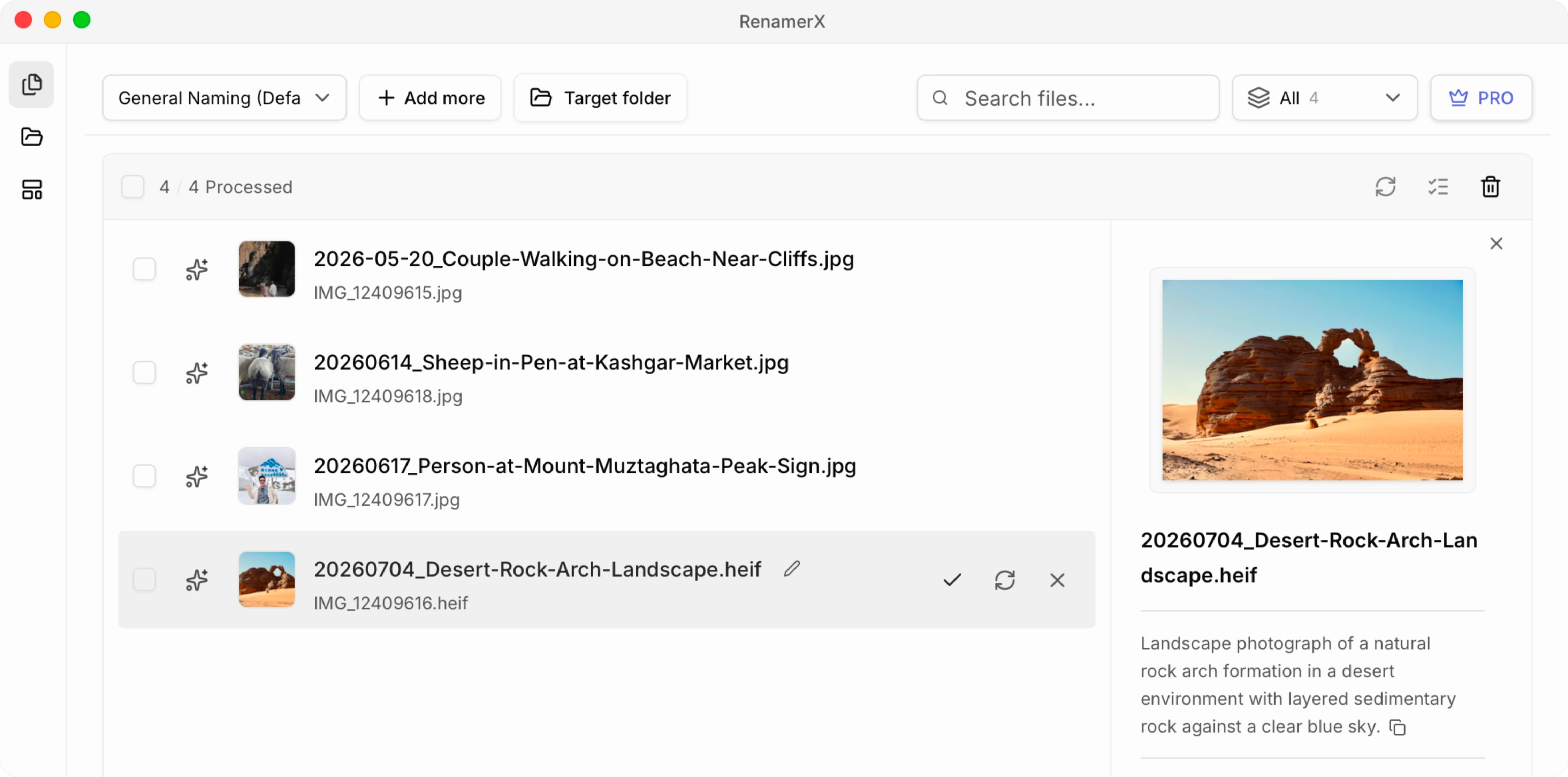
For a small set, open each photo and its metadata, fill the template, and rename the file manually. For a larger collection, RenamerX can read available image metadata, analyze a visual preview, and suggest the information required by the selected template. The template controls the final order, date format, separators, and extension. This photo workflow is one application of renaming files by content.
For example, a travel folder that is mainly browsed by date and scene can use {date}_{title} throughout:
| Original filename | Suggested filename |
|---|---|
IMG_12409615.jpg | 2026-05-20_Couple-Walking-on-Beach-Near-Cliffs.jpg |
IMG_12409618.jpg | 2026-05-20_Ocean-Waves-Below-Rocky-Cliffs.jpg |
IMG_12409624.jpg | 2026-05-20_Sunset-Over-Coastal-Trail.jpg |
The date can come from verified capture metadata, and each short title from the visible scene. If a required value is not supported, omit it or correct it during review rather than forcing a guess.
Step 5: Review complete filenames, not isolated values
Check the original and suggested names side by side. Verify dates, locations, creator names, projects, and descriptions against the image and its context. Look for duplicate targets, overly long descriptions, private coordinates, guessed identities, and sequence information that needs to remain visible.
RenamerX keeps suggestions reviewable before the filesystem changes. You can edit, retry, ignore, or select suggestions. Core photo analysis and renaming run on the device after the required resources are installed; setup, licensing, updates, and defined diagnostics retain their documented network boundaries.
Step 6: Apply a test batch and verify the result
Apply a small approved batch first. Check the destination folder, filename sorting, duplicates, extensions, and any delivery or backup process that uses the old paths. Keep a rename map or Undo available until the workflow has been verified.
RenamerX preserves the original extension, resolves target-name conflicts with a numeric suffix, and supports Undo while the original path is still available. It supports common image formats, HEIC and HEIF, and selected camera RAW formats.
When Another Tool Is Better
The useful tool depends on what the names require:
| Situation | Better fit | Reason |
|---|---|---|
| The filename comes entirely from known metadata tags | ExifTool or a metadata-focused renamer | A deterministic tag-to-filename rule does not need visual analysis |
| The change is a fixed prefix, sequence number, or text replacement | Finder, Explorer, or a traditional batch renamer | The task does not require content understanding |
| The useful name needs visible content plus metadata or confirmed context | RenamerX | It can suggest the selected information, apply a template, and keep the result reviewable |
ExifTool publishes its available date, GPS, and metadata tag groups for deterministic metadata workflows. ExifTool Tag Names
Photo Renaming Checklist
- The collection has one clear retrieval or browsing pattern.
- The filename contains only information that helps someone find or distinguish the photo.
- The first part matches the main sorting or search clue.
- The visible description states what the image shows without guessing identities or context.
- Capture dates, locations, creators, projects, and events come from verified sources.
- Repeated values use consistent spelling, date format, and separators.
- The original extension and any useful sequence information remain intact.
- A representative sample and a small applied batch have been checked before the full collection.
A useful photo filename lets someone recognize the frame and place it in the right collection without opening it. Choose the information from the way the collection will be used, then let content, metadata, and confirmed context provide the evidence for that name.