How to Rename Invoice Files with a Consistent Naming Convention
Invoice folders quickly become difficult to browse. A billing system exports invoice.pdf, a scanner creates scan_0042.pdf, and an email attachment becomes Invoice (4).pdf. Once dozens of these files accumulate, you have to open them one by one to find the right supplier or customer, invoice date, or invoice number.
A useful invoice filename brings those lookup clues into the name. That makes files easier to recognize, search, and sort, and easier to use for reconciliation and handoff without opening each invoice first.
Quick Answer
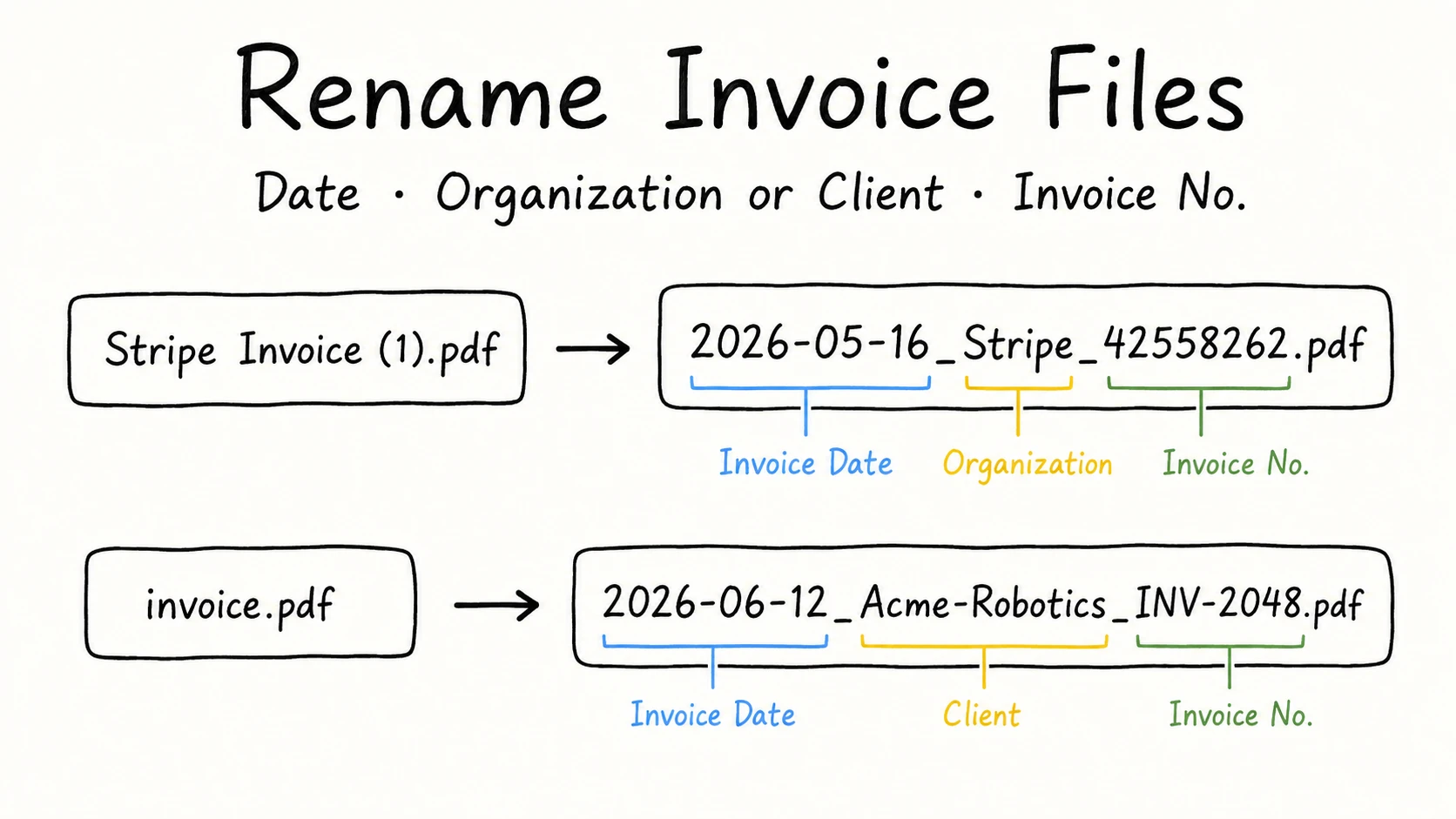
A useful invoice filename contains two to five details that make the file easier to recognize, search, and sort. These commonly include the invoice date, the organization or client people use to find the file, and the invoice number:
{date}_{organization | client}_{identifier}
Use the same information order for the same kind of invoice, put the most-used lookup clue near the front, format dates consistently, and use one separator throughout the folder.
A few invoices can be opened and renamed manually. For a large folder, RenamerX can use built-in local AI to read the file content without uploading the files, generate filenames that follow your template, and show every suggestion for review before you apply the batch. Applied renames can be undone if needed.
| Original filename | Better filename | Pattern |
|---|---|---|
Stripe Invoice (1).pdf | 2026-05-16_Stripe_42558262.pdf | {date}_{organization}_{identifier} |
scan_0042.pdf | 2026-06-03_Office-Depot_100023.pdf | {date}_{organization}_{identifier} |
invoice.pdf | 2026-06-12_Acme-Robotics_INV-2048.pdf | {date}_{client}_{identifier} |
A Useful Invoice Filename Should Contain the Details Needed to Find It
An invoice contains far more information than its filename needs. The supplier and customer may both appear several times. The page may include an issue date, due date, service period, purchase order number, invoice number, account number, subtotal, tax, total, and payment instructions.
Choose the details people will use to recognize, search, and sort the invoice without opening it. A compact starting pattern combines the invoice date, the relevant organization or client, and the invoice number:
{date}_{organization | client}_{identifier}

2026-05-16_Stripe_42558262.pdf
2026-06-12_Acme-Robotics_INV-2048.pdf
In a folder organized by supplier or issuer, use {organization}. In a folder organized by customer or account, use {client}.
When invoices share a folder with receipts, statements, credit notes, or quotes, you can add {type} to keep those record types distinguishable:
{date}_{organization | client}_{type}_{identifier}

2026-05-16_Stripe_Invoice_42558262.pdf
In a folder dedicated to invoices, the folder already provides that context, so {type} may not add useful information. The broader file naming conventions guide explains the same principle: keep information that helps people recognize, search, sort, share, or distinguish similar files, and leave out information that does not.
Adjust this starting point to fit the folder's actual use. For example, a bookkeeping folder used to reconcile documents with bank transactions may need the invoice total more than {type}.
Use the Invoice Date, Not the Most Prominent Date
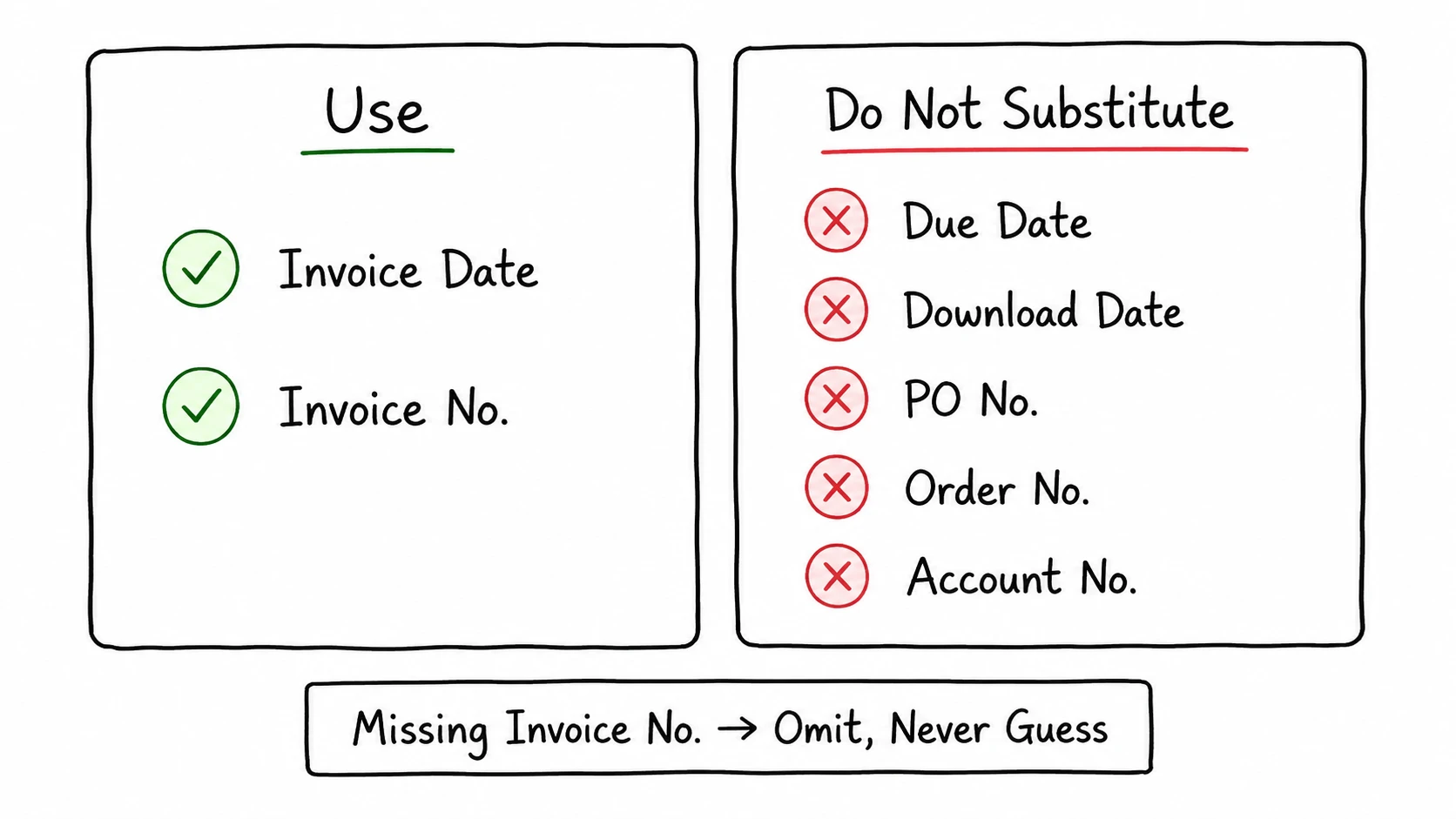
The correct date is the date that identifies the invoice, not the largest or latest date on the page. That is normally the labeled invoice date or issue date.
| Date on the page | What it means | Default filename use |
|---|---|---|
| Invoice date or issue date | When the invoice was issued | Use as the invoice date |
| Due date | When payment is expected | Do not substitute for the invoice date |
| Service or billing period | When the service was delivered | Can be added when it improves retrieval |
| Download or scan date | When you saved or digitized the file | Usually omit |
| File creation or modification date | A filesystem timestamp | Do not treat as the invoice date |
Use YYYY-MM-DD when the exact issue date is useful. ISO 8601 uses year-month-day order, which avoids the ambiguity between regional formats such as 04/06/2026 and 06/04/2026 and keeps filenames in chronological order when sorted by name. The date format guide covers month-only periods and other levels of date precision. ISO 8601
Some recurring invoices are easier to find by billing period as well as issue date. In that case, add the period as a separate field or keep it in the title. Do not silently replace the invoice date with the service month, because the two answer different questions.
Keep the Invoice Number Separate From Other Numbers
The invoice number is the identifier assigned to that billing document by its issuer or billing system. It is not interchangeable with every other reference on the page.
| Number | What it identifies | Use in the invoice filename? |
|---|---|---|
| Invoice number | The invoice itself | Usually yes |
| Purchase order number | The buyer's purchase order | Can be added when reconciliation or lookup uses it |
| Order number | The merchant's order | Useful for order lookup, but not a replacement for the invoice number |
| Customer or account number | A customer or billing account | Usually omit or mask |
| Tax or registration number | A legal entity | Usually omit from ordinary filenames |
GOV.UK lists a unique identification number and invoice date among the details an invoice must contain. The exact legal requirements vary by jurisdiction, but the practical naming lesson is stable: use the number that identifies the invoice itself, and keep other business references separate. GOV.UK
If the invoice has no invoice number, omit that field. Do not copy a nearby PO number, account number, tax number, or total into the identifier position. If a billing or accounting process assigns the invoice number, use that system as the source of truth. Keep any separate internal reference visibly different from the invoice number.
Put the Strongest Lookup Clue Near the Front
The first field determines how files group when you sort the folder by name. Start with the information people use first when they look for an invoice again.
| Retrieval pattern | Template | Example |
|---|---|---|
| Browse by date | {date}_{organization | client}_{identifier} | 2026-05-16_Stripe_42558262.pdf |
| Mixed financial folder | {date}_{organization | client}_{type}_{identifier} | 2026-05-16_Stripe_Invoice_42558262.pdf |
| Browse by supplier | {organization}_{identifier}_{date} | Office-Depot_100023_2026-06-03.pdf |
| Browse by customer | {client}_{identifier}_{date} | Acme-Robotics_INV-2048_2026-06-12.pdf |
| Find by invoice number | {identifier}_{organization | client}_{date} | INV-2048_Acme-Robotics_2026-06-12.pdf |
HM Revenue & Customs requires received VAT invoices to be kept so they can be presented using the invoice date and supplier's name. That does not prescribe one universal filename, but it shows why those two clues are useful in an invoice archive. HMRC VAT Guide
Once you choose the order, keep it stable. Use the same short organization or client name, date format, capitalization, separator, and record type across the folder. A controlled vocabulary prevents Office Depot, Office-Depot, and OfficeDepot from becoming three accidental groups. The file naming templates library provides additional date-first, organization-first, and identifier-first patterns.
When You Reconcile Files With Transactions, You Can Include the Invoice Total
The invoice total can be useful in bookkeeping workflows that reconcile invoice files with bank or card transactions. It also helps distinguish two charges from the same supplier on the same day or lets a bookkeeper search for a document by transaction value. Real invoice-renaming requests use patterns such as YYYY-MM-DD_Vendor_Amount_InvoiceNo.pdf and Platform-Date-InvoiceNumber-Amount; bookkeepers also describe using date, vendor, invoice number, and amount when filing or handing off invoices. Zapier Community, Reddit: Bulk PDF Invoice Renaming, Reddit: Storing Invoices in PDF
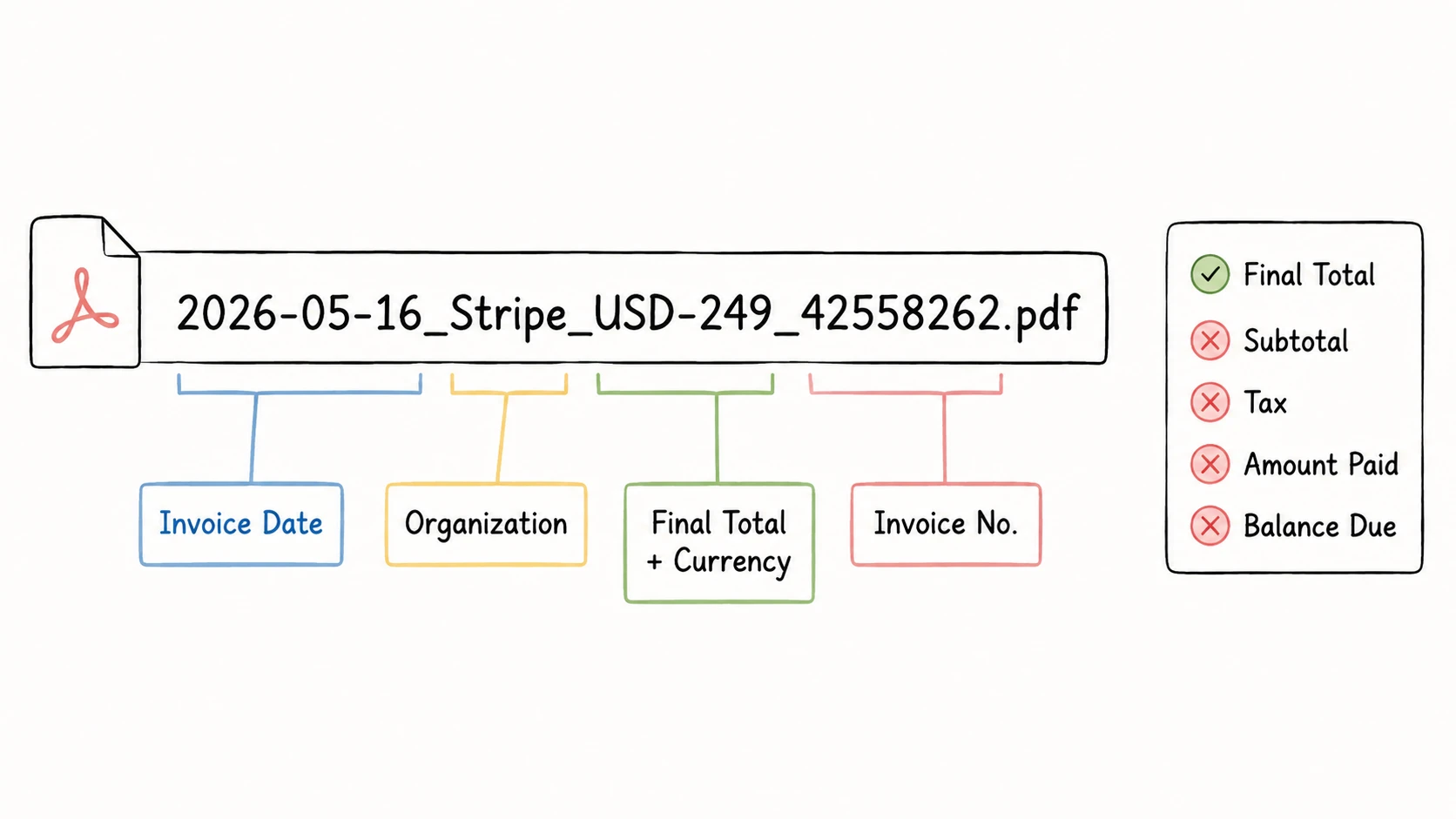
Use the invoice total: the final total shown on the invoice when it was issued. Do not substitute the subtotal, tax, amount already paid, or current balance due. Add the currency when the folder can contain more than one currency or when the symbol would be ambiguous.
A filename used for transaction reconciliation might look like:
2026-05-16_Stripe_USD-249_42558262.pdf
In this example, underscores separate the main filename fields, and USD-249 keeps the currency code and amount together. If cents are not zero, use a documented form such as USD-249-50 for USD 249.50 and apply it consistently. The safe filename guide explains how to keep this kind of value portable across platforms.
Amount is less useful when the accounting, AP, or document system already indexes every invoice and provides reliable amount search. It can also expose financial information in shared folders, recent-file lists, email attachments, and screenshots. The right rule is therefore not “always include amount” or “always omit amount.” Include it when people actually reconcile or search for invoices by value, define exactly which total to use, and format the amount and currency consistently.
Receipts and Statements Need Different Names
An invoice template should not be applied unchanged to every financial record. The useful date and identifier depend on what the document records.
| Record | Useful fields | Example |
|---|---|---|
| Invoice | Issue date, supplier or customer, invoice number; total and currency when reconciling transactions | 2026-05-16_Stripe_Invoice_42558262.pdf |
| Receipt | Transaction date, merchant, short purchase description | 2026-04-14_GitHub_Copilot-Pro_Receipt.pdf |
| Statement | Statement period, institution, safe account label when needed | 2025-11_Chase_Credit-Card-Statement.pdf |
| Credit note | Issue date, supplier, credit note number | 2026-05-20_Stripe_Credit-Note_CN-1042.pdf |
A small receipt may have no stable receipt number. In that case, the transaction date, merchant, and purchase description are more useful than an invented identifier. A statement normally uses the statement period, often YYYY-MM, rather than the payment due date. Full account and card numbers should stay out of filenames.
In a mixed finance folder, give each record type a pattern that reflects how people will find that record later.
How to Rename Invoice Files by Content
For a few invoices, open each file, confirm the supplier or customer, invoice date, and invoice number, then apply the chosen pattern manually. The method is simple; repeating it across a large folder is not. Every file has to be opened, the right values must be distinguished from nearby dates and numbers, and the final names must remain consistent.
RenamerX handles that repetitive work while keeping every proposed name reviewable before the files change.
Step 1: Start with representative invoices and a template
Choose several invoices from different suppliers or customers, including a generic export, a scan, one with several dates, and one without a clear invoice number. Select the two to five details people use to retrieve them. If you reconcile documents with bank or card transactions, include the invoice total and currency. A built-in template can provide a starting point; then adjust the fields and order for this folder.
Amount applies to financial documents rather than files in general, so RenamerX does not expose it as a standalone universal field. If your invoice naming rule needs the total, add title to the template and tell the AI what title should contain for this workflow. For example:
For invoice files, set Title to the invoice total and currency only,
using portable filename characters only. Format USD 249.00 as USD-249;
format USD 249.50 as USD-249-50. Use the final total for the whole invoice,
typically labeled Total, Grand Total, or Invoice Total. Do not use subtotal,
tax amount, amount paid, or balance due.
If the total or currency is unclear, leave Title empty.
With {date}_{organization | client}_{title:amount}_{identifier}, that instruction can produce 2026-05-16_Stripe_USD-249_42558262.pdf. Choose the organization or client field that matches the filing context. The custom prompt defines what to extract; the template still controls the order and formatting.
Step 2: Add the files and generate suggestions
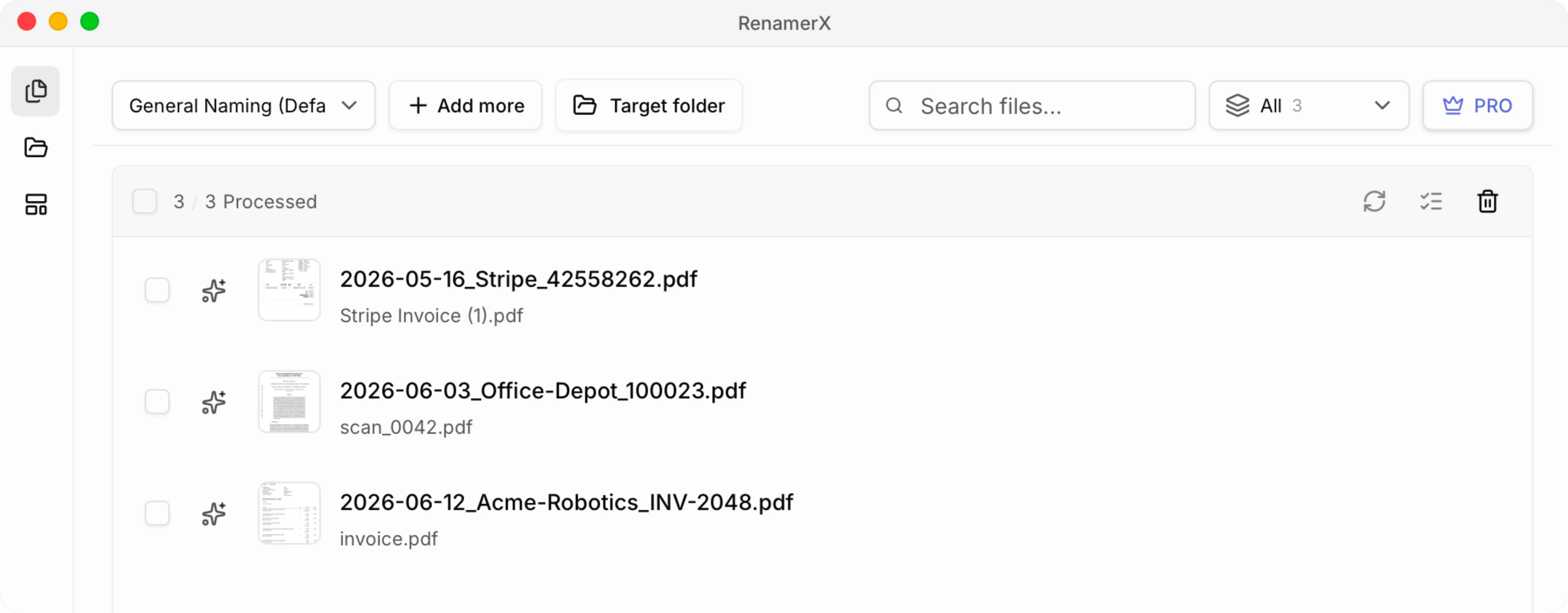
Drag the invoice files into RenamerX and choose the template. Its built-in local AI reads the file content without uploading the files, extracts the information requested by the template, and generates clear, searchable, consistently formatted filename suggestions.
Step 3: Review the original and suggested names
Compare the names side by side. Check the supplier in {organization} or customer in {client}, the invoice date, invoice number, and any invoice total or currency requested by the template. Edit a wrong value, skip a file whose evidence is unclear, or remove a field the invoice does not support. For low-quality scans, use the focused guide to renaming scanned PDFs. For reports, receipts, agreements, and mixed document collections, use the broader PDF renaming guide.
Step 4: Apply the approved batch and keep Undo available
Apply the filenames after the batch looks right. Verify several files in the destination folder and make sure any accounting import, attachment link, or document workflow does not depend on the old name. If a result needs to be reversed, Undo can restore the original filename while the original path remains available.
Review Exact Values Before Applying the Batch
A small error in a date, an invoice number, an amount, or the supplier or customer name can make a file difficult to find or reconcile. Before applying a batch, check these failure cases:
- Due date used as invoice date: the file sorts into the wrong period and may be harder to reconcile.
- PO or order number used as invoice number: the filename points to a different business record.
- The wrong supplier or customer is used: the issuer, supplier, customer, and billing entity may all appear on the page; use the party that matches the retrieval rule for this folder.
- Payment processor mistaken for the merchant: decide whether the folder should use the legal issuer, merchant, or purchased service, then keep the rule consistent.
- One character misread in a long identifier:
0/Oand1/Ierrors can create a convincing but wrong invoice number. - The wrong amount enters the filename: use the final total shown on the invoice and its currency, not subtotal, tax, amount paid, or balance due.
- Sensitive values added without a retrieval need: omit full account numbers, card details, addresses, and unnecessary payment data.
- Two invoices produce the same target name: determine whether they are duplicate downloads, revisions, or separate invoices before deciding how to resolve the conflict.
The .pdf, .jpg, or .png extension should stay unchanged. Microsoft also reserves characters such as <, >, :, ", /, \, |, ?, and * in Windows filenames, so the final template should replace unsafe characters consistently. Microsoft Learn
Clear Filenames Support Accounting; They Do Not Replace It
Clear invoice filenames make records easier to find, sort, reconcile, share, and hand off. They do not validate a purchase, approve payment, detect fraud, assign a tax category, post an accounting entry, or create a complete audit trail.
Keep the accounting, AP, or document system as the source of truth for financial status and compliance. RenamerX solves the narrower problem that appears before or beside those systems: turning unclear local filenames into consistent names without manually opening and retyping every invoice.
Make Every Invoice Findable Without Opening It
A useful invoice filename contains the few details that make the document easier to recognize, search, and sort: usually the invoice date, the organization or client relevant to the filing context, and the invoice number. When reconciliation by value is part of the workflow, you can add the invoice total and currency. Use two to five fields, put the strongest lookup clue near the front, and keep the order and formatting consistent.
For a small set, apply the convention manually. For a large folder, RenamerX can read the invoice content, fill the selected fields, and generate reviewable filenames while you decide which changes reach the filesystem.
Sources and Further Reading
- GOV.UK: Invoices, What They Must Include
- HM Revenue & Customs: VAT Guide, Invoice Records
- Zapier Community: Rename Invoice PDFs by Date, Vendor, Amount, and Invoice Number
- Reddit r/Bookkeeping: Bulk PDF Invoice Renaming
- Reddit r/Bookkeeping: Storing Invoices in PDF
- ISO: ISO 8601 Date and Time Format
- Microsoft Learn: Naming Files, Paths, and Namespaces