Best AI File Renamers in 2026: 5 Tools Tested
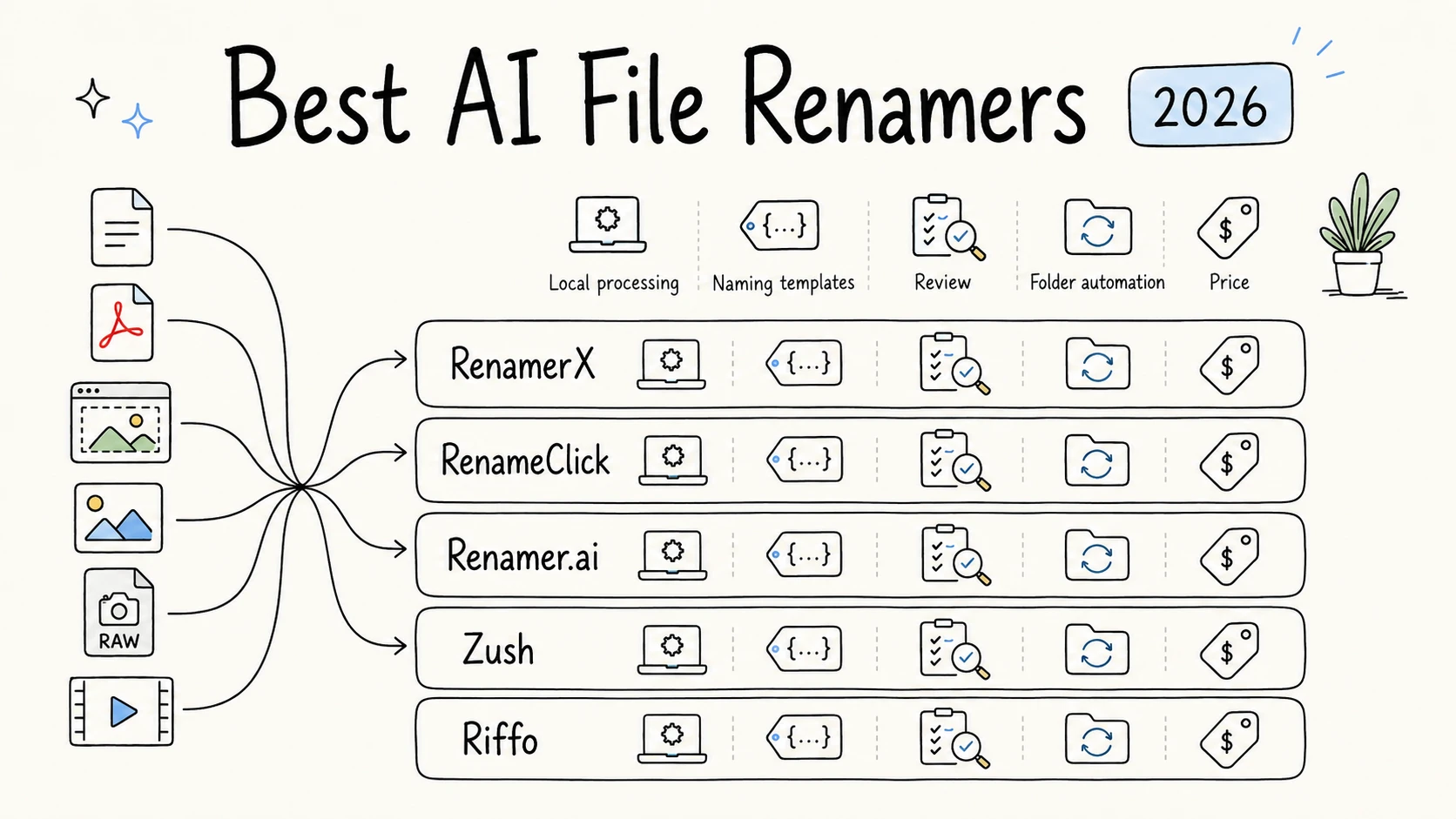
We tested the same mixed set of documents and media with five AI file renamers: RenamerX, RenameClick, Zush, Riffo, and Renamer.ai. We compared naming quality, supported formats, local and cloud processing, naming controls, folder automation, recovery, and price.
Disclosure: RenamerX is our product. See the test method and full relationship statement.
RenamerX offered the best overall balance across file support, naming quality, local processing, output control, automation, recovery, and price. For folders with camera RAW files or videos, compare RenamerX and Zush first. RenamerX and RenameClick provide the easiest built-in local AI options, and RenameClick also emphasizes local search and file moving. Renamer.ai is better suited to detailed cloud extraction from business documents. Riffo is easy to try, but its results need more manual review.
Comparison at a glance
| Comparison | RenamerX | Zush | RenameClick | Renamer.ai | Riffo |
|---|---|---|---|---|---|
| Overall assessment | Best overall balance in this test | Broad formats and flexible naming blocks | Built-in local AI with search, sorting, and file moving | Detailed business-document extraction in the cloud | Free to try; outputs need more review |
| Test result | 50/50 successful | 49/50 successful | 36 successful, 1 failed, 13 unsupported | 34 successful, 2 failed, 14 unsupported | 35 successful, 15 unsupported |
| Naming quality in this test | High: clear, consistent, and rich in useful search terms | High: clear, readable titles; some inferred details need review | Medium: concise and readable, but sometimes missing identifying details | High for business documents: detailed and searchable, but longer and less uniform | Low: frequent repetition or inconsistent structure; occasional instruction text |
| Platforms | macOS and Windows | macOS and Windows | macOS and Windows | macOS and Windows | macOS and web demo |
| AI processing modes | Built-in local AI; ready after the model download | Cloud AI, BYOK, or Offline AI through Ollama | Built-in local AI; ready after the model download, with optional local and cloud providers | Vendor cloud; no local AI mode | Local preprocessing with cloud-assisted AI; no full local mode |
| Supported file formats | Documents, images, HEIC/HEIF, video, and all camera RAW formats in the test | Documents, images, audio, video, design files, and most camera RAW formats in the test | Documents, common images, structured text, and audio; no camera RAW or video | Documents and common images; no camera RAW, video, or audio | Documents and common images in this test; no camera RAW or video |
| Naming conventions and output control | Content and metadata fields, templates, controlled vocabulary, semantic dates, formatting, language, and custom instructions | Templates, metadata and AI blocks, custom blocks, formatting, language, and instructions | AI titles, file and EXIF metadata patterns, language, and custom instructions | Smart Templates control fields and formatting; AI supplies values | Template-based naming with limited public documentation |
| Folder automation | Watch Folders with review or auto apply | Folder monitoring with reusable templates | Auto Flow with per-folder naming and sorting settings | Magic Folders for background renaming | No documented watched-folder workflow |
| File sorting and organization | Template-driven folder placement | Tags and searchable metadata, but no automatic file sorting | AI categories, metadata folders, Match folders, and file moving | Template-based folder structures and move-after-processing | Auto Foldering |
| Review and recovery | Review, edit, Apply, and Undo | Bulk review, Activity history, and one-click revert | Review, auto apply, Undo, and Redo | Review, Activity Log, and Revert | Public recovery details are limited |
| Price | 50 free credits/month; $36 lifetime | 50 free renames; $8/month or $38 one-time | Free analysis and 30 applied changes/month; $8 plus VAT/month or $48 plus VAT lifetime | 25 files/month free; paid plans from $9.95/month | Presented as free; no public paid limit found |
The test result row shows whether each app produced a filename. The filename quality row evaluates the names themselves. An app may support more formats without producing the clearest name for every file, while an app with narrower support may perform well on the documents it accepts.
How we tested
Disclosure: RenamerX is our product. This comparison was tested and written by Sancijun, the creator and developer of RenamerX. We used the same 50-file set for every tool and publish the complete aligned workbook so readers can inspect the results and repeat the test.
We prepared 50 files in different formats. The dataset contained 10 DOCX files, 1 PPTX, 12 PDFs, 8 PNG screenshots and project images, 4 JPG photos, 3 HEIC or HEIF images, 8 camera RAW files, and 4 MP4 videos. The content included project files, meeting records, research papers, invoices, contracts, screenshots, travel media, scans, and old inbox files. We normalized every original filename so it gave the tools no useful clue about the content.
| Test detail | Recorded value |
|---|---|
| Test date | July 29, 2026 |
| Computer | MacBook Air, model Mac16,12 |
| Chip | Apple M4, 10-core CPU with 4 performance and 6 efficiency cores |
| Memory | 16 GB |
| Architecture | arm64 |
| Operating system | macOS 26.5.2, build 25F84 |
| Test set | 50 mixed work files across 8 format groups and 9 content scenarios |
We tested each product with the normal processing mode and naming setup described below:
| Tool | Version | AI mode | Naming setup |
|---|---|---|---|
| RenamerX | v1.0.1 | Built-in local model | General template and built-in default prompt |
| RenameClick | v2.14.2 | Built-in local model | Default naming behavior and built-in default prompt |
| Renamer.ai | v4.5.4 | Default cloud model | Default naming behavior and prompt |
| Zush | v3.8.1 | Default cloud model | Create Date_Smart Title template and built-in default prompt |
| Riffo | v1.0.9 | Default cloud model | category_date_content-title template |
Each app used its normal default workflow. If an app did not support a format, we recorded the file as unsupported. We evaluated filename quality only when the app produced a name. We did not compare processing speed or assign a single accuracy percentage, because filename quality involves several different judgments.
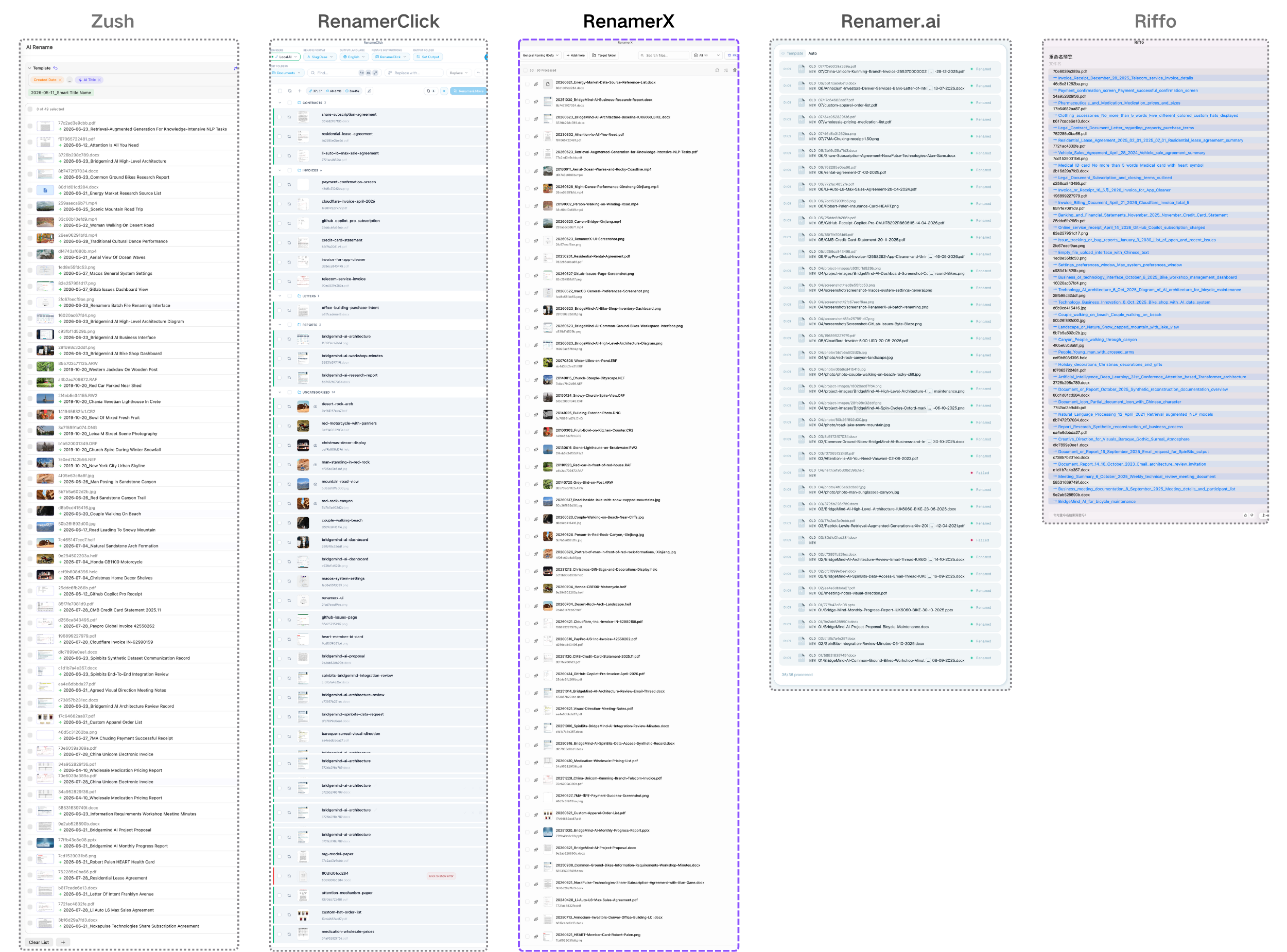
You can download the complete comparison workbook to inspect every original hash, output, failure, and unsupported result.
Results of the five-tool comparison
Format support in the test set
RenamerX and Zush were the only tools in this test that processed both video and camera RAW files. If your folders contain many videos or RAW photos, the practical shortlist is RenamerX or Zush. Zush skipped the ERF file, while RenamerX processed all eight RAW formats.
| Tool | Result on the 50-file test set |
|---|---|
| RenamerX | 50/50 successful, including all 4 MP4 videos and all 8 camera RAW files |
| Zush | 49/50 successful, including all 4 MP4 videos and 7 of 8 RAW files; ERF was unsupported |
| RenameClick | 36 successful, 1 failed, and 13 unsupported; all videos and most RAW files were skipped |
| Renamer.ai | 34 successful, 2 failed, and 14 unsupported |
| Riffo | 35 successful and 15 unsupported |
Check the extensions in your own folders before choosing a tool. RenamerX publishes its complete list in Supported File Types.
Filename quality across the five tools
A useful filename should tell you what the file is, include the words or identifiers you are likely to search for, distinguish it from similar files, and follow a consistent naming convention. We used those four questions to compare the names each tool returned.
- RenamerX produced the most balanced results. Names were clear and consistent, usually retained useful search details, and distinguished similar project images. A few titles still needed wording or punctuation edits.
- Zush produced natural, readable titles, but some were generic or included inferred details. One church-steeple cityscape was titled
New York City Urban Skyline, adding a specific location that needs verification. - RenameClick produced the shortest names, but sometimes dropped organizations, identifiers, and other useful search terms. Two project images both became
bridgemind-ai-dashboard.png, and a GitLab screenshot was incorrectly namedgithub-issues-page.png. - Renamer.ai retained the most detail in many business documents, including organizations, project codes, people, invoice numbers, and document types. The names were highly searchable, but often longer and less uniform.
- Riffo needed the most editing. Some names repeated the same idea, changed structure across the batch, or included instruction text such as
No_more_than_5_words.
Semantic dates add real value, but need careful review
A meaningful date makes files sort chronologically and helps distinguish similar invoices, meeting notes, photos, and reports. Extracting it is difficult because the useful date depends on the file: an invoice issue date, a meeting date, a publication date, and a photo capture date all come from different places.
RenamerX and Renamer.ai usually made stronger semantic date choices in the documents they processed. Renamer.ai correctly identified the workshop date and omitted a date from an undated share subscription agreement. RenamerX produced useful dates across documents and media, although a small number needed correction.
RenameClick and Zush do not extract semantic dates by default. If you need them, you may need to customize the output with custom instructions or prompts.
Date extraction is valuable enough to keep, but important enough to review. A wrong leading date can move a file into the wrong year and spread through an automated folder. The date format guide explains how to define which date a naming rule should use.
Naming conventions and output control
A file naming convention defines what a filename should contain and how the parts should be written. A template applies that convention to a batch. Custom instructions tell the AI which meaning to extract or how to express it. These controls matter because a good title alone does not keep dates, client names, identifiers, separators, and terminology consistent across a folder.
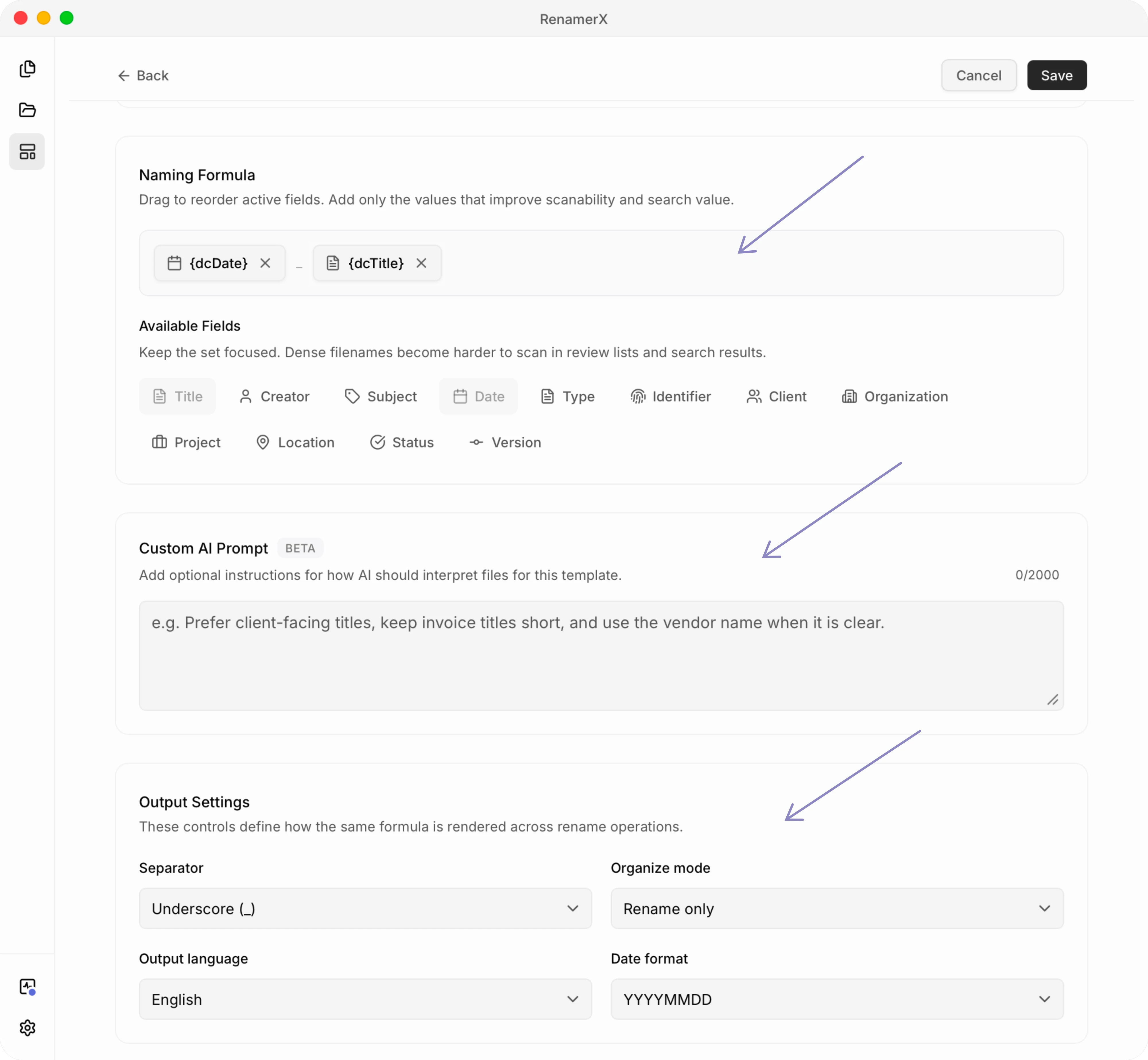
RenamerX separates field extraction from filename construction. Its local model combines content and metadata to identify dates, organizations, titles, document types, identifiers, projects, and locations. The template chooses the fields and their order, then applies date formats, separators, output language, and controlled vocabulary. Custom instructions adapt extraction to a team or document type. The file naming templates guide explains this method.
This gives RenamerX the clearest balance of ease of use, naming consistency, and output control in this comparison. Users can define a repeatable convention without first learning a large block catalog or a special pattern syntax.
Zush provides more than 145 blocks for metadata, media details, finance, legal, client, travel, and AI-detected content. Custom AI Blocks can extract a user-defined value from the file. Templates save block order, formatting, language, date format, custom instructions, metadata, and monitoring settings. The range is flexible, but users need to understand which source each block uses.
RenameClick offers format patterns and custom instructions. Patterns combine an AI-generated title with file dates, EXIF data, audio metadata, counters, and text transformations. Custom instructions can extract content fields such as invoice date, vendor, amount, or patient name and return a fixed filename structure. The syntax takes time to learn, and selecting custom instructions disables the separate pattern and output-language controls.
Renamer.ai Smart Templates control content-derived fields, their order, separators, text case, and date format. The AI supplies the field values, but the public product does not document custom AI instructions comparable to RenamerX, Zush, or RenameClick. Riffo accepted a category-date-title template in our test, though its public documentation explains fewer naming controls.
Local and cloud processing
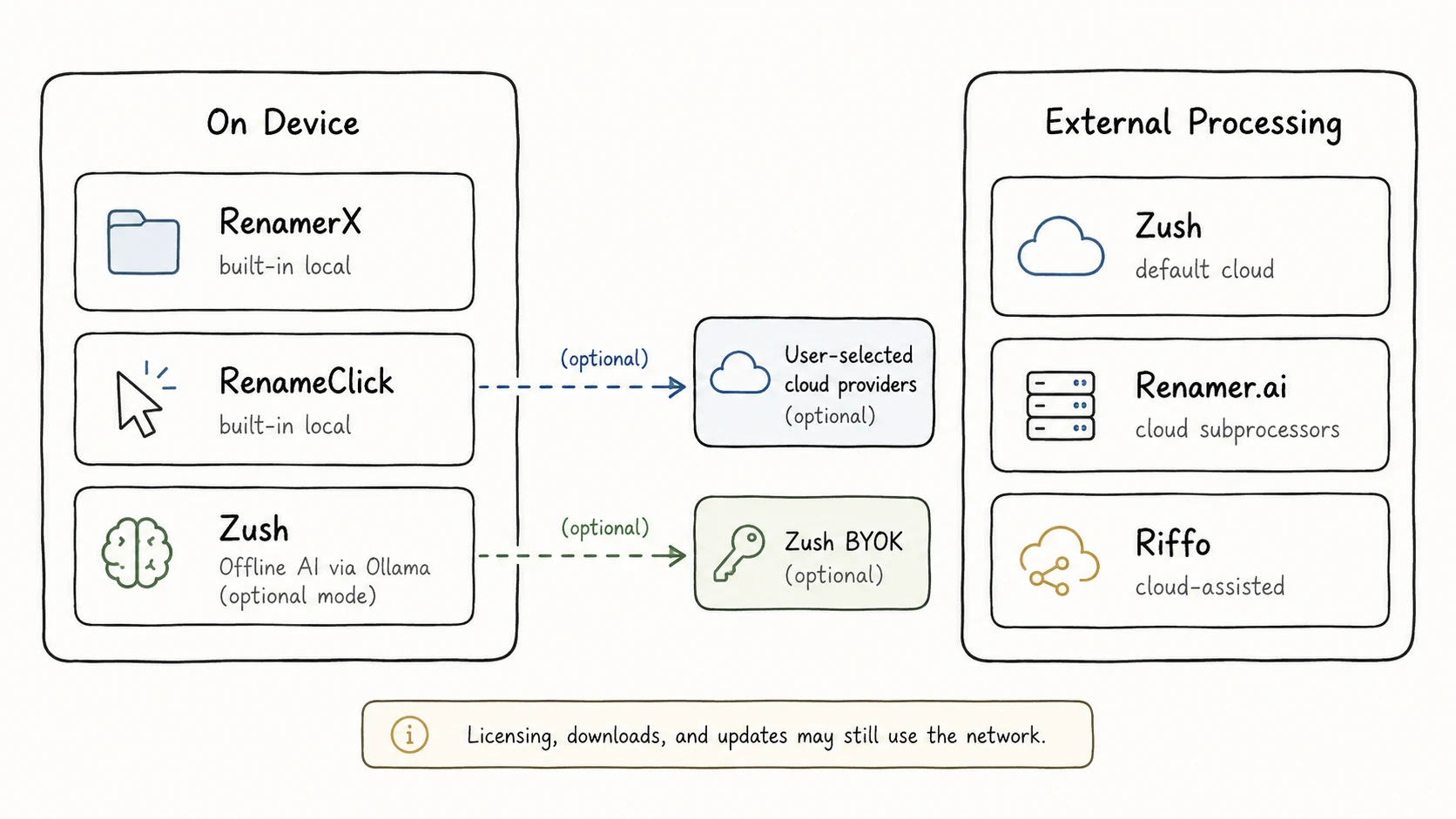
RenamerX and RenameClick are the easiest choices in this comparison for users who prioritize local processing and privacy. Both include built-in local AI and work after the model download without installing or configuring Ollama. RenamerX documents its setup and network boundaries in the Local AI Runtime guide.
Zush offers cloud, BYOK, and Offline AI modes. Its local mode requires a compatible Ollama setup. Renamer.ai sends file content to specialized AI subprocessors, and its privacy policy says those providers may retain inputs for up to 30 days for abuse monitoring. Riffo performs initial processing locally, then sends extracted file characteristics to AI providers and its cloud nodes.
For sensitive contracts, financial records, client files, or unpublished research, start with RenamerX or RenameClick in local mode. Resource downloads, licensing, purchases, updates, and diagnostics described in the privacy policy may still use the network. Read the current policies before deployment: RenameClick privacy, Zush privacy, Renamer.ai privacy, Riffo privacy, and RenamerX security and privacy.
Automation, file sorting, and recovery
| Need | Suitable choices | Why |
|---|---|---|
| Rename new files in a monitored folder | RenamerX, RenameClick, Zush, Renamer.ai | Watch Folders, Auto Flow, Zush Monitor, and Magic Folders can process new files as they arrive |
| Rename and place files into a folder structure | RenamerX, RenameClick, Renamer.ai, Riffo | They document template-driven placement, categorization or moving, folder-pattern variables, or Auto Foldering |
| Rename without automatic file sorting | Zush | Zush supports monitoring and renaming, but does not automatically categorize files into folders |
| Review changes and reverse applied batches | RenamerX, RenameClick, Zush, Renamer.ai | They document review plus Undo, Redo, Activity history, or Revert |
Folder automation, review, and recovery are common across RenamerX, RenameClick, Zush, and Renamer.ai. RenamerX, RenameClick, and Renamer.ai also combine them with automatic file sorting. Zush does not support automatic file sorting, so it is not suitable when renamed files must be categorized into folders. The RenamerX Watch Folders guide explains its review and auto-apply options.
An incorrect field or duplicate title can repeat across a monitored folder. Use review mode until the naming rule works on a representative batch.
Traditional batch renamers may be better when the rule depends only on the existing filename, a counter, a prefix, or a regular expression. AI is useful when the new name depends on information inside the file. The guide to renaming files by content explains how that works; this comparison focuses on choosing a product.
Price and long-term value
| Tool | Free use | Paid option |
|---|---|---|
| RenamerX | 50 credits per month | $36 lifetime, unlimited credits and full automation |
| Zush | 50 AI renames | $8/month or $38 one-time for PRO |
| RenameClick | Unlimited AI analysis and 30 successful apply operations per month | $8 plus VAT/month or $48 plus VAT lifetime |
| Renamer.ai | 25 files per month | $9.95/month for 200 files, $29.95 for 1,000, or $99.95 for 5,000; the pricing page displays monthly equivalents billed annually |
| Riffo | Mac app and online demo presented as free; online demo allows up to 10 files per batch | No public paid plan or clear usage limit found |
RenamerX and Zush have the most attractive long-term prices among the products with clearly documented paid plans. Their lifetime licenses cost $36 and $38. RenameClick also offers a lifetime license, but at $48 plus VAT. Renamer.ai charges by monthly file allowance, while Riffo does not publish enough detail to judge its long-term limits. Confirm current prices before buying; the RenamerX pricing page is the source for its current plan details.
Tool-by-tool assessment
RenamerX: mixed formats, local AI, and structured naming
RenamerX is the strongest fit here for mixed documents and media that need local processing, structured naming, folder placement, and recovery in one workflow. It handles one-time cleanup and recurring files without a separate Ollama setup. A few generated titles still needed wording or punctuation edits.
Zush: broad format support and flexible naming blocks
Zush is a strong choice when broad format support and granular filename construction matter most. Its cloud, BYOK, and Ollama modes provide several processing options, but Offline AI needs additional setup. Zush does not support automatic file sorting.
RenameClick: local file management beyond renaming
RenameClick suits users who want local AI, content search, categorization, file moving, and Auto Flow in one desktop app. Its concise names are easy to scan, though they sometimes omit identifiers or entities. It skipped most RAW files and all four videos in this test.
Renamer.ai: detailed document extraction with a metered cloud model
Renamer.ai is most compelling for business documents where organizations, project codes, people, invoice numbers, and document types improve search. Smart Templates, folder structures, Magic Folders, and Revert support repeated processing. The limits are fewer supported media formats, cloud AI subprocessors, recurring usage-based pricing, and longer names.
Riffo: easy to try, but results need more review
Riffo is easy to test through its Mac app and online demo, and it includes Auto Foldering. Its outputs in this test included repeated phrases, inconsistent field order, and instruction text, so it is better kept in a manual review process. Public documentation also provides less detail about desktop format support and recovery.
Which AI file renamer should you choose?
Start with the files you need to rename and your privacy requirements:
- List the extensions in the real folder. If it includes RAW, HEIC, HEIF, video, audio, design files, or email, remove tools that do not cover the required formats.
- Decide whether file content may leave the device. If it may not, test RenamerX or RenameClick in built-in local mode, or evaluate Zush with Ollama rather than its cloud default.
- Write the naming rule before testing the model. Check date meaning, required identifiers, field order, separators, and missing values.
- Decide whether the app should only rename, or also categorize and move files. If you need automatic file sorting, compare RenamerX, RenameClick, Renamer.ai, and Riffo.
- Require review and recovery before enabling a watched folder. Run the same representative batch twice and inspect edge cases, duplicates, and uncertain dates.
In this 50-file test, RenamerX offered the best balance across supported formats, local processing, structured naming, organization, automation, recovery, and price. Zush is the closest alternative for broad format support. RenameClick makes sense when local search, categorization, built-in local audio transcription, and file moving matter more than RAW and video support. Renamer.ai is better suited to detailed cloud extraction from business documents when longer, less uniform filenames are acceptable.
Download a free option, copy 20 to 50 representative files into a test folder, and compare the proposed names against the convention you plan to keep. RenamerX includes 50 credits each month, so a test of this size can be repeated before buying or enabling Watch Folders. The credits and license guide explains what the free and Pro plans include.
Official product sources
- RenamerX product page and supported file types
- RenameClick product and pricing, supported files, changelog, format patterns, custom instructions, and privacy policy
- Zush product, features, formats, and pricing, supported-file documentation, templates, Offline AI setup, and privacy policy
- Renamer.ai product, formats, automation, and pricing, product changelog, and privacy policy
- Riffo product, online demo, and privacy policy