Local AI vs Cloud AI for File Organization
Local AI vs Cloud AI for File Organization
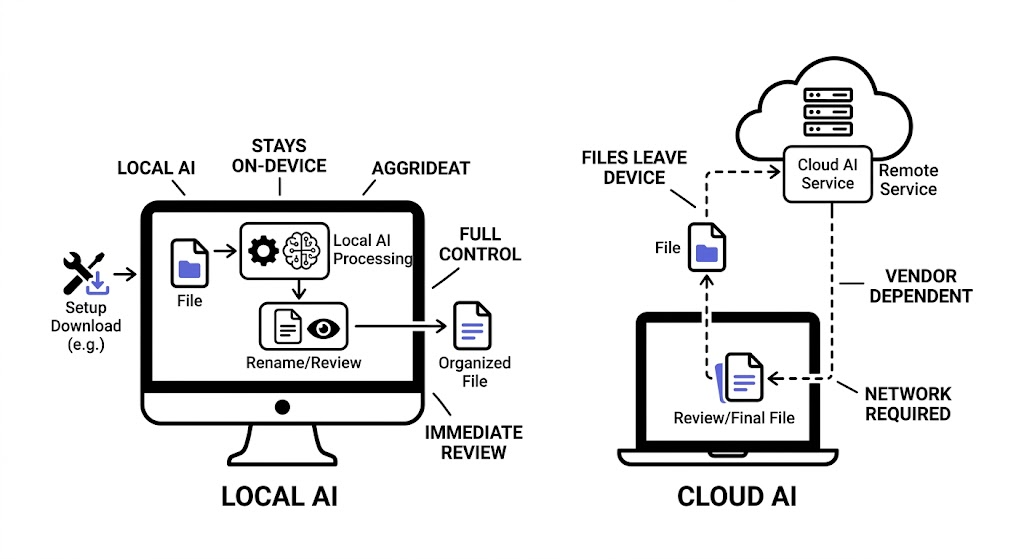
Local AI is usually the better fit for file organization when privacy, trust, and predictable desktop workflows matter. Cloud AI can still be useful in some cases, but it introduces a different tradeoff: less local control in exchange for remote processing and, in some tools, easier centralized access.
For many people, the question is not whether cloud AI is good or bad. It is whether their files should leave the device at all for the job they need done. If the workflow involves local documents, screenshots, or client materials, that question matters early.
What local AI means in file organization
Local AI means the file understanding and rename suggestion workflow runs on the user's device after the required resources are installed.
In practice, that usually means:
- files stay on the device during normal processing
- runtime behavior depends on local hardware
- performance can be tuned with local settings
- privacy expectations are easier to explain
That privacy angle is easier to reason about when it is treated as a risk-management question rather than a slogan. NIST's Privacy Framework is a useful reference point for thinking about how products should identify and manage privacy risk: NIST Privacy Framework.
This model is especially relevant for desktop file workflows where trust and data control matter as much as convenience.
What cloud AI means in file organization
Cloud AI means some or all of the file understanding workflow depends on remote services.
That can make sense when a product is built around:
- shared cloud libraries
- team access through a web platform
- centralized processing
- server-side workflows
But it also changes the privacy and control model. Once files or file-derived content leave the device, the user needs a stronger reason to accept that tradeoff.
That is also where AI risk becomes broader than privacy alone. NIST's AI Risk Management Framework explicitly frames trustworthiness as something that has to be incorporated into how AI systems are designed and evaluated: NIST AI Risk Management Framework.
The real comparison
| Factor | Local AI | Cloud AI |
|---|---|---|
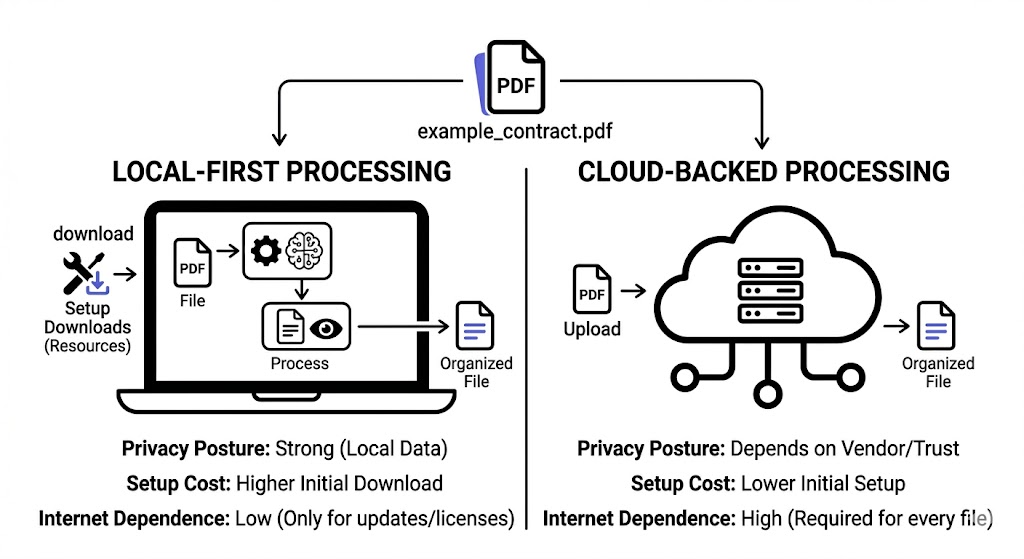
| Privacy posture | Stronger for sensitive local workflows | Depends on vendor handling and trust |
| Desktop control | Higher, especially in review-first tools | Often lower if processing is remote or hidden |
| Setup | Usually heavier on first launch | Often lighter at first |
| Ongoing speed | Depends on local hardware and runtime settings | Depends on network and service performance |
| Offline readiness | Better after setup | Usually weaker |
| Team-wide centralization | More limited by default | Often easier to centralize |
Why local AI often fits file organization better
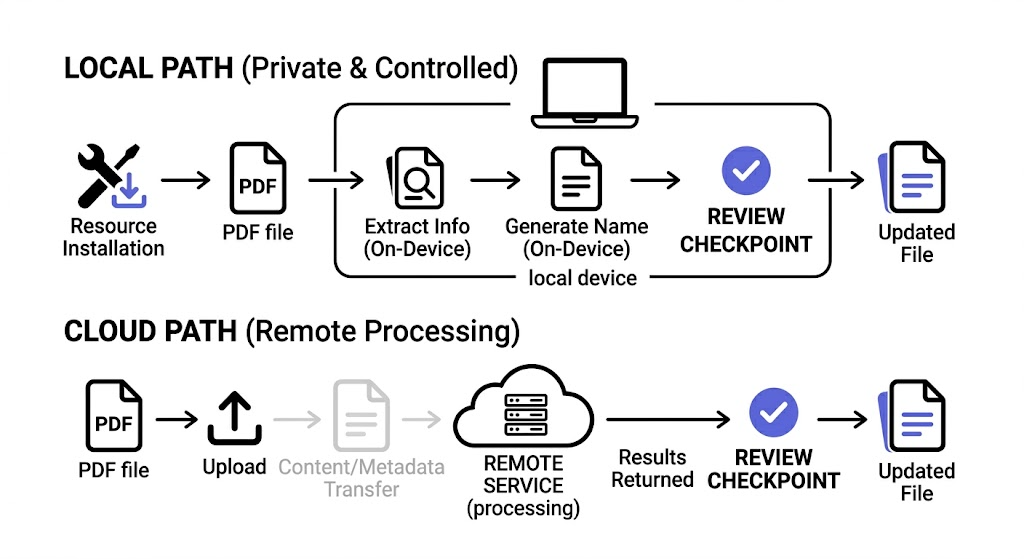
File organization is usually a desktop trust problem before it is a raw model problem.
People want to know:
- where the files are processed
- whether they can review the result
- whether mistakes can be undone
- whether private materials stay private
That is why local AI often feels like a more natural fit for file organization than for many other AI categories. The files already live locally, and the user usually wants them to stay that way.
When cloud AI can still make sense
Cloud AI may still be a reasonable choice when:
- the files already live in a cloud platform
- the workflow is built for shared remote access
- the user is comfortable with remote processing
- the product's central value is not local desktop control
So this is not a moral judgment about cloud AI. It is a workflow judgment.
The hidden issue: trust is not just privacy
Privacy is a major factor, but not the only one.
Even if users accept remote processing, they still need:
- predictable naming behavior
- visible review steps
- clear folder logic
- undo or rollback
That means cloud AI can still feel risky if the workflow behaves like a black box.
Local AI does not automatically solve that. It simply makes one part of the trust model stronger.
How RenamerX handles the local AI tradeoff
RenamerX is positioned as a local-first AI file renamer and organizer. That means the normal file understanding and rename suggestion flow is designed to stay on-device after setup resources are downloaded.
The product also exposes runtime controls such as:
- performance mode
- context size
- GPU policy
- parallel slots
- image detail
That matters because it makes local AI a configurable desktop workflow, not just a hidden claim.
For the setup and runtime details, see /docs/getting-started/installation, /docs/customization/local-ai-runtime, and /docs/help-support/security-and-privacy.
If you want the adjacent workflow questions, read /blog/ai-file-organizer-what-it-actually-needs-to-get-right and /blog/why-undo-matters-in-ai-powered-file-automation. If you want to test a local-first workflow on your own files, compare plans on /pricing.
What to ask before choosing local or cloud AI
Ask these questions:
- Do these files need to stay on-device?
- Is review before apply important?
- Am I organizing a personal desktop library or a cloud-first team workspace?
- Would I trade some setup effort for stronger privacy and control?
Those questions usually lead to a clearer answer than generic AI marketing language.
FAQ
Is local AI better than cloud AI for file organization?
Usually yes when privacy, local control, and desktop trust matter. Cloud AI can still fit some remote or shared workflows, but local AI is often a more natural match for organizing files that already live on the device.
Does local AI mean the app never uses the internet?
Not necessarily. A local-first app may still use the internet for setup downloads, license activation, or billing-related tasks while keeping normal file understanding and rename generation on-device.
Is cloud AI always less private?
It usually introduces more privacy considerations because remote processing is involved. The real question is whether that tradeoff is acceptable for the workflow and file types involved.
Is local AI slower than cloud AI?
It depends on hardware and runtime settings. Local AI can feel slower on smaller machines, but it also avoids some network dependence and can be more predictable once configured.
Conclusion
Local AI versus cloud AI is not mainly a question of which sounds more advanced. It is a question of where trust should live.
For desktop file organization, local AI often wins because it aligns with how users already think about private files, controlled workflows, and on-device review. If the files live locally and the user wants clear control, local-first is usually the stronger default.