AI File Organizer: What It Actually Needs to Get Right
AI File Organizer: What It Actually Needs to Get Right
An AI file organizer is a tool that helps classify, rename, and optionally group files based on file content or metadata instead of only manual folder rules. A good one does not just move files around quickly. It gets naming, grouping, review, and trust right at the same time.
That distinction matters because many people hear AI file organizer and imagine two very different products. One is a useful desktop workflow assistant. The other is a black box that starts moving local files without clear logic. If you care about your files, those are not the same thing.
What an AI file organizer should actually do
At a practical level, an AI file organizer should help answer three questions:
- What is this file?
- What should it be called?
- Should it stay where it is, or belong in a clearer folder structure?
The best tools answer those questions in a way that is visible and reviewable, not mysterious.
That trust layer is not just a product preference. NIST's AI Risk Management Framework treats trustworthiness as something that should be designed, evaluated, and managed explicitly rather than left as a vague claim: NIST AI Risk Management Framework.
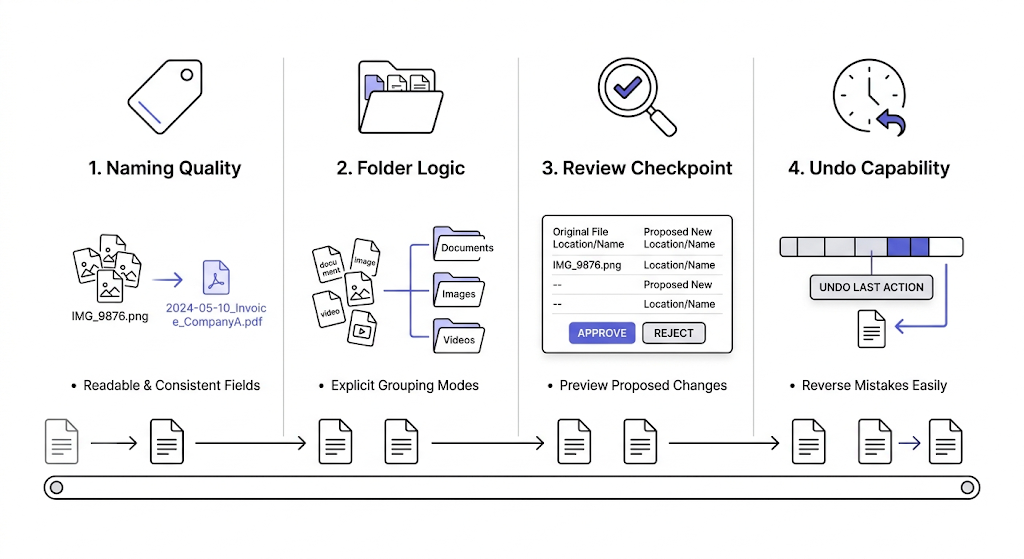
The four jobs an AI file organizer must get right
1. Naming must be more consistent than manual cleanup
If the tool only generates slightly different vague names, it is not organizing much.
Good organization starts with filenames that are:
- readable
- searchable
- consistent across similar files
- built from meaningful fields such as date, subject, type, project, or identifier
This is why file organization is tightly connected to file naming conventions rather than separate from them.
2. Grouping logic must stay predictable
If a tool organizes files into folders, the folder logic must be easy to understand.
In RenamerX terms, that usually means keeping organization modes explicit:
- flat
- subject tree
- type tree
- project tree
Each mode should have a clear reason to exist. For example, a project tree works when files belong to recurring projects. A type tree works when document classes matter more than project names.
3. Review has to exist before trust can exist
AI organization feels useful only when the user believes the output makes sense.
That means a good tool should provide:
- preview before apply
- visible statuses
- exception handling
- a way to undo mistakes
Without those controls, the tool may be fast but hard to trust.
4. It should work with real file variation
Real desktop libraries contain PDFs, images, videos, screenshots, exports, and messy filenames from many sources. A useful AI organizer must work across that variation without pretending every file is equally easy to classify.
What weak AI file organizers tend to get wrong
They optimize for surprise instead of predictability
If users keep asking why the tool chose a name or folder, the system is not helping enough.
They treat file organization as only a folder problem
Moving files without improving filenames often creates cleaner folders but not a better archive.
They skip the review stage
This is where trust usually breaks. Hidden automation makes errors feel worse because the user did not see them coming.
They overclaim file understanding
Some file types will always be easier than others. Tools that imply perfect understanding usually create disappointment.
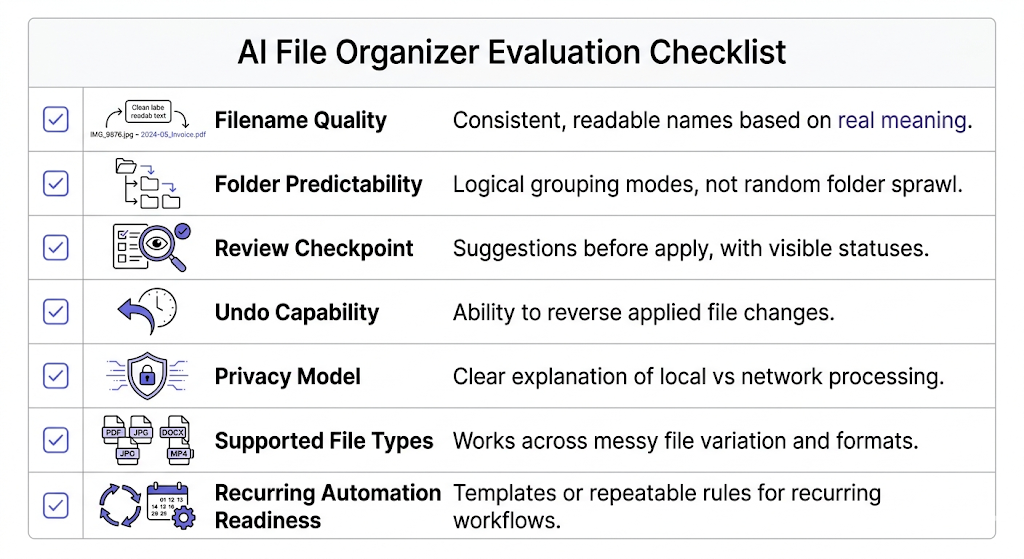
What to look for when choosing an AI file organizer
| Evaluation point | What good looks like |
|---|---|
| Naming quality | Consistent, readable filenames based on real file meaning |
| Folder logic | Explicit grouping modes, not random folder sprawl |
| Review model | Suggestions before apply, with visible statuses |
| Undo | Applied changes can be reversed |
| Privacy model | Clear explanation of what stays local and what uses the network |
| Reusability | Templates or repeatable rules for recurring workflows |
If a tool looks clever but fails on these basics, it is usually less useful than it first appears.
The privacy row matters for the same reason. NIST's Privacy Framework treats privacy as a risk-management concern that should be made understandable and governable, which is a useful lens for local file workflows: NIST Privacy Framework.
Where manual rules still beat AI organization
Manual folder rules still work well when:
- the workflow is simple and narrow
- file names already follow a strong convention
- the logic is based on one fixed path or extension rule
- no content understanding is needed
AI organization becomes more useful when:
- filenames are inconsistent
- content meaning matters
- repeated batches need more than string replacement
- users want a system, not just a one-time cleanup
For that comparison directly, read /blog/ai-file-organizer-vs-manual-folder-rules-what-actually-works.
How RenamerX approaches AI file organization
RenamerX treats AI file organization as a controlled workflow rather than an invisible sorting engine.
The product is built around:
- local-first processing after setup
- naming templates
- explicit organize modes
- Batch Rename for one-off workflows
- Watch Folders for recurring intake
- review-first safety and undo
That matters because the tool does not ask users to trust a final answer blindly. It helps them generate readable filenames and optional folder structure from file content, then review the result before it becomes real.
If you want the product details behind that workflow, see /docs/customization/templates, /docs/core-workflows/batch-rename, and /docs/core-workflows/watch-folders. If the main open question is privacy rather than grouping logic, read /blog/local-ai-vs-cloud-ai-for-file-organization. If you want to test the workflow on your own files, compare plans on /pricing.
FAQ
What is an AI file organizer?
An AI file organizer is a tool that uses file content, metadata, or both to help name and optionally group files more intelligently than manual foldering or simple string-based rename rules.
What should a good AI file organizer get right?
It should get naming, grouping, review, and undo right. If any one of those is weak, the tool may still look impressive but will be harder to trust in real file workflows.
Is an AI file organizer the same as a cloud document system?
No. Some tools work on local desktop files and focus on naming and organization workflows rather than acting like a full document management system.
Can an AI file organizer replace manual folders completely?
Not always. Manual folders still help in simple workflows. The strongest setup is usually a mix of good filenames, light folder structure, and controlled automation where it truly saves work.
Conclusion
An AI file organizer is only as good as the parts users must trust after the demo ends.
That means the real standard is not whether it can classify a file once. It is whether it can help build a consistent, reviewable, and predictable organization system over time. If it gets that right, it becomes useful. If not, it becomes another tool that looked smarter than it felt.