AI File Organizer vs Manual Folder Rules: What Actually Works?
AI File Organizer vs Manual Folder Rules: What Actually Works?
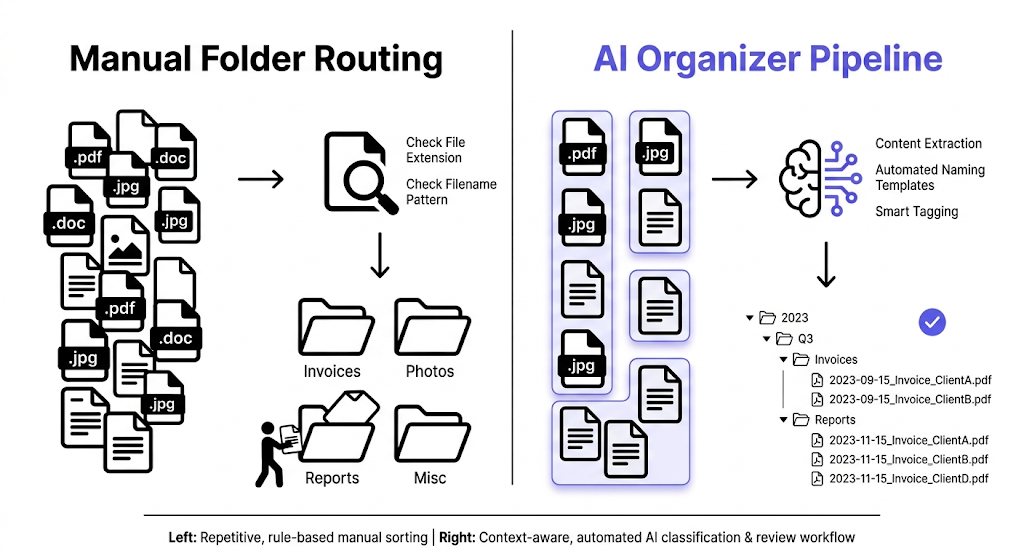
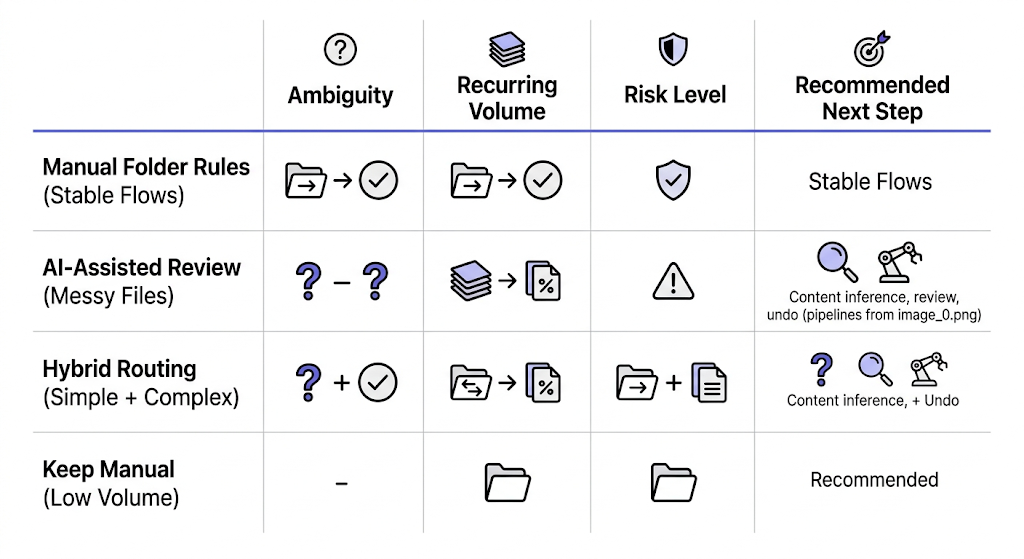
Manual folder rules work best for narrow, predictable file flows. AI file organizers work better when filenames are inconsistent, file meaning matters, and simple path-based rules are no longer enough. The right choice depends on how much ambiguity exists in your file workflow.
In other words, this is not a contest between old and new. It is a question of which method matches the real mess in front of you.
Where manual folder rules still work well
Manual folder rules are still effective when the workflow is simple.
Examples:
- move all invoices into one invoices folder
- route screenshots into a screenshots folder
- separate images from documents by extension
In these cases, the rule does not need to understand the file deeply. It only needs a stable signal such as path, extension, or source folder.
That is why manual rules remain useful. They are easy to reason about when the workflow is narrow.
Where manual folder rules start to fail
Manual rules become weaker when:
- files arrive with poor names
- the same folder contains mixed document types
- file meaning matters more than file extension
- users want readable filenames, not just relocation
- recurring exceptions start piling up
Once that happens, the rule set often grows more complicated while the results become less satisfying.
What AI file organizers handle better
AI file organizers are stronger when the system needs to infer useful meaning from the file instead of only following static path logic.
Examples:
- naming PDFs based on document meaning
- grouping files by subject, type, or project
- generating clearer filenames for screenshots or image assets
- applying one naming template across messy real files
The advantage is not that AI makes manual rules obsolete. The advantage is that AI can help in places where rigid folder rules stop being expressive enough.
That distinction matters even more when trust is part of the workflow. NIST's AI Risk Management Framework treats trustworthiness as something that should be designed and managed explicitly, not assumed because a system looks intelligent: NIST AI Risk Management Framework.
A direct comparison
| Question | Manual folder rules | AI file organizer |
|---|---|---|
| Best for | Narrow, repeated routing | Mixed files where naming and meaning matter |
| Main signal | Path, extension, filename pattern | Content, metadata, plus structured naming rules |
| Naming quality | Usually unchanged unless separately handled | Can improve filenames and organization together |
| Predictability | High when rules are simple | High only if review and templates exist |
| Edge cases | Multiply as rules grow | Need review and exception handling |
| Trust model | Clear if the rule is visible | Clear only if the workflow is reviewable |
The real tradeoff is not intelligence versus simplicity
The real tradeoff is this:
- manual rules are easier to explain
- AI workflows can solve harder naming and grouping problems
The moment an AI organizer becomes useful is when the file problem is no longer just put PNGs in this folder or replace text in these names. It becomes useful when the user needs file meaning, not just pattern matching.
Why review matters more in AI workflows
A manual rule can be trusted quickly because the logic is usually obvious. An AI workflow needs a stronger review layer, especially at the start.
That means the useful AI organizer is not the one with the most dramatic automation claim. It is the one with:
- visible suggested results
- editable outputs
- controlled folder logic
- undo after apply
Without those, the AI workflow may solve a harder problem but still feel riskier than simple rules.
When you should keep using manual rules
Stay with manual rules when:
- the workflow is narrow and stable
- filenames are already good enough
- folder routing is the only goal
- the team values very explicit logic over richer naming
Examples:
- archived exports by extension
- simple download cleanup for one file type
- fixed path routing with no content-based decisions
When an AI organizer becomes the better option
Consider AI organization when:
- the file name should reflect the content
- the batch contains documents, images, or screenshots with weak original names
- users need subject, type, or project grouping
- the library keeps growing and manual rules keep sprouting exceptions
At that point, the stronger system is often the one that combines extraction, templates, review, and optional folder organization.
Microsoft's PowerRename is a good example of where the manual side still works well. It handles preview, regex, search and replace, and undo, but it still operates mainly on text patterns already present in the filename: PowerRename utility for Windows.
How RenamerX fits this comparison
RenamerX sits between rigid rule engines and opaque automation. It uses local extraction plus explicit naming templates, then lets users decide whether the output stays flat or organizes into subject, type, or project structures.
That means the product can handle problems that manual folder rules usually do not solve well, while still keeping the workflow visible through:
- Batch Rename
- Watch Folders
- Review First
- Undo
So the comparison is not AI instead of control. It is AI with a control layer.
If you want the product details behind that control model, see /docs/core-workflows/batch-rename, /docs/core-workflows/watch-folders, and /docs/help-support/security-and-privacy. If you want adjacent trust questions, read /blog/ai-file-organizer-what-it-actually-needs-to-get-right and /blog/local-ai-vs-cloud-ai-for-file-organization. If you want to test the workflow on your own files, compare plans on /pricing.
FAQ
Are manual folder rules still useful?
Yes. They work well for simple routing problems with stable signals such as extensions, folders, or basic filename patterns. They become weaker when file meaning matters more than path logic.
When is an AI file organizer better than manual folder rules?
It is better when filenames are messy, files are mixed, or the workflow needs naming and grouping based on file meaning rather than only on location or extension.
Is AI file organization less predictable than manual rules?
It can be if the tool hides too much. The better AI workflows keep suggestions visible, let users review results, and offer undo so predictability stays part of the experience.
Should I replace all manual rules with AI organization?
Not necessarily. Many workflows benefit from using manual rules for simple routing and AI-assisted workflows for the harder naming and classification problems.
Conclusion
Manual folder rules and AI file organizers solve different levels of the same problem.
Use manual rules when the workflow is simple and explicit. Use an AI organizer when you need the system to understand enough about the file to improve naming and grouping, not just move it. In practice, what actually works best is choosing the smallest tool that still solves the real problem.