Rename and organize messy files with local AI
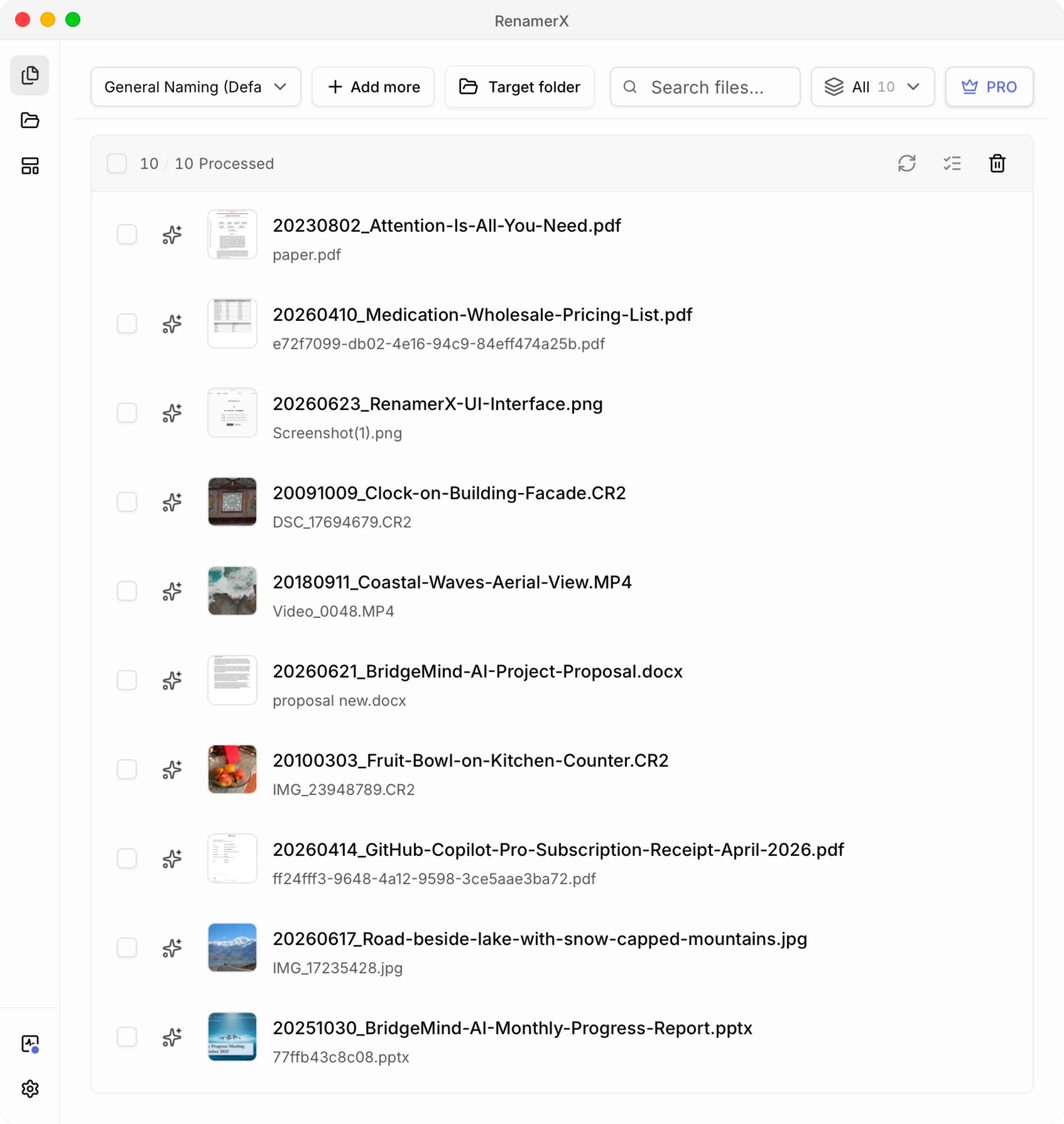
RenamerX reads what’s inside your documents, images, and videos and suggests clear, searchable filenames that follow your naming rules. Files stay on your device—no uploads. Review every suggestion before anything changes, undo anytime.
Get started for free, no credit card required
See RenamerX in action
Watch how RenamerX turns file chaos into a clean system in minutes.
Choose a naming template
Define your exact file structure. Tell RenamerX what specific details to extract, like dates, clients, or amounts.
Add files or folders
Drop a messy batch into RenamerX. Everything stays on your machine from the start.
Let local AI read the files
RenamerX identifies the fields you care about and builds consistent names following your template.
Review, apply, and undo
Check every suggestion, fix edge cases, then rename in bulk. If anything looks wrong later, undo brings your files back.
Why RenamerX?
RenamerX combines local AI, template-driven naming, and a review-first workflow so you can clean up large file collections without giving up control.
Review first. Undo anytime.
Preview every suggestion, edit what matters, and roll back applied changes if you need to.
Local AI, by default
Read file content on your device and generate suggestions locally. Your files stay under your control from import to apply.
Batch rename without manual cleanup
Import an entire folder, generate consistent names in one pass, and fix edge cases before anything changes on disk.
Watch folders with safe automation
Monitor incoming files continuously, debounce noisy file events, and only process files after they settle.
Organize as you rename
Rename files and place them into clean Subject, Type, or Project folders in the same workflow.
Templates that keep names consistent
Turn your naming convention into a reusable template with structured fields, controlled vocabularies, and predictable output.
Works with the files you actually use
Simple, transparent pricing
One-time purchase, lifetime license. Built for real-world personal and small-team workflows.
RenamerX runs locally on your device. Your license key appears after checkout and in your email receipt. Core features keep working forever.
Supported AI providers
Use built-in local AI, or connect your own provider.
RenamerX Built-in
Built-in Qwen3.5 4B model
IncludedOn deviceOllama
Run local models
No API keyYour serverLM Studio
Local model server
Key optionalYour server

OpenAI
Vision-capable models
API keyCloudGoogle Gemini
Gemini models
API keyCloudCustom Provider
Use other OpenAI-compatible API
Key optionalYour endpoint

Built-in Local AI runs on Apple silicon and Windows x64 PCs with a compatible GPU. It downloads about 3.4 GB of model files, and RenamerX checks compatibility during setup.
File renaming guides
Learn how to rename files by content, rename in batches, build a naming convention, and compare AI file renamers.
Explore all guidesFrequently asked questions
Answers to the questions people ask before trusting an AI file organizer with real files.
Still comparing AI file renamers?
Start free on a messy folder first. You can review every suggestion before RenamerX changes anything on disk.
Find RenamerX on