Watch Folders vs Batch Rename: Which Workflow Fits Your Files?
Watch Folders vs Batch Rename: Which Workflow Fits Your Files?
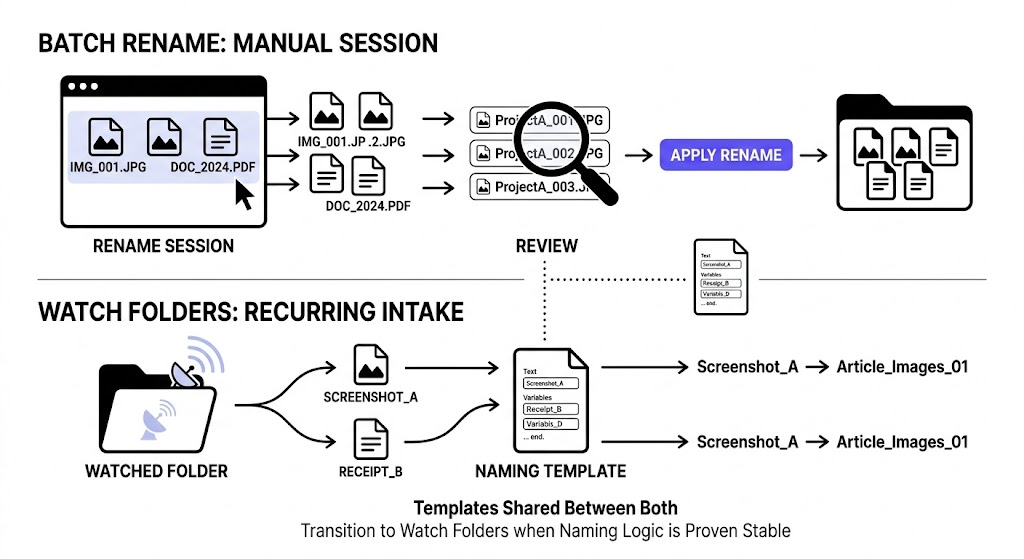
Batch Rename is the better workflow for one-off or ad hoc cleanup. Watch Folders is the better workflow for repeated file intake where the same naming pattern should keep applying over time. The right choice depends less on file type and more on whether the workflow is recurring and stable.
If you are still learning the naming pattern, Batch Rename is usually safer. If the same files keep arriving in the same place and the rule is already trusted, Watch Folders becomes the better fit.
The core difference
The easiest way to think about it is this:
- Batch Rename is a workspace you open intentionally for a set of files.
- Watch Folders is a standing workflow that waits for files to arrive.
Both can use the same naming template. The difference is when and how the workflow is triggered.
When Batch Rename is the better choice
Batch Rename is better when:
- the cleanup is one-off
- the files are already in front of you
- the naming pattern is still being tested
- the batch contains edge cases you want to review closely
- you want immediate control over each run
Examples:
- renaming last month's invoices
- cleaning up screenshots for a new article
- normalizing a project archive before sharing it
- testing a new naming template on real files
Built-in OS tools still cover part of this lane. Microsoft's PowerRename is a strong Windows example, and Finder already supports multi-file rename on Mac, which is why Batch Rename has to justify itself with more than simple text replacement: PowerRename utility for Windows and Rename multiple files on Mac.
Batch Rename is the right environment when you want a clear start, review period, and end to the rename session.
When Watch Folders is the better choice
Watch Folders is better when:
- similar files keep arriving repeatedly
- the folder scope is stable
- the template is already validated
- you want less repeated manual intake work
- the workflow benefits from ongoing automation
Examples:
- recurring screenshot capture folders
- a narrow Downloads intake lane
- a folder where exported reports arrive regularly
- a repeated asset prep folder for content or product images
The key word is repeated. If the folder behavior is not predictable, a watched workflow is usually premature.
A direct comparison
| Workflow | Best for | Main strength | Main risk |
|---|---|---|---|
| Batch Rename | One-off cleanup and template testing | High control and easy review | Repeated manual effort |
| Watch Folders | Stable recurring intake | Ongoing automation | Trust issues if the scope is too broad or the template is unproven |
A simple decision framework
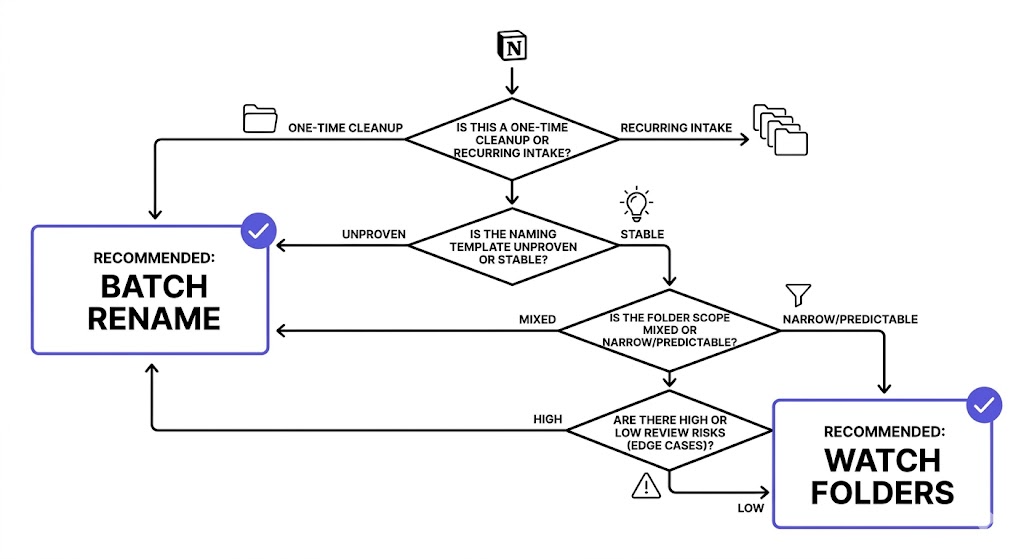
Choose Batch Rename if the answer to any of these is yes:
- Is this a one-time cleanup?
- Am I still testing the naming rule?
- Do I expect many edge cases?
- Do I want to inspect the whole batch before anything changes?
Choose Watch Folders if the answer to most of these is yes:
- Do similar files keep arriving automatically?
- Is the folder scope narrow and stable?
- Has the template already worked well in real batches?
- Would repeated manual import now be wasted effort?
Why many workflows should start in Batch Rename
Even when the end goal is automation, Batch Rename is often the better starting point because it helps you validate:
- the template
- the file scope
- the edge cases
- the date logic
- the trust level of the output
Once those are stable, moving the same logic into Watch Folders becomes much safer.
Why Watch Folders can save real time
If the workflow truly repeats, Watch Folders removes repeated manual intake. That is especially useful when:
- the same source generates files daily or weekly
- filenames should follow the same structure every time
- the user no longer wants to recreate the same batch setup repeatedly
But that time saving is only real if the watched lane is narrow enough to stay predictable.
How RenamerX implements these workflows
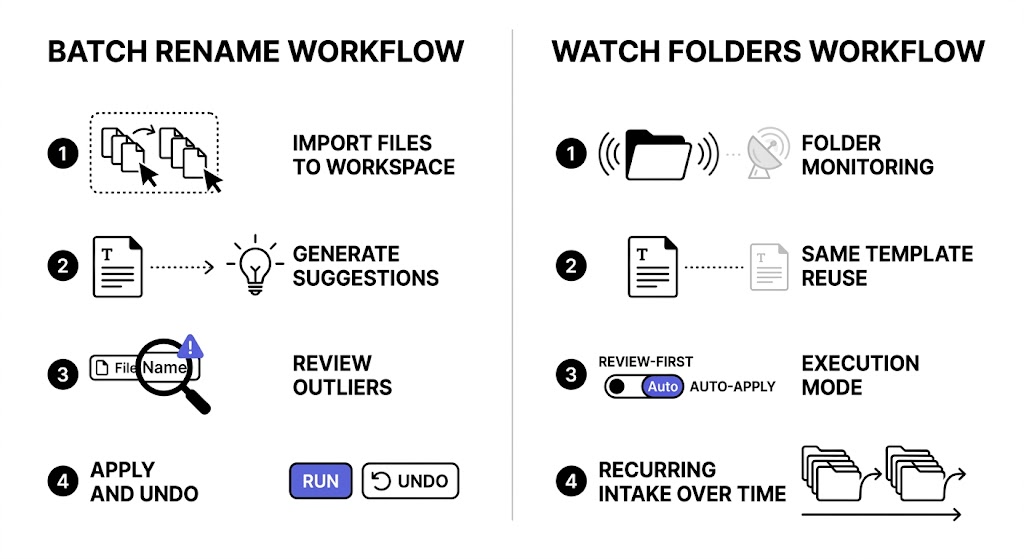
In RenamerX, Batch Rename is the one-off workspace for importing files, generating suggestions, reviewing results, and applying or undoing changes.
Watch Folders extends the same template-driven logic into recurring folders. The current workflow supports two execution modes:
- Review First
- Auto Apply
That means the transition from manual batch work to recurring automation can be gradual rather than all-or-nothing.
For the workflow details, see /docs/core-workflows/batch-rename and /docs/core-workflows/watch-folders.
If the bigger question is how to build trust before turning on recurring automation, read /blog/review-first-vs-auto-apply-how-to-trust-file-automation-gradually and /blog/why-undo-matters-in-ai-powered-file-automation. If you want to test both workflows on your own files, compare plan access on /pricing.
FAQ
What is the difference between watch folders and batch rename?
Batch Rename is a manual session for a selected set of files. Watch Folders is a recurring workflow that monitors a folder and applies the same naming logic as new files arrive.
Which is safer, watch folders or batch rename?
Batch Rename is usually safer when you are still testing the rule or handling mixed files. Watch Folders becomes safe when the folder scope is narrow and the naming pattern has already proved reliable.
Should I start with watch folders right away?
Usually not. Most workflows benefit from being tested in Batch Rename first so you can validate the template and spot exceptions before moving into continuous automation.
Can both workflows use the same naming template?
Yes. That is often the best approach. Test the template in Batch Rename first, then reuse it in Watch Folders once the pattern is stable.
Conclusion
Watch Folders and Batch Rename solve related problems, but they are not interchangeable.
Use Batch Rename when you need focused control. Use Watch Folders when the same workflow keeps repeating and the naming system is already trustworthy. In most cases, the best path is not choosing one forever. It is starting with Batch Rename and graduating into Watch Folders when the workflow is ready.