Review-First vs Auto-Apply: How to Trust File Automation Gradually
Review-First vs Auto-Apply: How to Trust File Automation Gradually
Review-first is the safer default for file automation. Auto-apply becomes useful only after the workflow is narrow, stable, and already trusted through repeated review cycles. If you want automation that people keep using rather than automation they fear, trust has to be built gradually.
This is especially true in file workflows because a rename is not just a suggestion once it touches the real filesystem. Even if undo exists, users still need to believe the system behaves predictably.
That is consistent with long-standing usability guidance. Nielsen Norman Group's usability heuristics explicitly call out user control, freedom, and support for undo as part of trustworthy interaction design: 10 Usability Heuristics for User Interface Design.
What review-first means
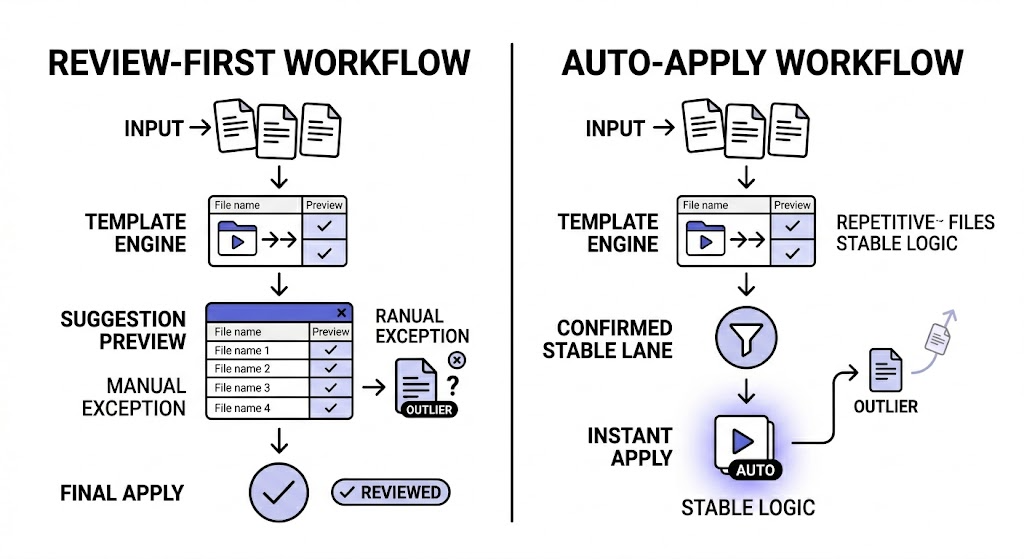
Review-first means the system generates the suggested result before it changes the actual file.
In practice, that gives you a checkpoint where you can:
- inspect the proposed name
- catch outliers
- edit or retry weak results
- ignore files that do not belong
- apply changes only when the batch looks right
Review-first is not anti-automation. It is how automation becomes trustworthy.
What auto-apply means
Auto-apply means the system writes the rename automatically when the watched workflow is triggered, without requiring a manual review step for each new file.
That can save time when:
- the files are highly repetitive
- the folder scope is narrow
- the naming template is already proven
- mistakes are rare and easy to detect
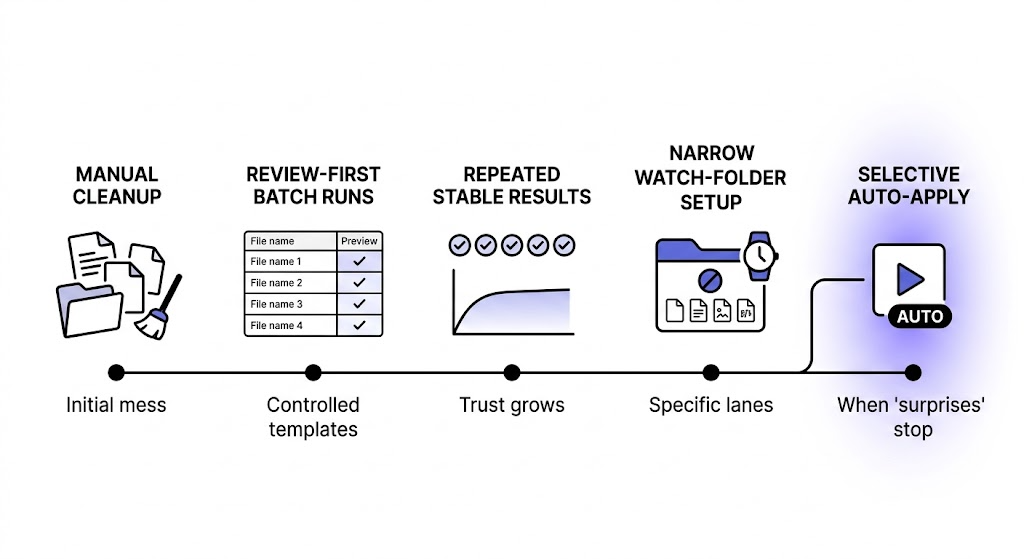
Auto-apply is most useful after the workflow stops surprising you.
The real tradeoff
The difference is not speed versus slowness. It is certainty versus efficiency.
| Mode | Main advantage | Main risk |
|---|---|---|
| Review First | Higher confidence and easier exception handling | More manual steps |
| Auto Apply | Less repeated effort | Faster mistakes if the workflow is too broad or unstable |
For most users, the question is not which mode is theoretically better. It is which mode matches the maturity of the workflow today.
Why review-first should usually come first
Review-first is the better starting point because it helps you validate all the parts that must become stable before automation deserves more trust:
- file scope
- template logic
- field reliability
- date selection
- controlled vocabulary choices
- outlier handling
If any of those pieces are still moving, auto-apply turns uncertainty into hidden changes.
From an AI governance perspective, that is also the healthier default. NIST's AI Risk Management Framework treats trustworthiness and risk management as part of system design and use, not something to patch in after deployment: NIST AI Risk Management Framework.
When auto-apply becomes reasonable
Auto-apply becomes a good option when most of these are true:
- the workflow handles one narrow class of files
- the source folder is predictable
- the naming template has already succeeded in many review runs
- you no longer learn much from checking every item manually
- outliers are rare enough that the saved time outweighs the residual risk
Examples:
- repetitive screenshot intake for one documentation workflow
- one recurring report export folder
- a tightly defined asset-prep lane with stable naming rules
Examples that usually need review-first longer:
- mixed Downloads automation
- document flows with weak scans or inconsistent inputs
- newly created naming templates
- folders that combine personal and work material
A gradual adoption model
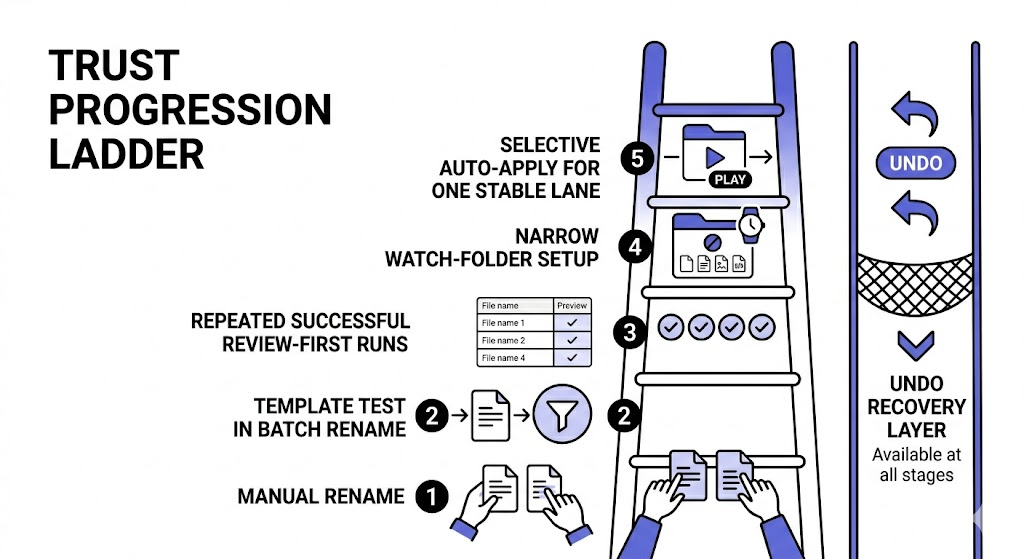
If you want to trust file automation without overcommitting, use this progression:
- clean up a sample batch manually
- test the template in Batch Rename
- move the recurring folder into Review First
- observe the results over repeated runs
- switch to Auto Apply only for the narrow workflow that has earned it
This path is slower than flipping the automation switch immediately, but much faster than recovering confidence after bad automation surprises.
Common mistakes when teams jump to auto-apply too early
Broad folder scope
If the watched folder contains mixed file types or unrelated workflows, auto-apply is usually premature.
Unproven templates
If the template has not been tested on enough real files, the automation is still experimental.
Confusing undo with trust
Undo is important, but it is not the same as predictability. A reversible mistake is still a mistake users had to notice and fix.
Treating review as wasted effort
At the start, review is how the workflow gets refined. It is not friction for its own sake.
How RenamerX supports gradual trust
RenamerX is intentionally designed around review-first control rather than magic-background automation.
The product workflow supports:
- template-based suggestions
- visible statuses in the workspace
- explicit apply steps in Batch Rename
- Watch Folders with either Review First or Auto Apply
- the ability to pause or reconfigure watched workflows
- undo support for applied changes
That makes the automation model more practical for real desktop work, where trust comes from visible control and repeatable behavior.
If you want the product workflow details, see /docs/core-workflows/batch-rename, /docs/core-workflows/watch-folders, and /docs/help-support/frequently-asked-questions. If you are deciding between recurring automation and one-off cleanup, pair this article with /blog/watch-folders-vs-batch-rename-which-workflow-fits-your-files and /blog/why-undo-matters-in-ai-powered-file-automation. If you want to try a review-first workflow yourself, compare Review First and Auto Apply access on /pricing.
FAQ
Which is better, review-first or auto-apply?
Review-first is better for new, mixed, or higher-risk workflows. Auto-apply is better for narrow recurring workflows that have already proved stable through repeated review.
Why is review-first important for file automation?
It creates a checkpoint before real filesystem changes happen. That helps users catch mistakes, learn the workflow's edge cases, and build confidence gradually.
When should I switch from review-first to auto-apply?
Switch only after the workflow is narrow, the template is stable, and repeated review cycles show that manual checking is no longer surfacing many surprises.
Does undo make auto-apply safe enough by itself?
No. Undo is an important safety net, but it does not replace predictable behavior. Trust grows from stable output, not only from the ability to reverse mistakes later.
Conclusion
The best automation is not the one that removes humans fastest. It is the one people keep trusting after weeks of real use.
Review-first is how that trust begins. Auto-apply is what you earn once the workflow becomes boring in the best possible way: narrow, predictable, and no longer surprising. That is the right path for file automation that is both useful and believable.