Best File Organization App for Mac: What to Look For
Best File Organization App for Mac: What to Look For
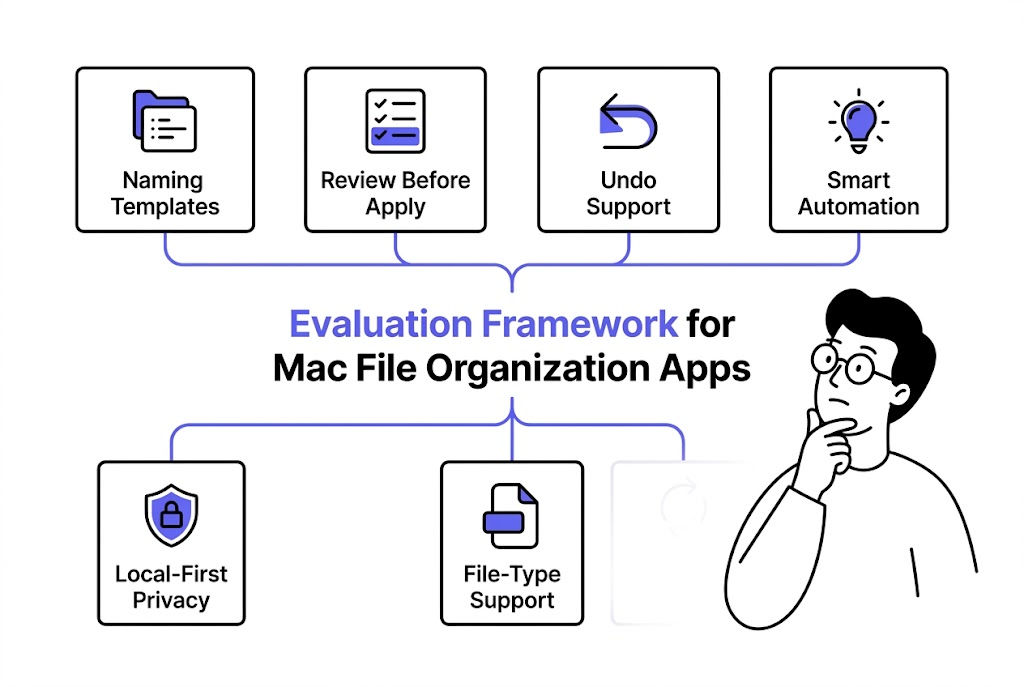
The best file organization app for Mac is not the one with the most automation claims. It is the one that improves naming, keeps grouping understandable, and gives you enough control to trust the workflow on real files. For most users, the winning criteria are clarity, review, and repeatability rather than raw feature count.
That matters because Mac users already have Finder, folders, saved searches, and batch rename. A separate app only deserves a place in the workflow if it solves the problems those tools do not solve well.
What Mac users usually need from a file organization app
Most Mac users are not looking for a giant document platform. They usually want one or more of these outcomes:
- clearer filenames
- less Downloads chaos
- recurring screenshot or export cleanup
- better project grouping
- safer automation
If an app does not improve those practical outcomes, it is usually just another layer on top of Finder.
The seven criteria that matter most
1. It should improve filenames, not just move files
Many tools help move files into folders. Fewer help make filenames clearer and more searchable. That difference matters because files often leave their original folders.
2. It should support repeatable naming rules
If every rename is still a one-off decision, the app is not really giving you a system.
3. It should keep automation understandable
Mac file organization feels safe when the user understands why a file is being named or grouped a certain way.
4. It should support review before trust is assumed
Automation without review is appealing in demos and more stressful in real desktop workflows.
5. It should allow recovery after apply
Undo matters because file organization becomes real only when the filesystem changes.
6. It should match your actual file types
Screenshots, PDFs, images, and project files all have different naming needs. A good app should handle the file types you actually use.
7. It should fit the privacy model you want
For some users, local-first handling is a deciding factor. For others, it is a bonus. Either way, the privacy model should be easy to explain.
That is easier to evaluate when privacy is treated as a real risk-management question. NIST's Privacy Framework is a useful reference point for thinking about how products identify and manage privacy risk: NIST Privacy Framework.
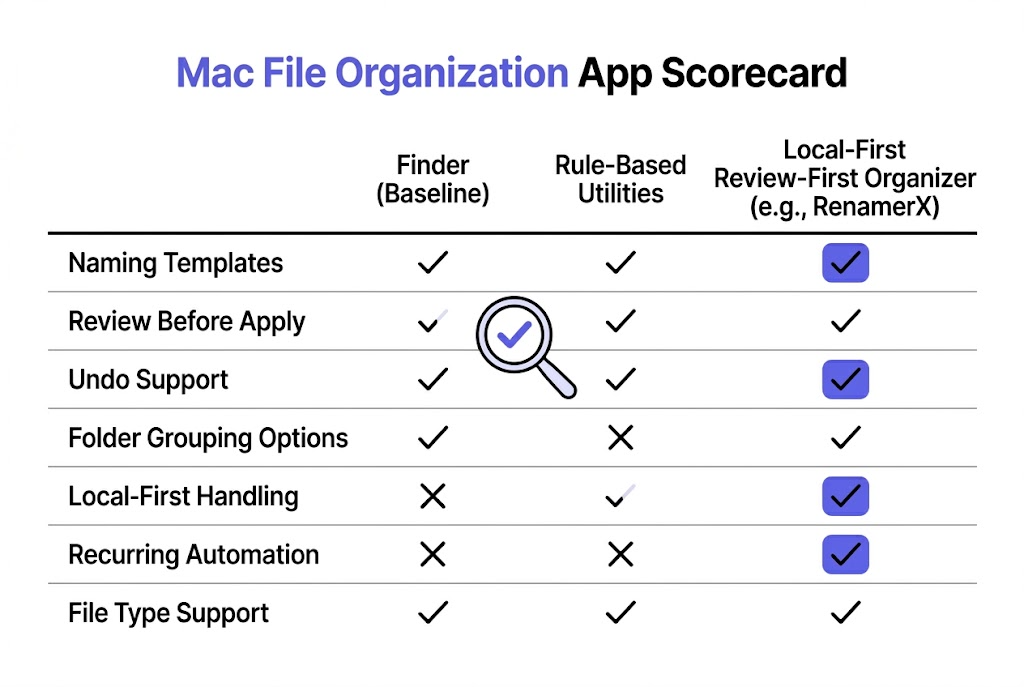
A practical evaluation table
| Criterion | Why it matters for Mac users |
|---|---|
| Naming templates | Turns cleanup into a repeatable system |
| Review-first workflow | Prevents trust from breaking too early |
| Undo | Makes applied changes less risky |
| Folder grouping options | Helps when subject, type, or project grouping matters |
| Local-first handling | Fits privacy-sensitive desktop workflows |
| Recurring automation | Reduces repeated intake work once the system is stable |
| File type support | Keeps the tool relevant to screenshots, PDFs, images, and more |
What Finder already covers and what it does not
Finder already covers:
- manual folder organization
- basic batch rename
- saved search views through Smart Folders
Finder does not fully cover:
- content-aware naming
- reusable naming templates
- review-first automation for recurring intake
- built-in undo around a larger template-driven organization workflow
That gap is what a dedicated file organization app needs to justify.
Apple's own docs show Finder's strengths for folder management and batch rename, which makes it a useful baseline rather than something a third-party app should pretend does not exist: Organize files in folders on Mac and Rename multiple files on Mac.
When a Mac file organization app is worth adding
It is worth adding when:
- file cleanup keeps repeating
- filenames need to become more descriptive
- recurring folders need a stable process
- Finder batch rename no longer solves the problem
- you want automation that still feels visible and reversible
It is probably not worth adding when:
- Finder already handles the workflow well enough
- the library is small and stable
- no recurring naming or grouping system is needed
How RenamerX fits this evaluation
RenamerX is strongest for Mac users who want a local-first file organization workflow with naming templates, review-first safety, undo, and recurring folder support.
That makes it especially relevant for users managing:
- screenshots
- PDFs
- document libraries
- image assets
- recurring Downloads cleanup
The product is not trying to be a general-purpose cloud document platform. It is trying to make local file naming and organization more repeatable and more trustworthy.
If you want the product workflow details, see /docs/customization/templates, /docs/core-workflows/watch-folders, and /docs/help-support/security-and-privacy. If you want adjacent Mac workflow reads, pair this article with /blog/batch-rename-files-on-mac-finder-automator-or-ai and /docs/customization/templates. If you want to test the workflow on your own Mac file lanes, compare plans on /pricing.
FAQ
What is the best file organization app for Mac?
The best one depends on the problem you actually need to solve. If you need better naming, review-first automation, and recurring folder workflows, look for an app that strengthens those areas rather than only adding more folder views.
Is Finder enough for most Mac file organization?
For many basic workflows, yes. Finder is a strong starting point. A dedicated app becomes useful when naming, recurring automation, and safer template-based organization matter more.
What should I look for in a smart file management app on Mac?
Look for clear naming logic, repeatable templates, review before apply, undo, and a privacy model that matches how sensitive your local files are.
Should a Mac file organization app automate everything?
Usually no. The best apps automate the repeated parts of the workflow while still keeping the system understandable and reviewable.
Conclusion
The best file organization app for Mac is the one that solves repeated file chaos without asking you to trust a mystery.
Look for stronger filenames, repeatable templates, review-first behavior, and undo. If those pieces are present, the app is likely improving the workflow instead of only layering more interface on top of Finder.