AI File Renamer: What It Is, How It Works, and What to Look For
AI File Renamer: What It Is, How It Works, and What to Look For
An AI file renamer is a tool that uses file content, metadata, or both to generate more readable filenames than simple manual rename or search-and-replace tools. The best ones do not only change names faster. They turn weak filenames into a more consistent naming system while keeping the workflow understandable.
That is the important distinction. An AI file renamer should not feel like a magic label generator. It should feel like a better way to name real files at scale.
What an AI file renamer actually does
At a practical level, an AI file renamer tries to answer one question:
What should this file be called so a human can find it later?
Depending on the tool, that may involve:
- reading the current filename
- extracting document or image context
- identifying date, subject, type, title, or project signals
- formatting those fields into a final filename
Those naming signals line up with common metadata concepts such as title, date, subject, and type, which is why structured metadata models remain useful reference points even in AI-assisted workflows: DCMI Metadata Terms.
That is different from a traditional bulk renamer, which usually edits text that already exists in the name.
How AI file renamers work
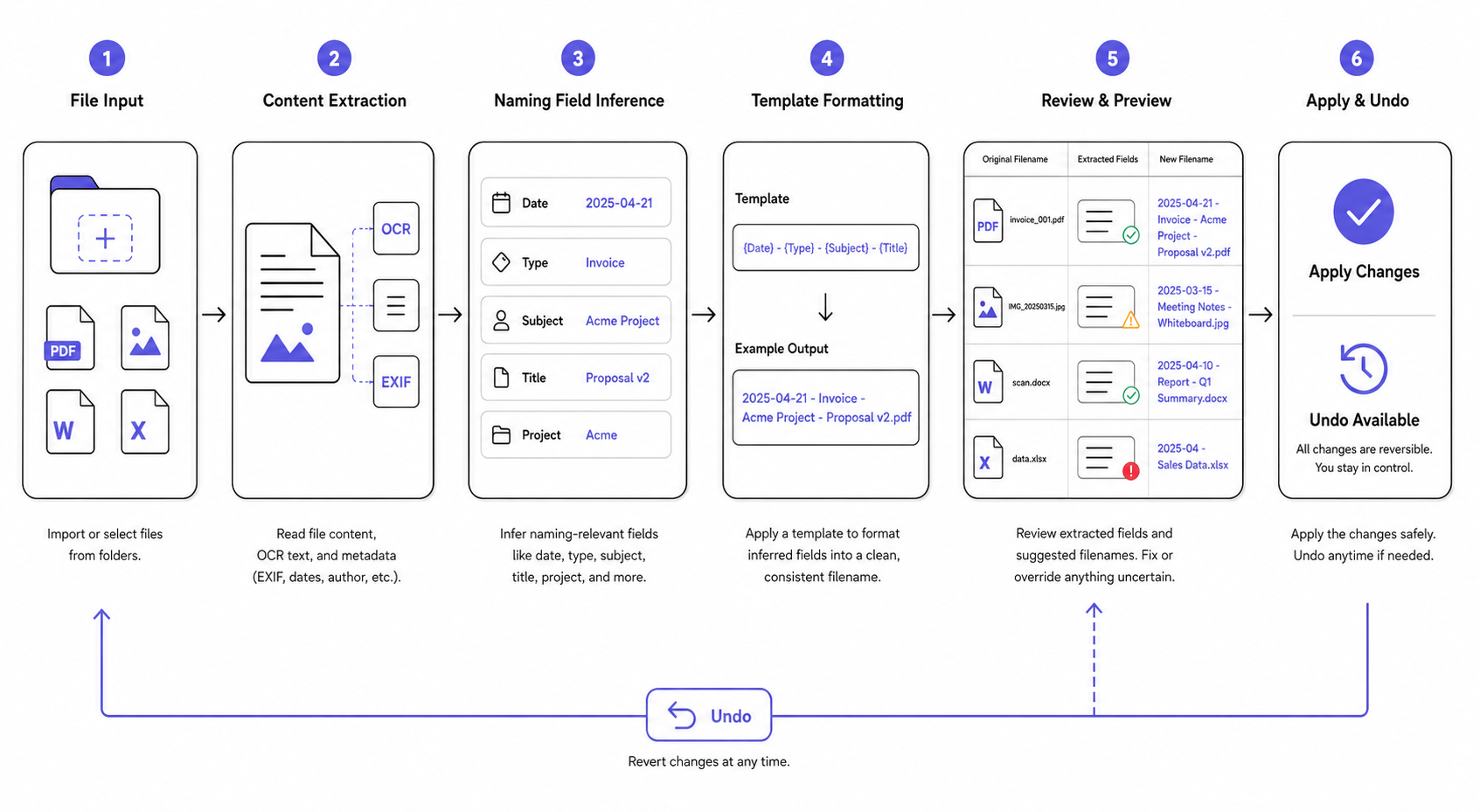
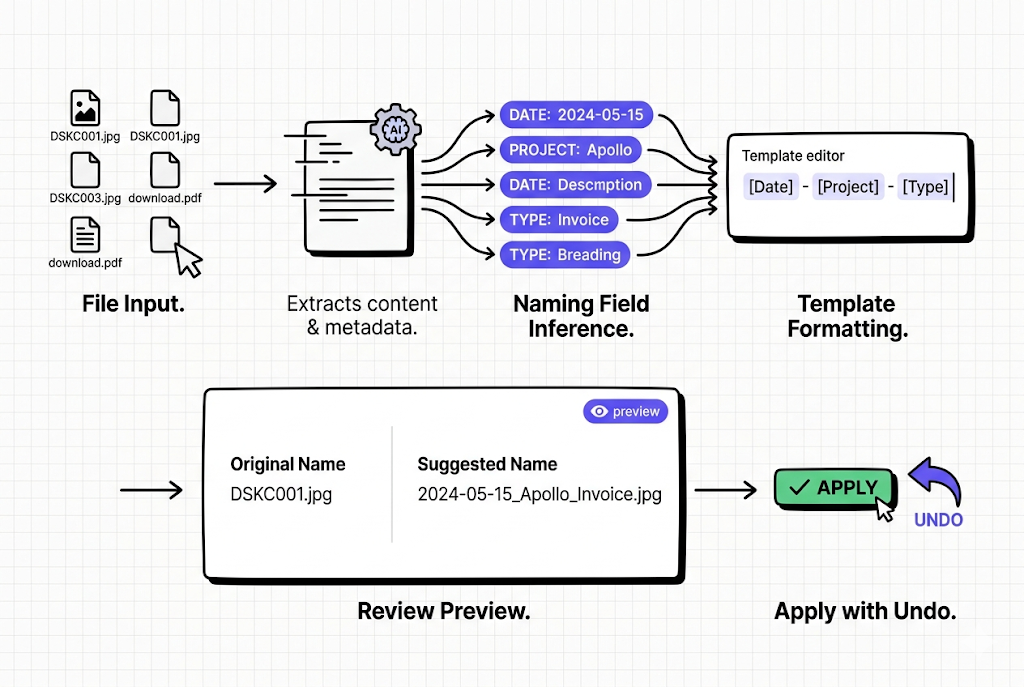
Most AI file renamers follow some version of this flow:
- import or select files
- inspect file content or metadata
- infer naming-relevant fields
- build a suggested filename
- apply or review the result
The key quality difference is where the product puts structure and control.
The weaker model is:
- infer one opaque final answer
The stronger model is:
- infer fields first
- format the name through a template
- let the user review the output
That second model is usually easier to trust because the rename feels less arbitrary.
What problems AI file renamers solve well
AI file renamers are most useful when:
- filenames are generic or inconsistent
- the file meaning matters more than the old name
- the same naming pattern should apply to many files
- documents, screenshots, or images keep arriving in batches
Examples:
- PDF downloads with weak names
- screenshots with timestamp-only names
- product image exports
- recurring folders such as Downloads or project assets
What they do not solve automatically
AI file renamers do not remove the need for:
- a clear naming system
- review where trust matters
- exception handling
- realistic expectations for weak or noisy files
That is why the best tools focus on assisted naming rather than pretending every file can be understood perfectly.
What to look for in an AI file renamer
| Criterion | Why it matters |
|---|---|
| Filename quality | The output should be readable and searchable |
| Naming templates | Repeated workflows need structure, not one-off guesses |
| Review-first workflow | Users should see suggestions before trusting them |
| Undo | Applied changes should be reversible |
| Folder organization options | Useful when naming and grouping should work together |
| Privacy model | Important when files are local or sensitive |
| File type support | The tool should match the files you actually work with |
AI file renamer versus traditional bulk renamer
| Tool type | Best for | Limitation |
|---|---|---|
| Traditional bulk renamer | Search and replace, numbering, regex cleanup | Weak when file meaning should shape the name |
| AI file renamer | Content-aware naming, templates, repeated workflows | Needs review and a stronger trust model |
Microsoft's PowerRename is a good example of the traditional side of that comparison. It supports preview, search and replace, regex, date variables, and undo, but it still works mainly on strings already present in the file name: PowerRename utility for Windows.
Traditional bulk rename tools are still useful. The point of an AI file renamer is not to replace them in every case. It is to solve the harder naming problems they do not solve well.
Why trust matters more than novelty
The strongest AI file renamers are not the ones that sound most futuristic. They are the ones users can trust with real files.
That usually means the product emphasizes:
- readable suggestions
- predictable naming logic
- review-first control
- undo after apply
- honest file-type boundaries
Without those, the tool may look impressive in examples but feel risky in a real library.
How RenamerX approaches AI file renaming
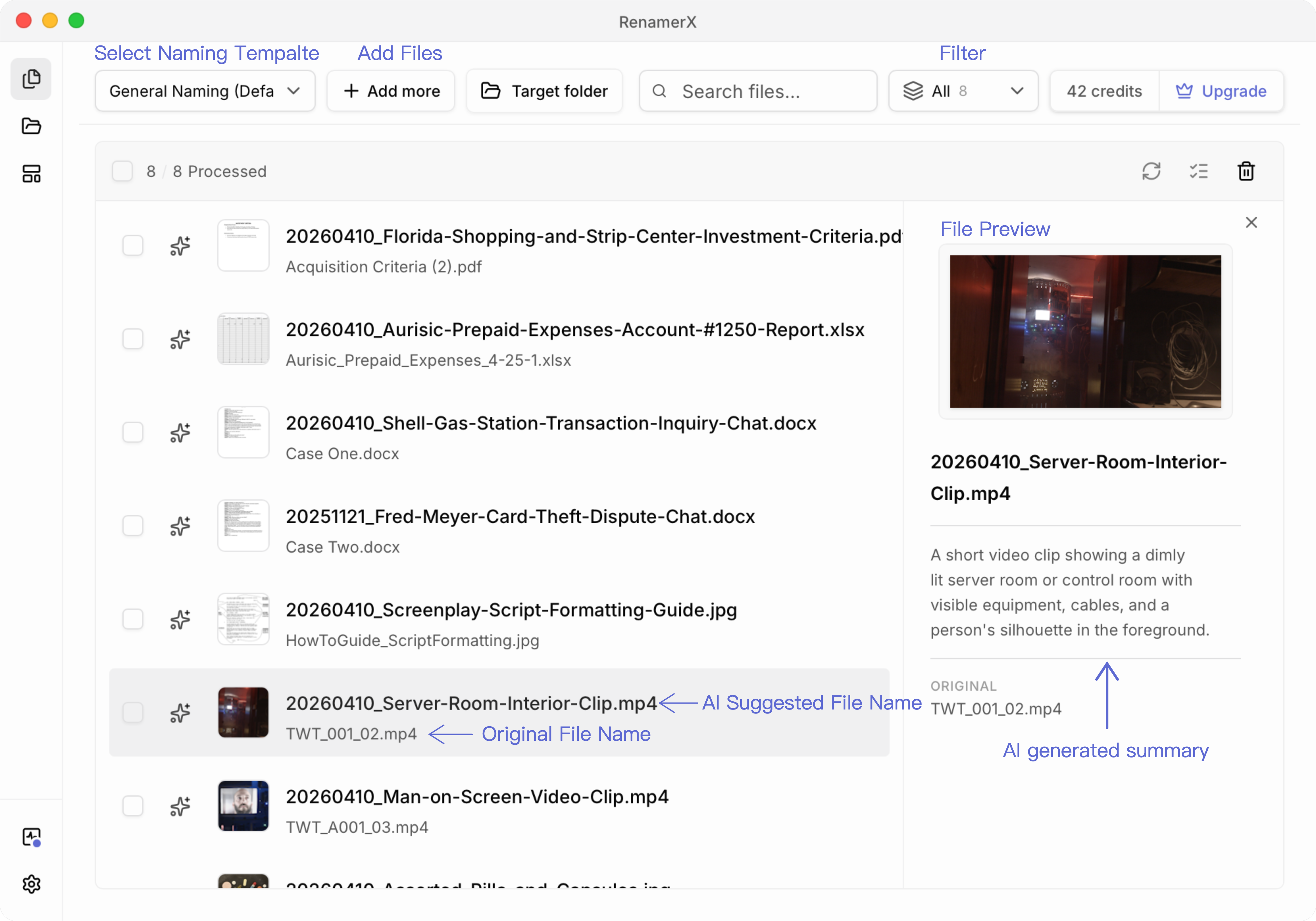
RenamerX is a local-first AI file renamer and organizer. It helps users generate readable filenames and optional folder structures from file content, with naming templates, review-first safety, watch folders, and undo.
That approach matters because the product does not frame AI as the final authority. It treats AI as a structured extraction step that feeds a naming system users can review and reuse.
If you want the product workflow details, see /docs/getting-started/how-it-works, /docs/customization/templates, and /docs/help-support/security-and-privacy. If you want the adjacent category, read /blog/ai-file-organizer-what-it-actually-needs-to-get-right and /blog/ai-file-organizer-vs-manual-folder-rules-what-actually-works. If you want to try the workflow on a real batch, review plan differences on /pricing.
FAQ
What is an AI file renamer?
An AI file renamer is a tool that uses file content, metadata, or both to suggest clearer filenames than manual rename or simple string-based bulk rename workflows usually provide.
How is an AI file renamer different from a bulk renamer?
Traditional bulk renamers usually edit text already present in the filename. An AI file renamer aims to infer better naming from the file itself, then generate a clearer output.
What should I look for in an AI file renamer?
Look for strong filename quality, reusable templates, review before apply, undo, a clear privacy model, and file-type support that matches your real workflow.
Are AI file renamers safe to use?
They can be, especially when the tool supports review-first workflows and undo. The safer products are the ones that keep the user in control instead of treating automation as something that should happen invisibly.
Conclusion
An AI file renamer is useful when it helps turn weak filenames into a system that stays readable and searchable over time.
The better products do this with structure, review, and clear boundaries rather than hype. If you are choosing one, look past the promise of smart naming and focus on whether the workflow will still feel trustworthy after the files change on disk.